BSWA 308/309 BSWA Technology Co., Ltd
26
3. Measurement Screen
Sound level meter has three measurement modes: Level Meter, 1/1 Octave, 1/3 Octave.
User can select it in the menu of Function.
Level Meter has 8 screens which can be switch through <◄>, <►>. The 8 screens are: Main,
3-Profiles, LN Statistical, Time History, Custom Measurement Page 1, Custom Measurement
Page 2, GPS Page 1 and GPS Page 2.
1/1 Octave has 6 screens: Octave Histogram, Octave Table Page 1~3, GPS Page 1 and
GPS Page 2.
1/1 Octave has 7 screens: Octave Histogram, Octave Table Page 1~4, GPS Page 1 and
GPS Page 2.
3.1 Icons and Meaning of Screen Display
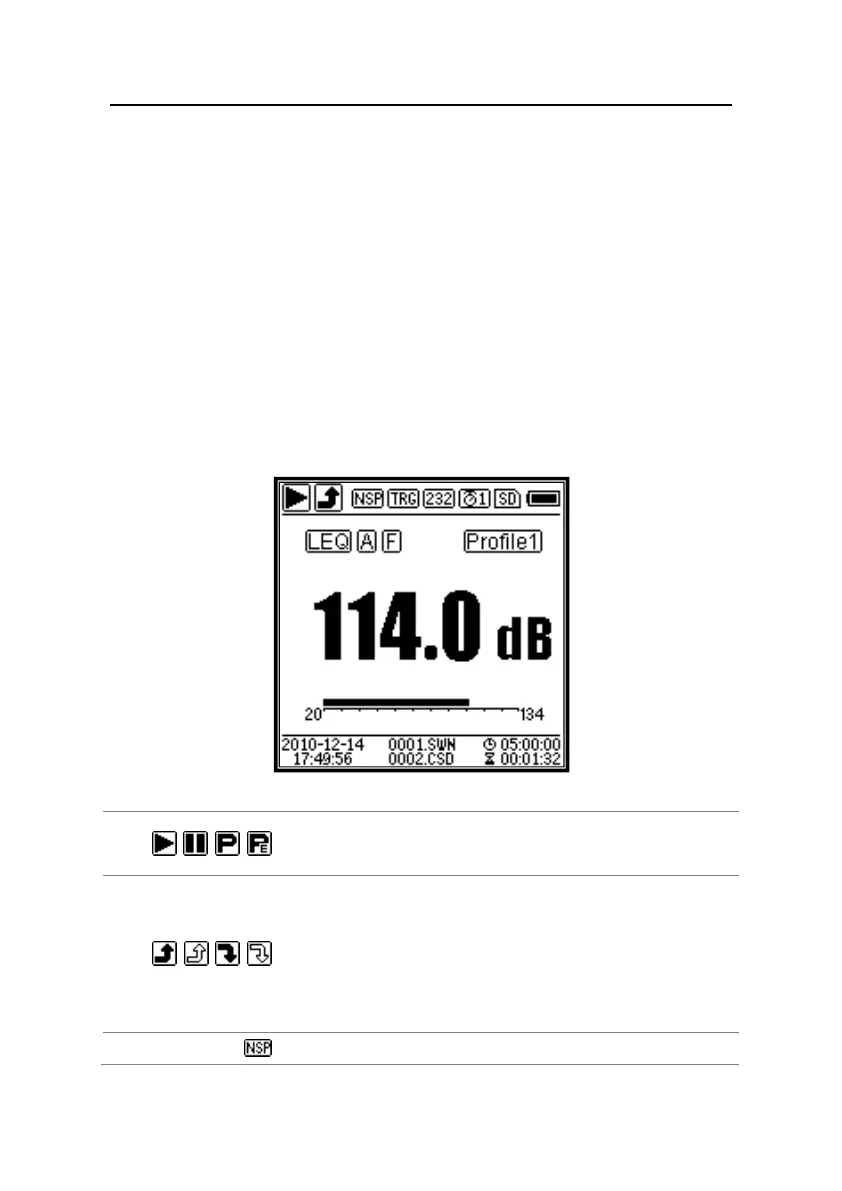
All icons of Main screen is enable, the meaning of each icons are describe as following:
Start, Stop, Pause, Pause (available back erase). Describe the
measurement state.
Overload indicator and under-range indicator. Solid arrow
indicates that the current state is overload / under-range. Hollow
arrow indicates that overload / under-range event have occurred
within the integral period。At the beginning of the new integral
period, overload and under-range indicator icon will be clear.
ICCP power state. Displayed when ICCP is turn off.


 To Next Page