BSWA 308/309 BSWA Technology Co., Ltd
22
2.4 Data and Power Supply Connector
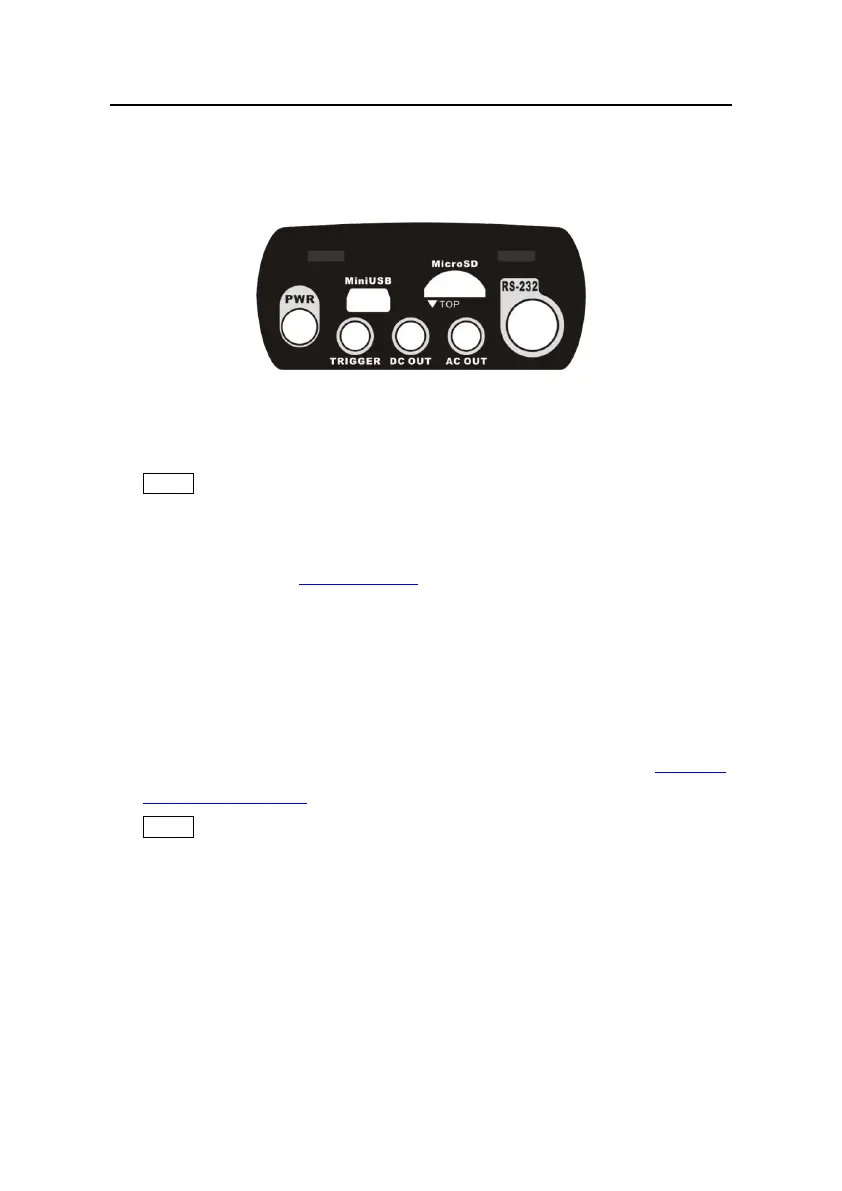
There are 7 interfaces at the bottom of the sound level meter. Open the rubber cover to see
these interfaces.
PWR:
Power connector, using the standard DC socket (2.1mm core diameter), can connect to
the 7~14V 500mA external power supply.
★Note: Exceed 14V could damage the sound level meter!
MiniUSB:
MiniUSB port which connects to a computer can be select as USB Disk Mode or
Modem Mode, refer to 4.4.10 USB Mode to earn more detail. Additional, MiniUSB can
be used as another external power, but the power supply must meet the requirement of
5V/1A.
USB Disk Mode:The files inside the MicroSD card can be access directly at this mode,
no need to install driver.
Computer can recognize the MiniUSB as serial port (virtual serial port, need to install
driver) and communicate with sound level meter by RS-232 protocol, refer to 5. RS-232
Communication Protocol to earn more detail.
★Note:At least 1A power current capacity must be meet for power supply and cable
(cable with ferrite core is not recommend for power supply). Please select the working
mode in time after connected to the computer. Otherwise, the computer can’t recognize
the USB. The MiniUSB and RS-232 port cannot working at the same time when select
Modem Mode.
MicroSD:
MicroSD socket, standard MicroSD card can be used to store SWN, OCT and CSD files.
Recommend to use card-reader to format the MicroSD card, rather than format it at the U


 To Next Page