BSWA 308/309 BSWA Technology Co., Ltd
43
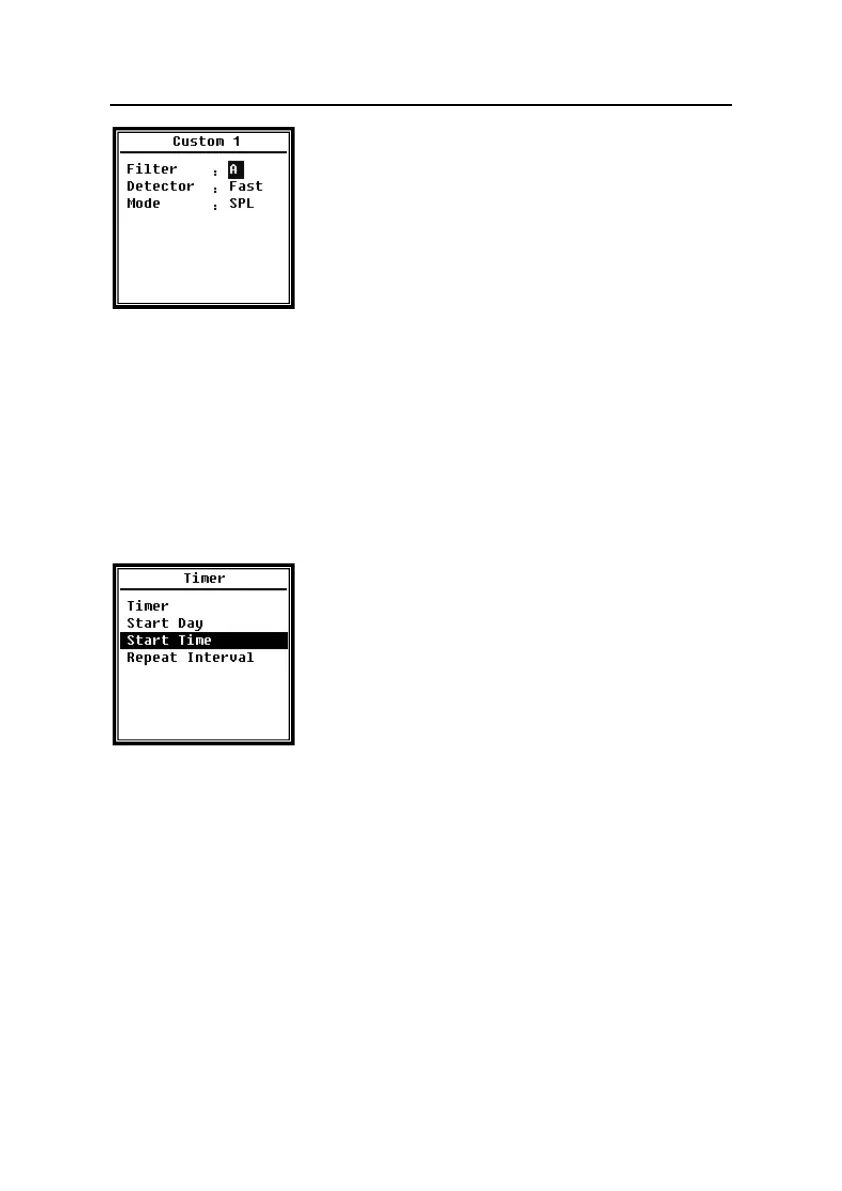
Press <▲>, <▼> can set the option of each group of custom
measurement: Filter, Detector and Mode.
Filter:
Press <◄>, <►> can set the filter of custom measurement: A, B, C and Z (Flat).
Detector:
Press <◄>, <►> can set the detector of custom measurement: Fast, Slow and Imp..
Mode:
Press <◄>, <►> can set the integral mode of custom measurement: SPL, SD, SEL, E,
Max, Min, Peak, LEQ, LIEQ, LN1~LN10.
4.3.11 Timer
Menu of Timer can set the Timer, Start Day, Start Time and
Repeat Interval. Press <▲>, <▼> can choose and select.
A new function named Timer was introduced to start
measurement by program. User can set the measurement
start from 00:00 of next day, measure several minutes and
repeat each hour, in order to achieve 24h auto measurement.
Timer:
Press <▲>, <▼> can set Timer working mode: OFF, Once and Loop.
Start Day:
Press <▲>, <▼> can set Timer trigger date: Ignore and the certain day in the future 30
days. If select Ignore, the Timer will ignore the date and only use Start Time to trigger.
Start Time:
Press <▲>, <▼> can set Timer trigger time: 00:00~23:59.
Repeat Period:
If Timer is triggered, it will be trigger all the time by the Repeat Period. Press <◄>, <►>
can set the option: 1m~59m, 1h~24h.


 To Next Page