BSWA 308/309 BSWA Technology Co., Ltd
33
4.2 Calibration
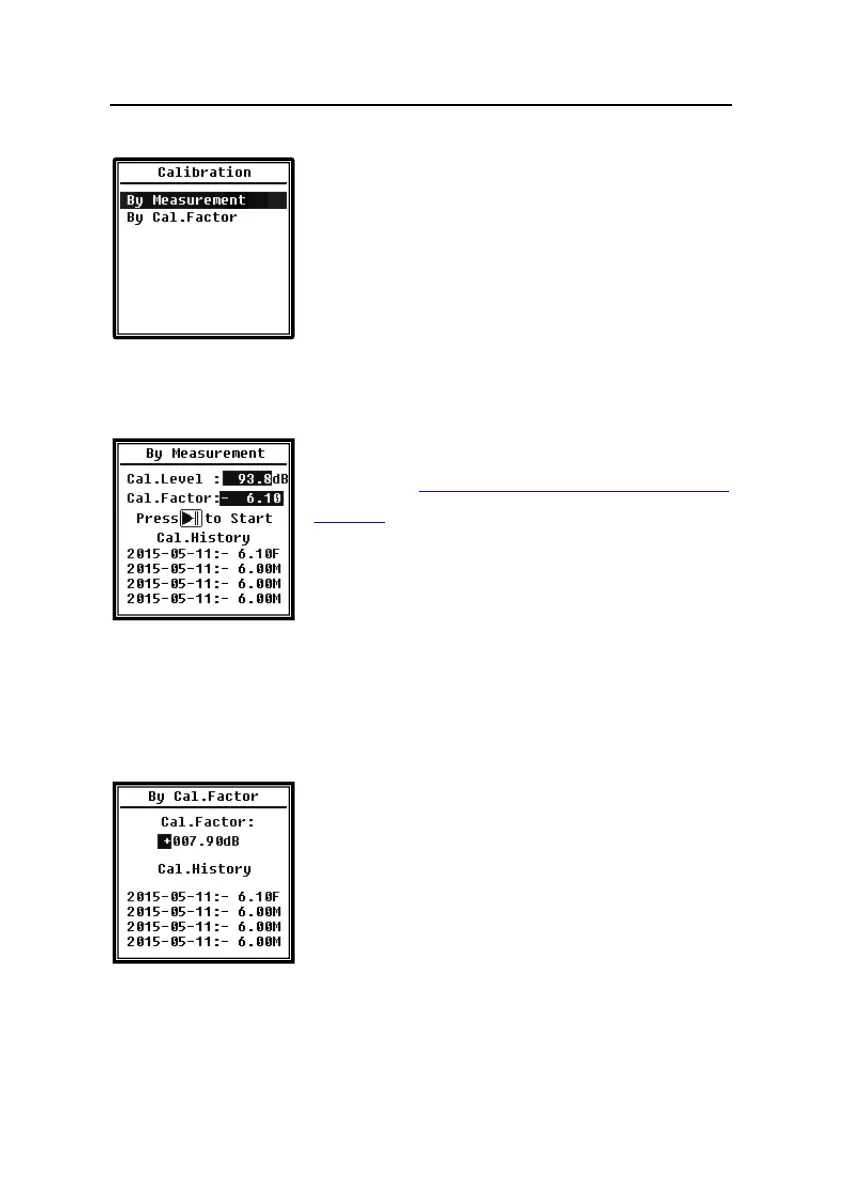
Select Calibration and press <Enter> to enter this menu.
Many factors include temperature, humidity and air pressure
will impact the microphone's sensitivity. Therefore, user must
run calibration at least once before measurement.
There are two calibration methods: By Measurement and By
Cal.Factor. Method of By Measurement is recommend for
calibration with sound calibrator. Method of By Cal.Factor can manually adjust the calibration
factor by user.
4.2.1 Calibration by Measurement
Select By Measurement and press <Enter> to enter this
menu. Refer to Annex 2 Adjustments at the Calibration Check
Frequency to earn more detail of the stated calibrator and
corresponding adjustment value.
Cal.Level can be adjusted between 0dB~199.9dB. Press <◄>,
<►> and <▲>, <▼> can change the Cal.Level and press
<Start> to start calibration. After calibration finished, the new Cal.Factor will be update as the
result and user can press <Enter> or <ESC> to save or ignore this result. This menu also
displays the calibration history. Ending with symbol M indicate the record was calibrate by the
method of By Measurement.
4.2.2 Calibration by Cal.Factor
Select By Cal.Factor and press <Enter> to enter this menu.
Users can adjust the calibration factor manually. Press <◄>,
<►> can select the digit of factor, press <▲>, <▼> can adjust
the value, press <Enter> to save and press <ESC> to return to
previous menu. Ending with symbol F indicate the record was
calibrate by the method of By Cal.Factor.
4.2.3 Conversion of Cal.Factor and Sensitivity
The sensitivity can be calculated by the following formulas, and the calibration factor also can
be calculated from sensitivity and type into sound level meter directly.


 To Next Page