BSWA 308/309 BSWA Technology Co., Ltd
40
4.3.4 Profile 1~3
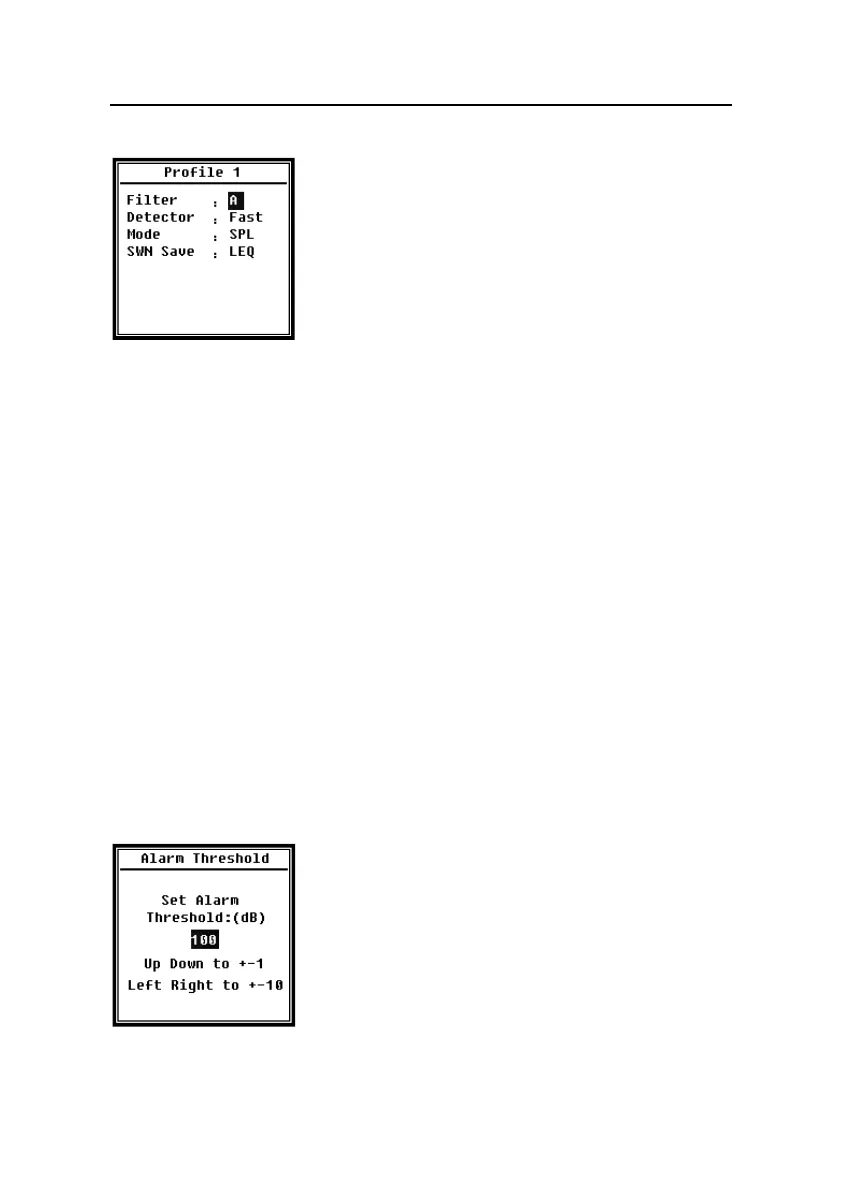
Menu of Profile 1~3 can set the Filter, Detector, Mode and
SWN Save. Press <▲>, <▼> can choose and select.
Filter:
Set the filter of Profile 1~3. Press <◄>, <►> can select the option: A, B, C and Z
(Z-weighting means no weighting and sometimes it is called Flat or Linear).
Detector:
Set the detector of Profile 1~3. Press <◄>, <►> can select the option: Fast, Slow, and
Imp..
Mode:
Set the integral mode of Profile 1~3. Press <◄>, <►> can select the option: SPL, PEAK,
LEQ, MAX and MIN.
SWN Save:
This option is used to set which data should be store in the SWN file, since the data
source of SWN file is Profile 1~3. So this option is no relationship with screen display.
Press <◄>, <►> can select the option: LEQ, PEAK, MAX or MIN.
4.3.5 Alarm Threshold
If measurement result of Profile 1~3 exceeds the Alarm
Threshold, the LED indicator above <Power> will turn red.
Alarm threshold can be set to 20dB~200dB. Press <▲>, <▼>
can increase and reduce 1dB. Press <◄>, <►> can add and
reduce 10dB.


 To Next Page