BSWA 308/309 BSWA Technology Co., Ltd
47
measurement. Notice that when enable the Trigger function, the <Start/Stop> button is
unavailable.
4.4.5 Date & Time
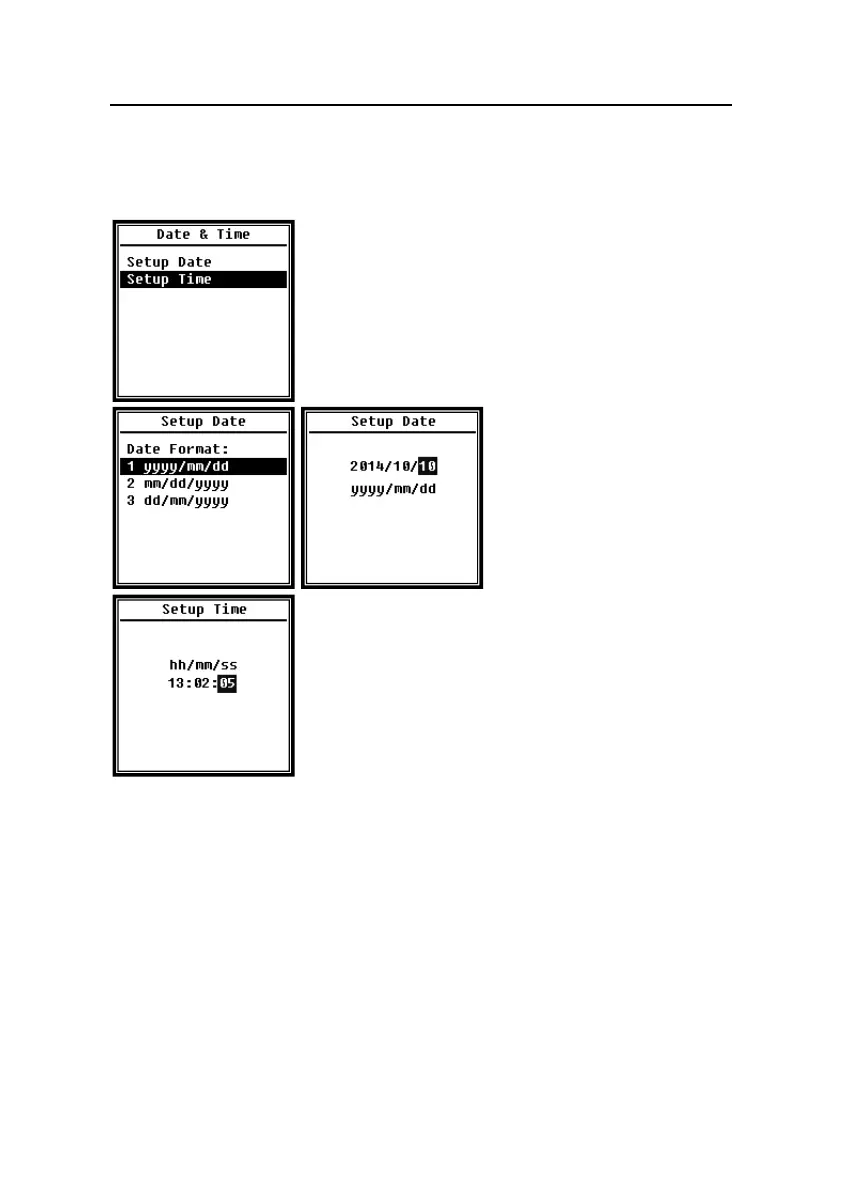
Menu of Date & Time can set the RTC time of sound level
meter. Press <▲>, <▼> can choose and select.
Press <▲>, <▼> can select date
format and turn to date setting.
Press <◄>, <►> can choose
year, month and day, press <▲>,
<▼> can modify the value. Press
<Enter> to save the setting.
The operation of time setting is almost the same. Press <◄>,
<►> can select hour, minute and second, press <▲>, <▼>
can modify the value. Press <Enter> to save the setting.
The power supply for RTC comes from an internal battery.
Please replace the RTC battery when sound level meter
cannot keep the date and time due to voltage of RTC battery is
too low. How to replace RTC battery: remove the 5 screws on the backside of sound level
meter to open the cover. The RTC battery is located on the surface of PCB as the following
figure. The model of battery is CR-1220.


 To Next Page