BSWA 308/309 BSWA Technology Co., Ltd
51
Response:
Response (refer to 5.3 Instruction to earn more detail) can enable or disable the
response signal (ACK/NAK), the option is: ON, OFF. Press <◄>, <►> can choose and
select.
4.4.9 File Manager
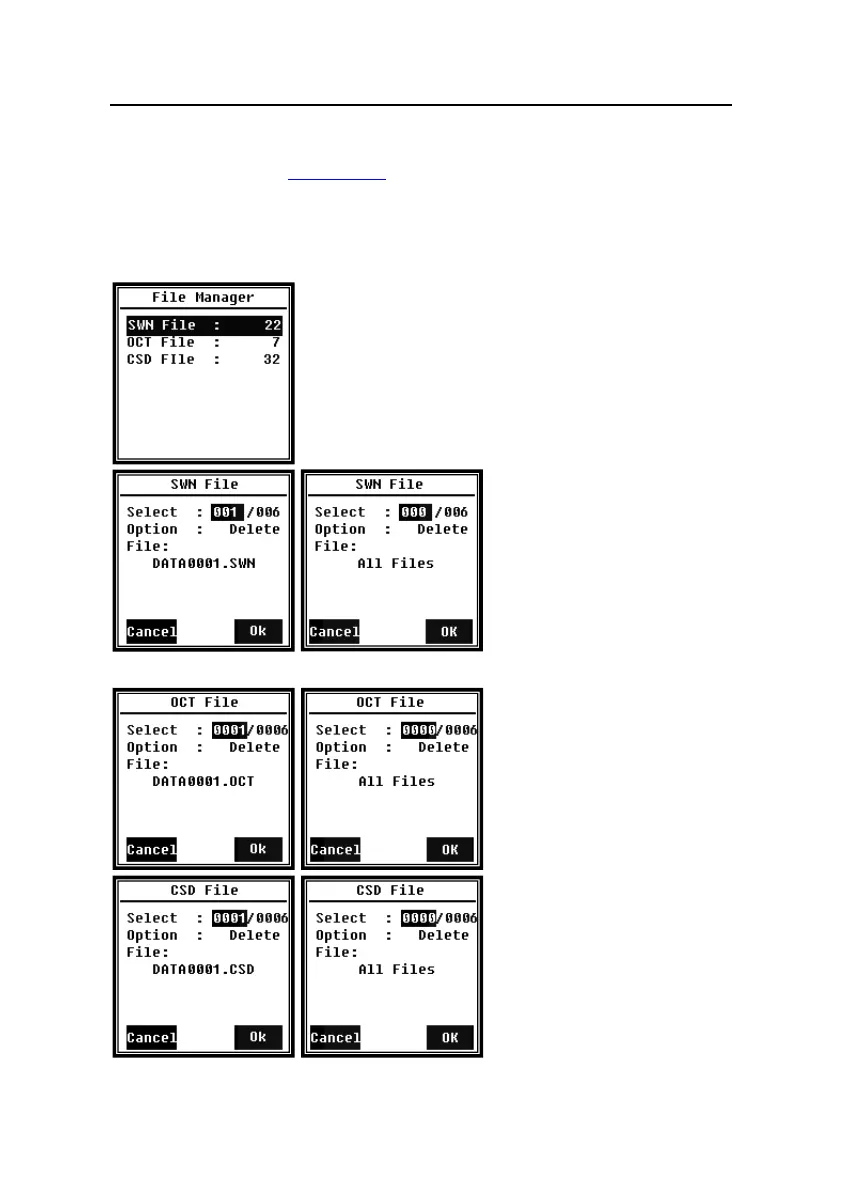
File Manager can manage the stored SWN, OCT and CSD file.
The numbers display at the right side of each line is the file
count for each kind of file type. Press <▲>, <▼> can choose
and select, press <Enter> to access next level of menu.
Menu of SWN File can delate
SWN files, press <▲>, <▼> to
select the file number which want
to be delete. The whole file name
will be display on the bottom of
the screen. Select 0000 as the file
number can delete the entire existing SWN file.
Menu of OCT File can delete the
OCT file. The operation is same to
menu of SWN File.
Menu of CSD File can view, print
and delete the CSD file. Press
<▲>, <▼> can change the cursor
between Select and Option.
Delete operation is same to menu
of SWN File.


 To Next Page