BSWA 308/309 BSWA Technology Co., Ltd
27
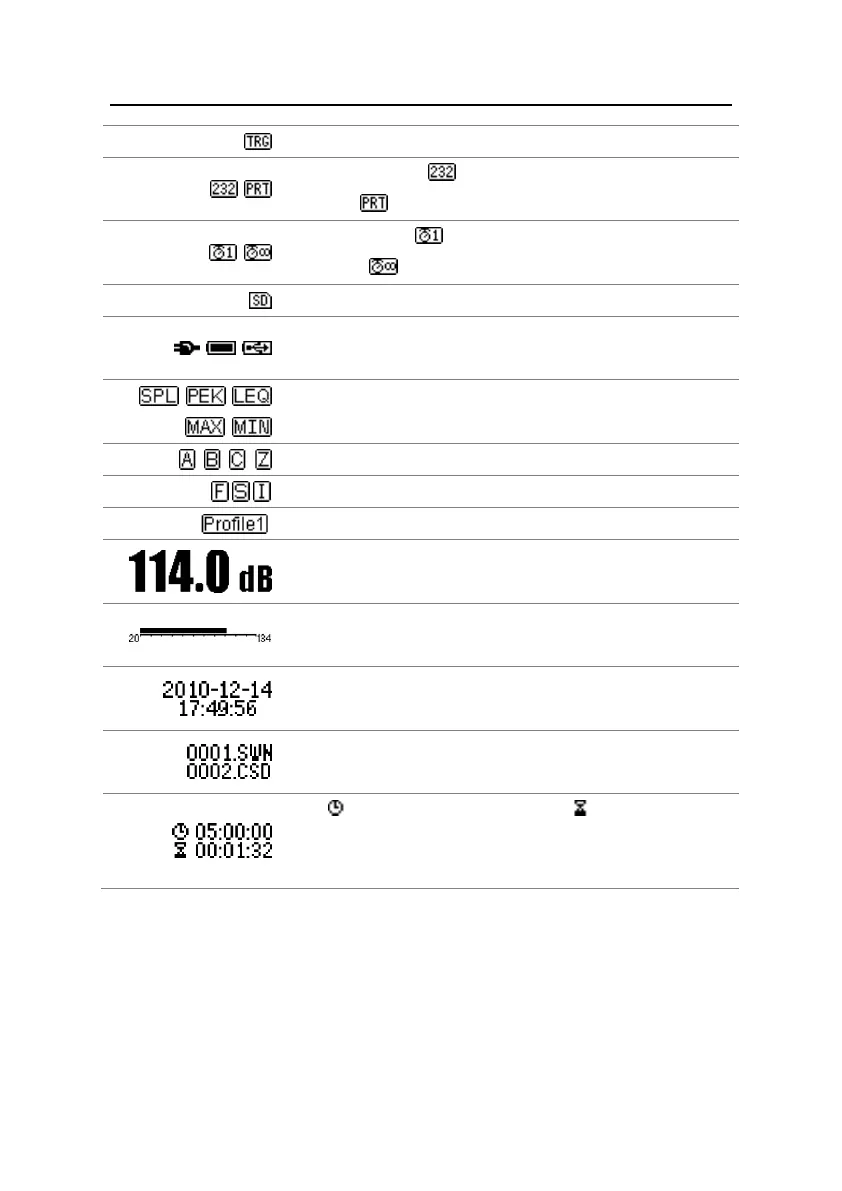
Trigger state. Displayed when trigger is enable.
RS-232 state. Icon will be displayed at the Remote mode,
and icon will be displayed at Printer mode.
Timer state. Icon means the timer is enabled and only run
once. Icon means the timer is enabled and run in loop.
MicroSD state. Displayed when enable the MicroSD storage.
Power state. The icons form left to right: external power supply,
battery supply (with voltage display) and USB power supply.
Calculation mode of measurement.
Icon of Profile. Indicate the profile number of current display.
Visualize and dynamic bar graph display of measurement values
within the current range.
The current storage file name.
Icon means the integral period, icon means the elapsed
time. The measurement stop when elapsed time equal to total
measurement time (Itg.Period * Repeat).
Icons in the same row will display one at the same time. All icons can be display on each
screen and keep the same meaning.


 To Next Page