
 Need help?
Do you have a question about the BTEK T419S and is the answer not in the manual?
Describes the manual's structure, text conventions, and special messages like cautions and notes.
Explains how key names, displayed messages, and annunciator names are represented.
Defines signal words and symbols like CAUTION and NOTE used in the manual.
Provides guidance on installing the indicator, referencing qualified service personnel for repairs.
Details safety precautions for battery replacement and disposal, including explosion risks.
Specifies requirements for using the indicator in wet environments, including socket and plug protection standards.
Emphasizes the need for routine checks and calibration, and advises on disconnecting power before maintenance.
Outlines DOs and DON'Ts for cleaning the indicator, advising against harsh chemicals or direct liquid spray.
States that operation requires appropriate training and suggests ergonomic setup to prevent RSI.
Warns against using sharp objects like screwdrivers or fingernails to operate keys.
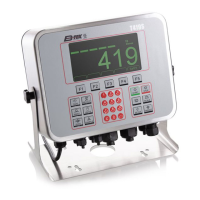
Describes the indicator's features, suitability for various environments, load cell support, and connectivity options.
Explains the functions of the F1-F5 keys, TARE, SELECT, PRINT, and UNITS keys, and their navigation roles.
Covers powering up the indicator and using the alphanumeric keypad for input, including negative numbers and decimal points.
Explains how to access menus using passwords and navigate through menu structures and lists.
Provides instructions on how to exit menus, save changes, and return to the startup screen.
Describes the procedure for adjusting screen contrast using specific key combinations.
Details what appears on the screen when the indicator is powered up and the default startup screen for the Accumulation application.
Explains the steps for performing a gross weighing, including zeroing the scale and placing the item.
Introduces three types of tare entry for net weighing: Pushbutton, Entered, and Preset tare.
Provides a step-by-step guide for performing net weighments using the pushbutton tare function.
Details the procedure for performing net weighments using the entered tare method.
Explains how to perform net weighments using pre-stored tare values, referencing the Supervisor menu.
Describes the softkeys (CHAN, ID, SETPT, PRINT) used in the accumulator application and their functions.
Details the process of entering channel numbers and ID numbers using the alphanumeric keypad and ENTER key.
Explains how to set setpoint values for points 1, 2, and 3 using the SELECT and ENTER keys.
Provides steps to record totals of individual weighments, including zeroing, taring, adding to accumulator, and removing weight.
Instructs on repeating accumulation steps and using the PRINT key to transmit and clear data if enabled.
Lists the functions of the User menu: setting Time, Date, Site ID, and checking Seal/Archive status.
Explains the items found in the About menu, including Bootloader, Firmware, Application, Serial, Option, Enet, DLoad, and BSQ information.
Lists common printing errors like Timeout, Print Error, Aborted, and Failed, with suggested checks.
Details errors related to copying files to or from USB, including Failed to Copy File, Can't Close Database, and File Not Found.
Explains BSQ errors, including general BSQ Error and BSQ Calibration Mismatch Error (BSQ XCAL).
Explains how to access the Supervisor menu using a password and navigate its main items: SuPEr, tArE, AccuM, Prt Tot, Tot Fmt.
Details the Edit, Print, and rESEt functions for managing preset tares and printing reports.
Covers setting accumulation parameters like Print Total (Prt Tot) and Total Format (Tot Fmt).
 General
| Brand | BTEK |
|---|---|
| Model | T419S |
| Category | Measuring Instruments |
| Language | English |

 To Next Page

