Chapter 3 Useful Functions
LinkStation Setup Manual
5151
What you can do on the WebAccess screen
You can perform following operations on the WebAccess screen.
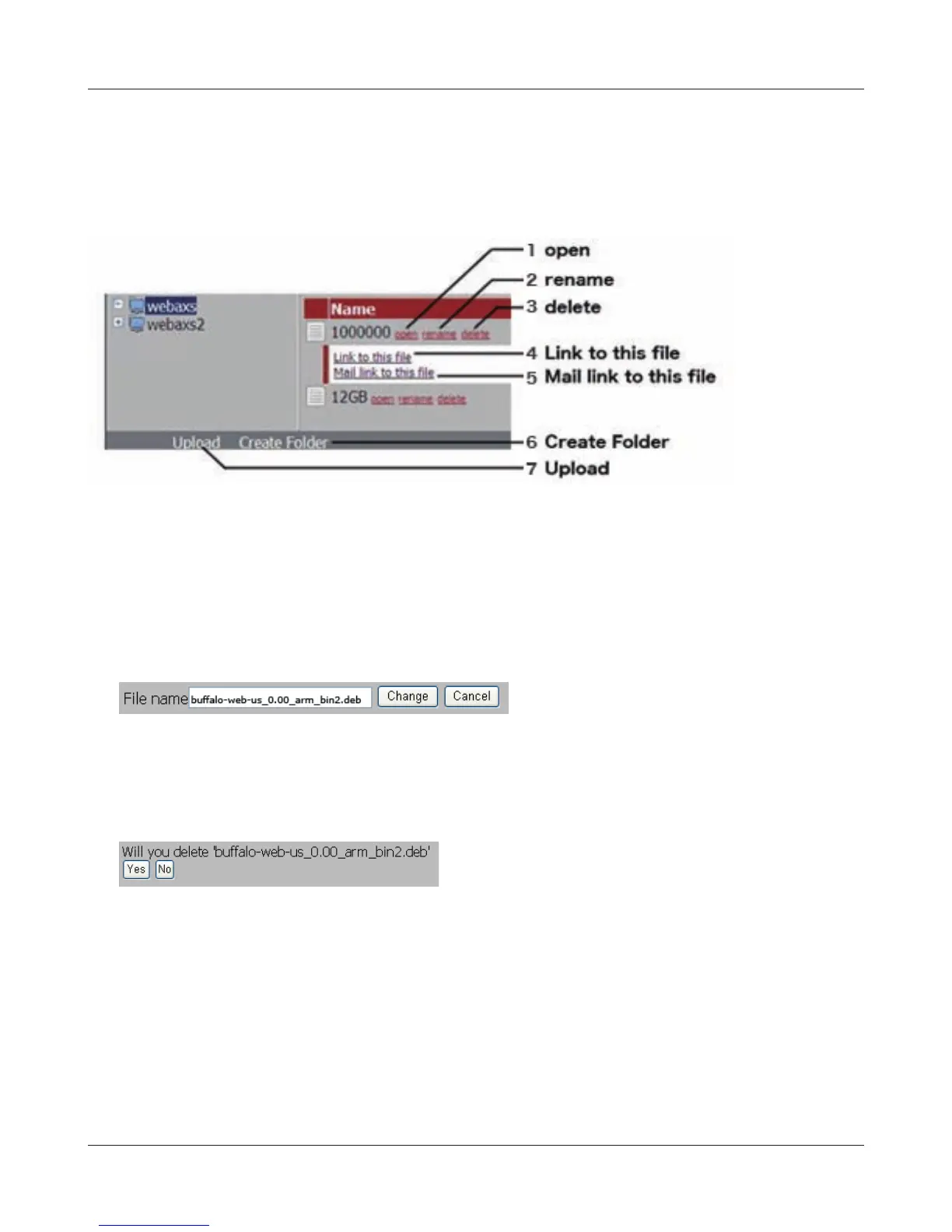
"open”, “rename”, “delete”, “Link to this le”, “mail link to this le”, “Create Folder”, “Upload"
1 open Open a le and folder.
Click [open] to open the specied le/folder.
To
save a le on the local drive , by right clicking the mouse on the le and click [save as] .
2 rename Change a le/folder name.
Click [rename] to display the following screen. Enter a le name or folder name in [File Name]
you want to change, and click [Change].
• You can use up to 80 characters for a folder name and le name, regardless of single or
multi bytes characters (including the extension).
3 delete Delete les/folders.
Click [delete] to display the following screen. Click [Yes] to delete the selected le.
4 Link to this le Link to a le or folder.
The le or folder name will be highlighted when you click on it. Right click on [Link to this le],
and select [Copy Shortcut]. It will copy the address link and can be accessed directly from the
outside. Use this feature when you want to give out this address link. From the right-click menu,
select [Add to Favorites] to bookmark address link.


 To Next Page
 Loading...











