Typeof
maintenance
Procedure Dutyof:
Weekly
Cleaning of combustion chamber by poker and scraper
brush
User
Monthly
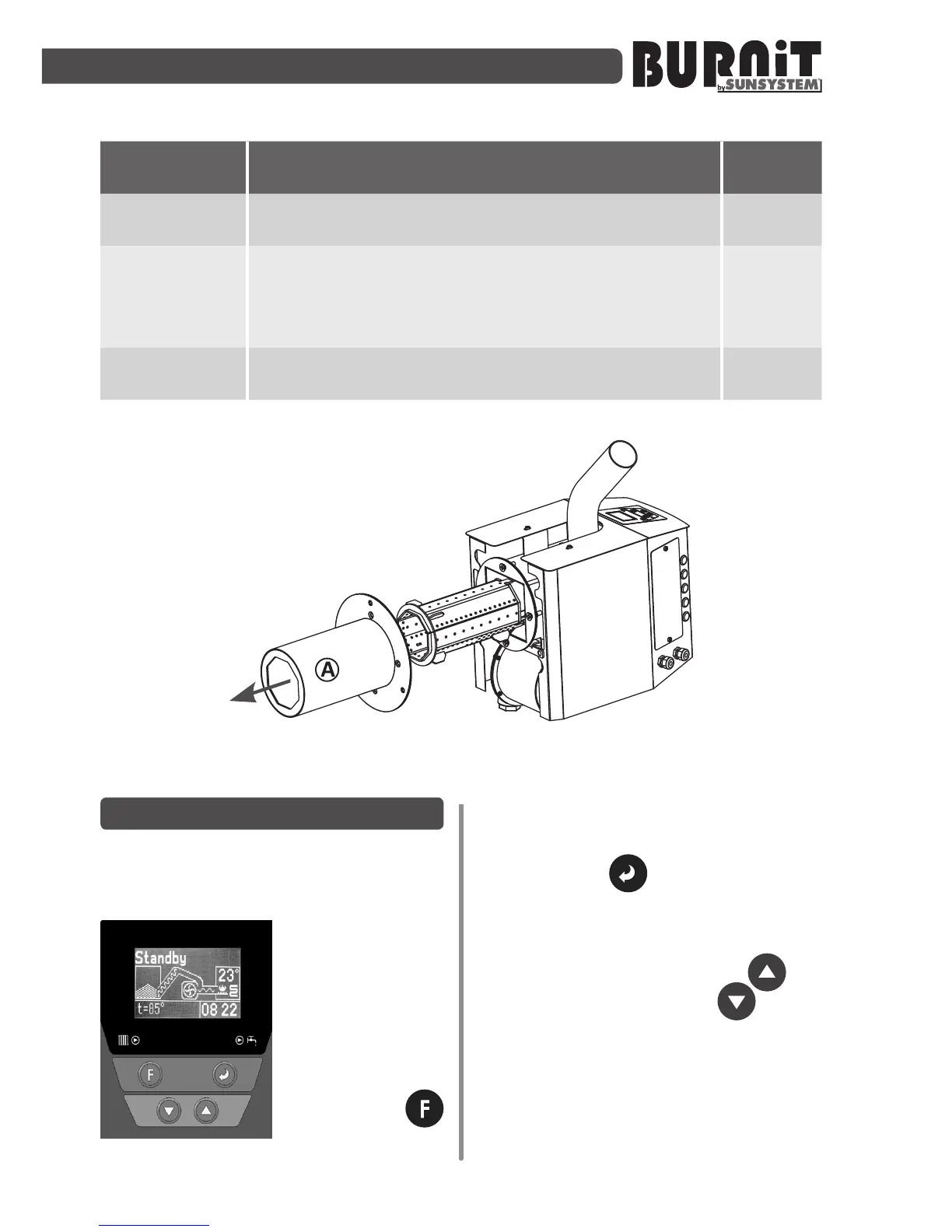
Dismantling of combustion chamber housing (A).
Cleaning of combustion chamber by scraper brush and
vacuum cleaner. Replacement of gasket if faulty (see
Diagram 8)
User /
Installer
Yearly
Full dismantling and cleaning of burner. Replacement
of all gaskets (see Diagram 10 in 12.2.)
Installer
Diagram 8. Dismantling of the combustion chamber housing.
9. CONTROL UNIT
9.1. Controller view. Explanaon of
buonsandindicators.
LCDscreen:
The controller
screen displays the
informaon for the
operaon of the
facility.
Explanaon of
buons:
Buon F
funcon buon.
Apply for: exit of the current menu;
taking back to main screen; burner
transfer from one condion to another
Buon„Enter” – apply for switching
from one parameter to another in
certain screen or to correct the certain
parameter.
Buons„NavigaonarrowUp” and
„NavigaonarrowDown” – Used
to change the value of a parameter in
the menu and to move to the next menu
page Aer entering the correct value
press buon “Enter", to move to next
parameter.


 To Next Page