Setting Backlight
This radio display has a backlight with adjustable brightness level.
1. Press MENU button - Main menu - System settings - Backlight, press SCROLL/SELECT
knob to confirm.
2. Turn SCROLL/SELECT knob to select “Power-on Level” or “Standby Level”, then press
SCROLL/SELECT knob to confirm.
3. Turn SCROLL/SELECT knob to select backlight level, and then press SCROLL/SELECT
knob to confirm the setting.
Power-on Level
z High
z Medium
z Low
Standby Level
z High
z Medium
z Low
Multi-room
Multi-room is a feature that enables you control your radio (one or more) via UNDOK App for
playback.
You can enjoy music by using your smartphone or tablet which has UNDOK App to respectively
control the radios (multi-room capable devices) in the kitchen, bedroom or living room. Of course
you also can group control the radios for playing.
1. To use multi-room feature, download UNDOK app from App Store for your iOS
smartphone or download from Google Play for your Android smartphone.
2. Start UNDOK app, making sure your radio and smartphone are connected to same WiFi
network.
3. All available devices will be listed. Tap your radio “BR320DABC xxxxxxxxxxxx” (the 12 digit
alphanumeric code is the MAC address of your radio) to connect to.
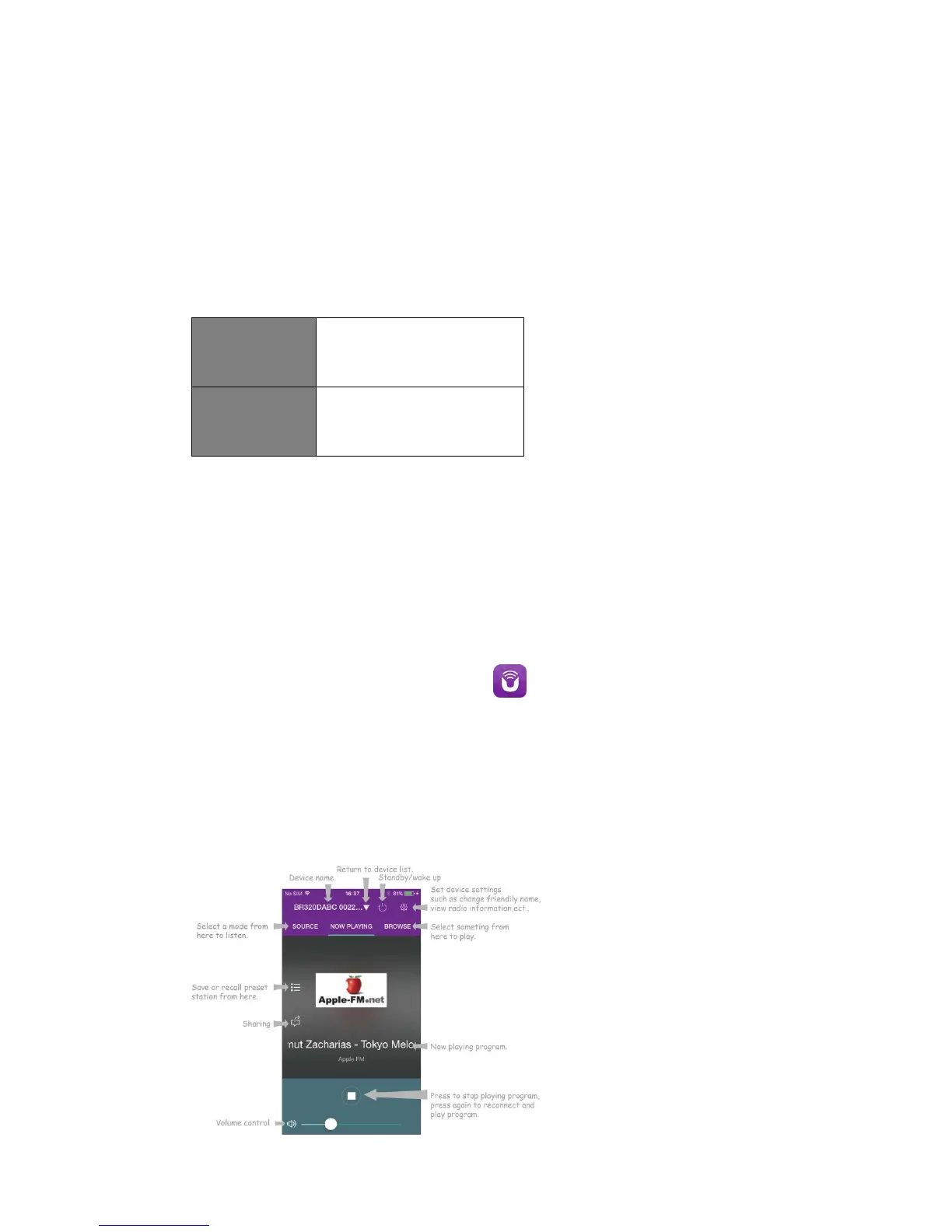
4. Now playing screen is shown. (Playing Internet radio mode for example.)



 To Next Page