17
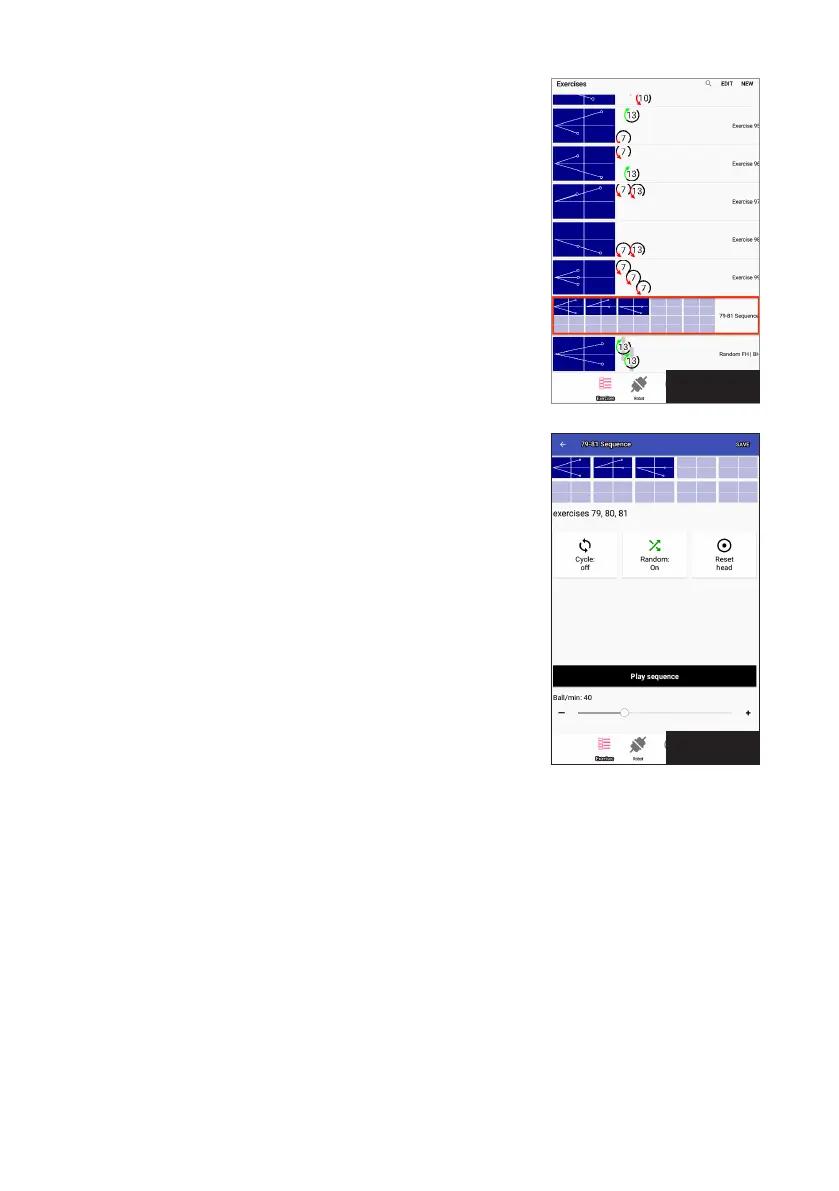
There will always be 10 mini table diagrams shown for each
sequence listed, even if a sequence doesn’t include 10 exercises.
Open spots are coloured light blue while filled spots are dark blue.
Photo 28 shows a sequence with 3 filled and 7 empty spots.
Creating and Saving Sequences
There are 2 ways to create a sequence:
1. From the Exercise List, select the first exercise to be included in
the sequence and open its Play Exercise screen. Tap Save at top
right, then Save To Sequence. In the resulting dialog box, select
New Sequence,
2. If you already have one or more sequences saved, they will
show up in the Save To Sequence dialog box. Tap one of the
already saved sequences and the exercise will be added to that
sequence in the next available open spot.
Continue adding more exercises, in the order you want them to
play, until you have no more to add. Or, you can click on the next
open spot in the sequence diagram and proceed to build a new
exercise from scratch (follow directions in the Ball Screen section).
Such exercises are saved directly into the sequence by tapping
Save at top right, then Save in the resulting popup window.
Playing A Sequence
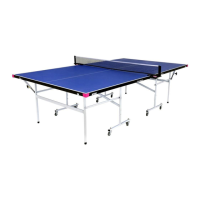
To better understand sequences, create one following the above
instructions. If not already open, tap a sequence in the Exercise
List to open the Play Sequence screen (see Photo 29), Study the
table diagrams to understand what exercises are included and their
order. Once you have a mental image of the exercises, touch the
Play Sequence button. It takes a few seconds for the sequence to
load and begin playing.
Play Sequence plays a series of exercises in a row similar to how Play Exercise plays a series of balls
in a row. Play Sequence begins with one repetition of the 1
st
exercise shown and continues with one
repetition of every other exercise in the order shown. When it reaches the last exercise, it loops back to
playing the 1
st
exercise and continues this order until the Stop Sequence button is touched.
Use the Random button to play the exercises out of their normal order. As an example, let’s say Exercis-
es 1, 2, and 3 are saved into a sequence. When played, the order could be something like 2–3–3–1–1–2–3
with Random on; whereas, with Random off, the order would always be 1–2–3–1–2–3.
Cycle can also be used with sequences in a fashion almost exactly the same as used in Play Exercise
(see page 12)2). And the Reset Head button functions the same (see page 1313).
Photo 28
Photo 29


 To Next Page