6
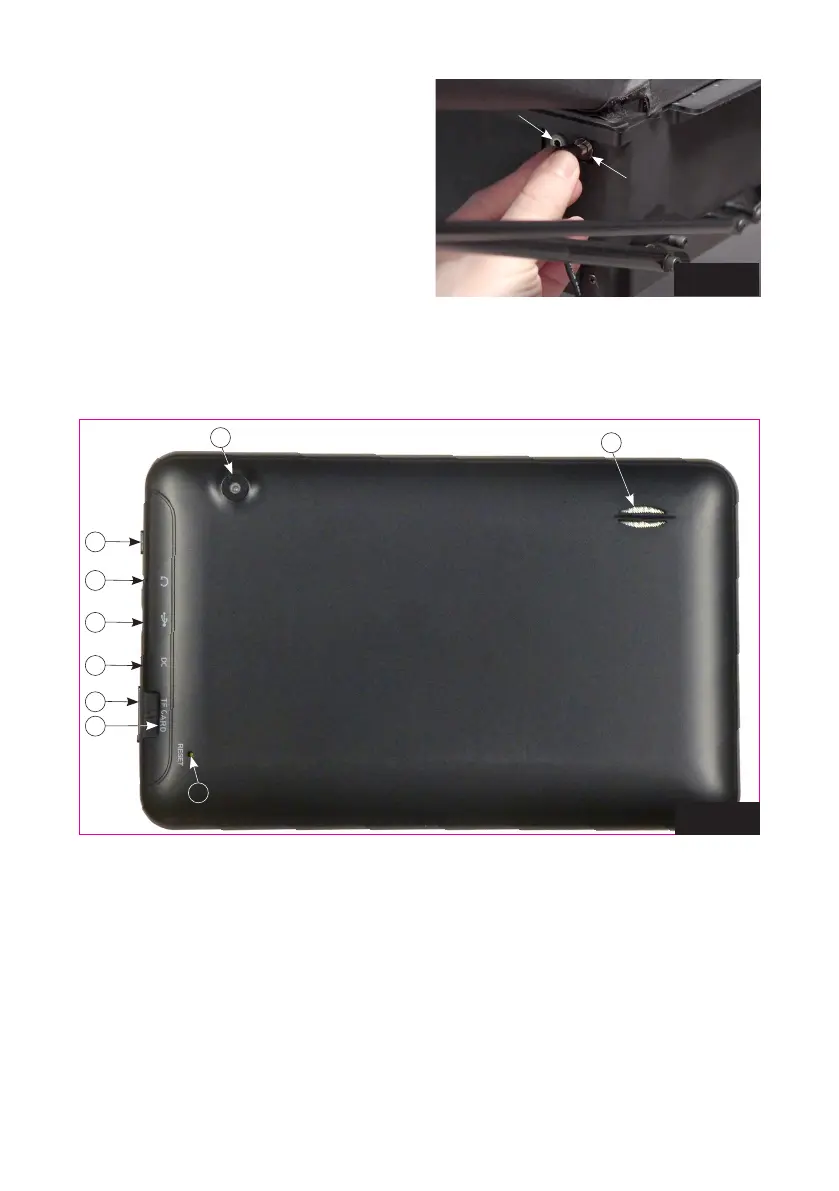
6. Plug your Power Supply into a power outlet and
then into the power socket on the side of the
Base (See Photo 6). Attach the Tablet to the
Control Panel Bracket and slip it onto the side
of the table closest to your free hand. Adhere
a long Velcro strip to side of table to prevent
bracket from slipping off. Lastly, connect the
Tablet Cable from the 3.5 mm socket (next to
the power socket) to the USB-micro port of
your tablet.
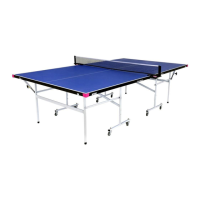
2. Tablet
1. Power Button — Used to turn the tablet on and off. Hold down for a few seconds. Brief press to put
tablet to sleep.
2. Headphone Jack — Connect headphones or earphones here. Not used for Amicus operations currently.
3. Micro USB Port — Can be used to charge tablet from robot with provided Tablet Cable, or alterna-
tively, charge the tablet by connecting it to a user-supplied USB Charger..
4. DC Power Port — Plug the provided Tablet Power Supply into a power outlet and then into this port.
This keeps the tablet’s battery charged. If unplugged, tablet has approximately 4 hours of battery
time when new. We recommend leaving the tablet plugged into power to prevent the Power Saver
function from turning off the screen during play.
Photo 6
Plug power
cord here
Plug Tablet
Cable here
1
8
9
2
3
4
5
7
Photo 7
6


 To Next Page