5
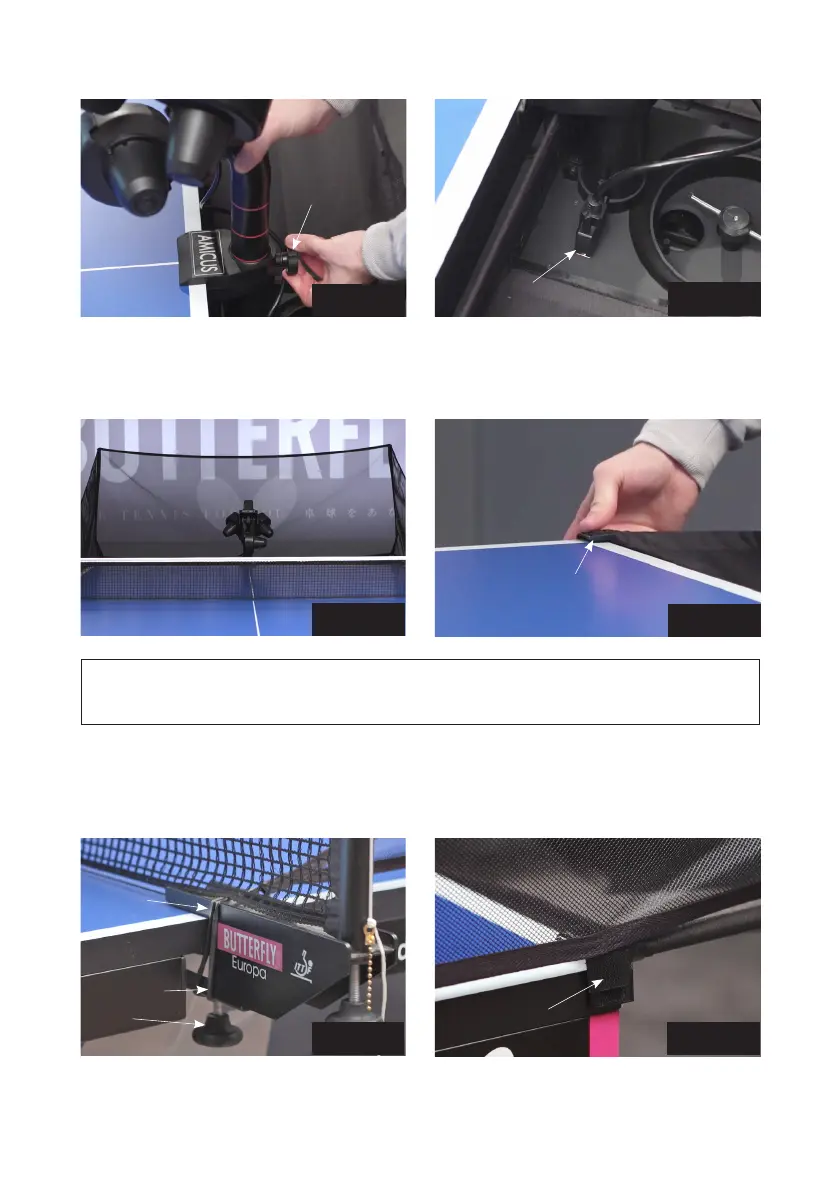
Photo 3A
Photo 3B
4. Standing behind the robot, grip the top of the net and fold the net down on both sides until the net
fully opens (as seen in Photo 4A). Fit the Net Corner Brackets around the corners of your table as
seen in Photo 4B.
Photo 4A
Photo 4B
NOTE: We recommend attaching the two shortest Velcro strips to the corners of your table under-
neath the Net Corner Brackets to help the brackets stay down and stabilize the entire net.
5. Pull a side net along the sideline of the table and pass its thick rubber band over the top of the
table’s net standard (see Photo 5A). Then wrap the rubber band around the Clamp Screw that holds
the net onto the table. Attach the Side Net’s Velcro tab to its matching piece located on the Net
Corner Bracket as seen in Photo 5B.
Photo 5A Photo 5B
Pass band
over net
standard
Secure
Velcro
flap here
Head Cable
Net Corner
Bracket
Wrap band
around clamp
screw
Black Knob


 To Next Page