26
If this procedure doesn’t clear the ball jam, all motors stop and one of the following error messages will
be displayed on the tablet:
1. Robot Error. The feeding motors has been stuck. Ball jam! Defective or oversized ball or foreign
object jamming the lower channel. Clear channel and test ball feed.
2. Robot Error. Ball gets stuck between the throw discs. Turn off power and then remove the ball.
The first error message indicates a problem with the ball feed system, It is sensing that resistance in
the Ball Feed Motor has risen above a set amount. This can be caused by a variety of issues including
a broken or oversized ball, foreign object, sticky substance, incorrect head height adjustment, hair
wrapped around the Ball Feed Gear shaft, new balls with a gritty powder on them, very dirty balls, a
restriction in the ball channel, and other similar issues. But it can also be caused by a bad Ball Feed
Motor or a loose connection between the Power Circuit Board and that motor. See Troubleshooting, p.
2727,for more detailed instructions.
The second error message indicates a problem with one of the head motors, usually one of the Ball
Throw Motors. This is commonly caused by lowering the head height, which then pushes the topmost
ball out of the Ball Tube and it gets caught among the 3 wheels. Other potential causes could be a wheel
rubbing on another part, wheel clearance adjusted too tightly, the Head Cable is loose or disconnected,
or a bad Ball Throw Motor. Again, see Troubleshooting, p. 2727, for more detailed instructions.
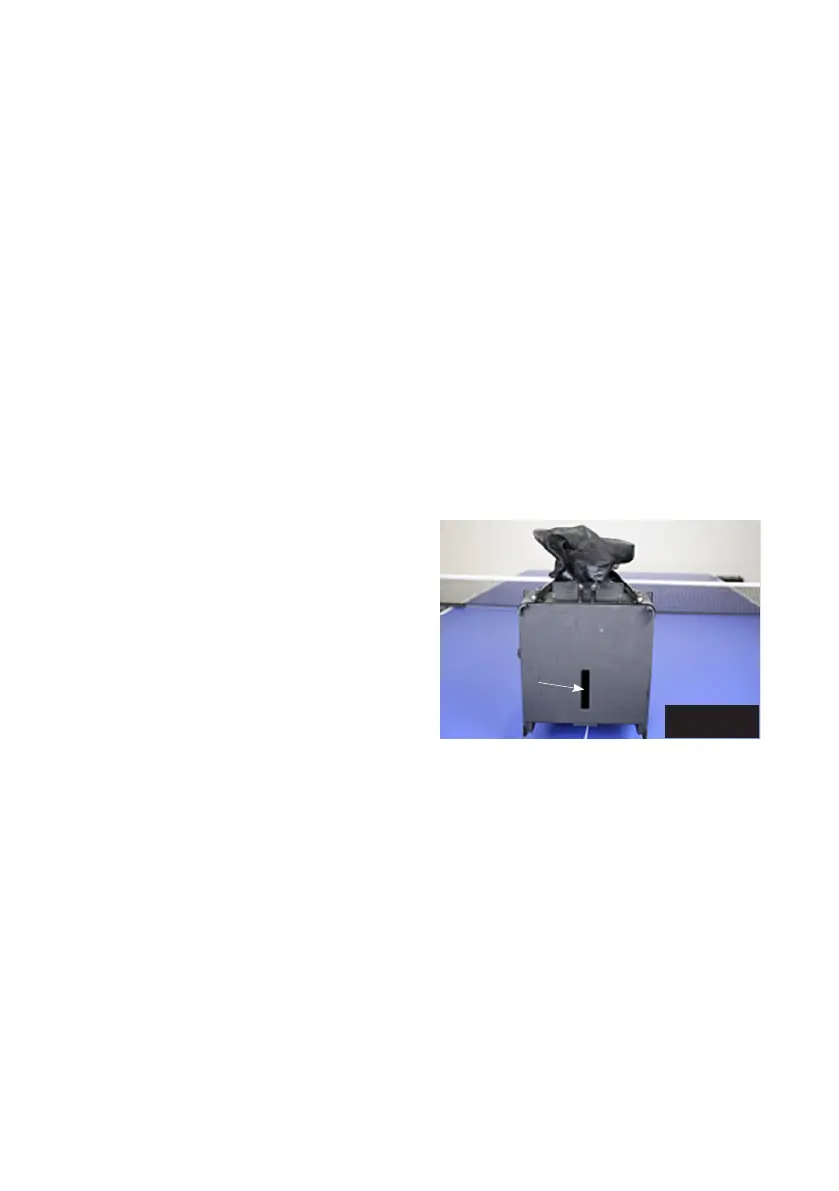
To check the ball channel, remove the head by
disconnecting the Head Cable, loosening the large
Black Knob on the rear of the Ball Tube, and pull-
ing up on the head. Then tilt the entire net system
forward onto the table until the balls in the lower
channel roll out the top of the lower Ball Tube (see
Photo 36). Then inspect through the access slot
on the Base Bottom to verify that no more balls
are in the channel. If necessary, take a long rod-
like tool (screwdriver, dowel, etc.), insert it through
the access slot, and push balls out of the channel.
Once clear of balls, with the help of a flashlight, inspect inside the ball channel and clear out any foreign
objects, sticky substances, or dirt. Also, insert a ball into the upper Ball Tube and see if it can roll all the
way to the wheels and back without stopping. With the ball channel empty, test ball feed to see if the
Ball Mixer Springs rotate when ball feed is started.
Without any balls in the machine, and with Head Cable connected, the Ball Mixer Springs should keep
rotating until you stop ball feed. This would indicate the ball feed mechanism is operating normally and
the issue is with the balls or something within the ball channel. But if the Ball Mixer Springs do not ro-
tate at all, rotate backwards and forwards, or stop after only a few balls, that would indicate something
is wrong with the ball feed mechanism, motor, connections, or the head. If the problem is with the head,
the second error message is shown on the tablet. Otherwise, the first error message is shown.
If you cannot determine the cause of the issue with the above suggestions and the Troubleshooting
Chart, please contact your Amicus Service Center for further assistance.
Photo 36
Access Slot


 To Next Page