EN
30
9.3 Maintenance messages
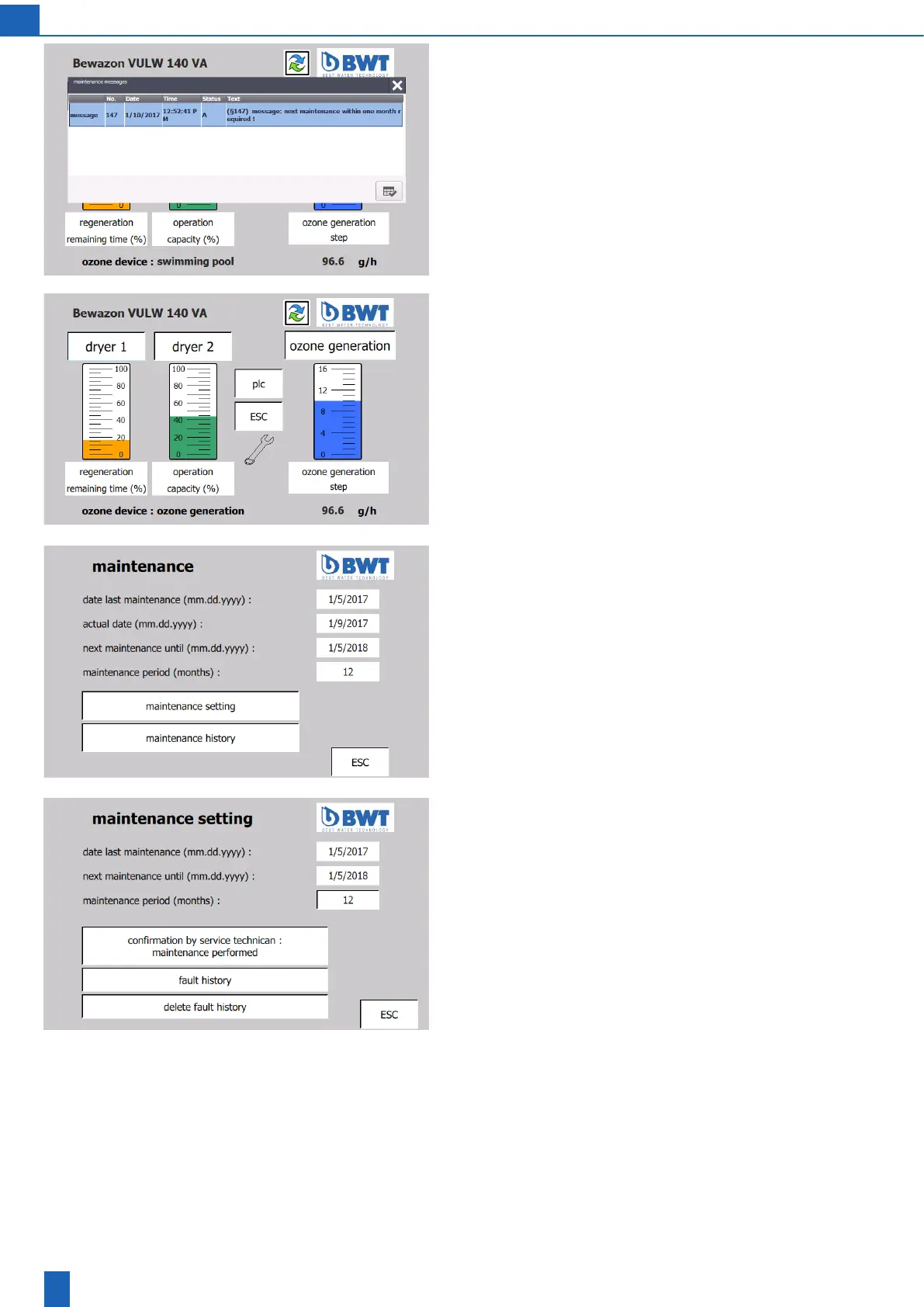
Start screen with maintenance notice:
Onemonthbeforethemaintenanceperiodpasses,amessagenoties
you of the next maintenance date. The message has to be acknow-
ledged.
Start screen with maintenance indicator:
When the maintenance period passes, a message is displayed to
inform you that the maintenance is required. The message has to be
acknowledged. On the start screen, the spanner maintenance icon
indicates that maintenance is required until it has been performed and
conrmedbytheservicedepartment.
If maintenance is not performed, another message informing you that
maintenance is required appears each month.
Maintenance:
Under “PLC settings -> Maintenance”, you can query when maintenance
was last performed and when maintenance is due next.
Next screen: Maintenance setting
Maintenance setting
(only with the service password)
Maintenance period: Setting for the maintenance period according to
the maintenance agreement. The date of the message for the mainte-
nancenoticationorformaintenancedependsontheperiodsethere.
Conrmationbyservicetechnician:Afterdevicemaintenanceisproperly
performed,theservicetechnicianconrmsthatthemaintenancewas
performed. The date for the next maintenance is then updated and
the maintenance icon on the start screen (the spanner) is deactivated.



 To Next Page