EN
21
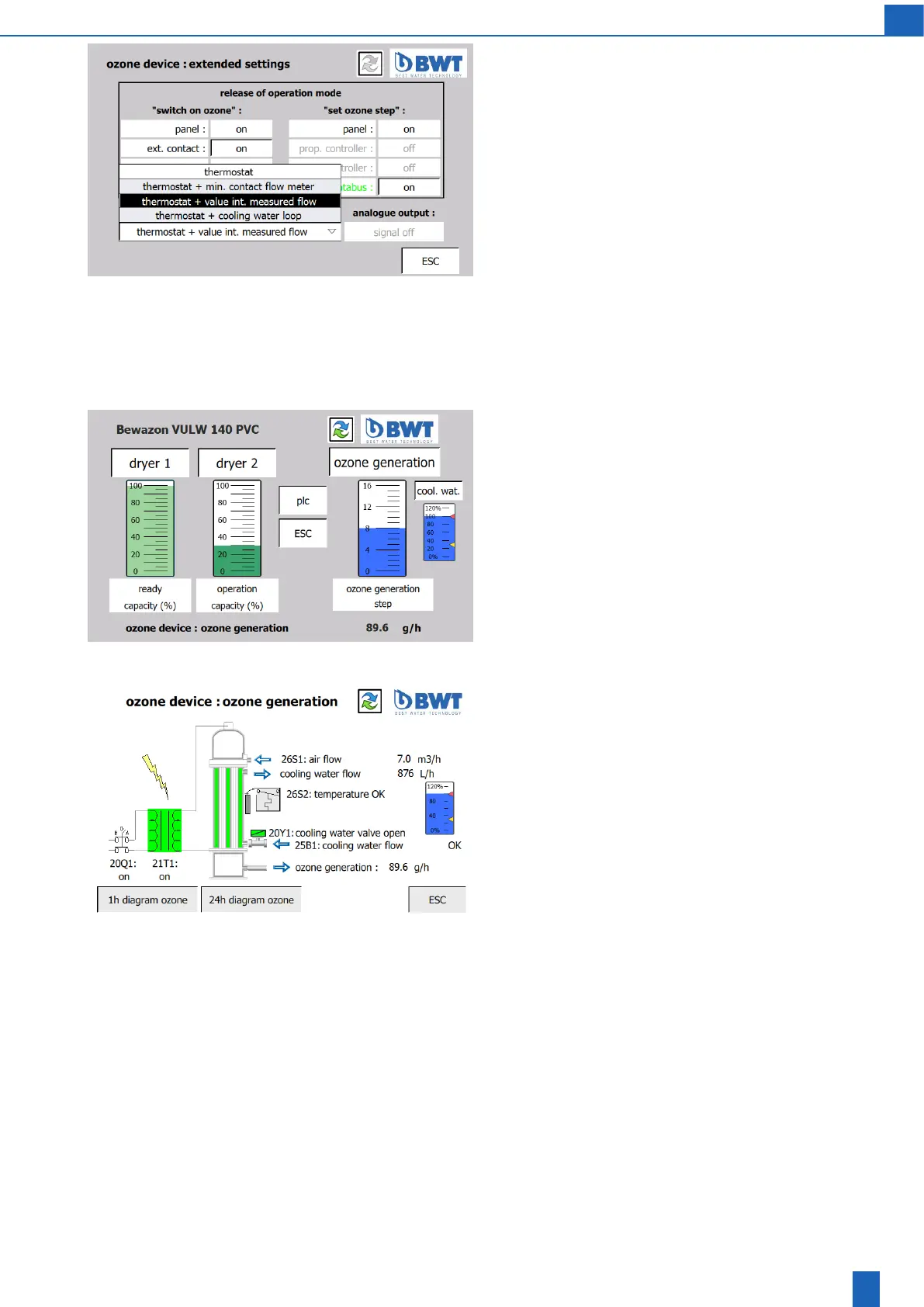
Ozone device: Extended settings
Cooling water monitoring
During unit operation while ozone generation is running (ozone le-
vel>=1),thecoolingwaterowismonitored.Therearefouroperating
modes for doing so:
1. Thermostat: Monitoring is carried out only using the thermostat on
the ozone generator. This operating mode should be selected only
iftheowmeterisnotavailable
2.Thermostat+min.contactowmeter:Inthisoperatingmode,moni-
toring is carried out using the thermostat and minimum limit contact
ofanexternaloatingowmeter
3.Thermostat + value int. measured ow (default setting): In this
operating mode, monitoring is carried out using the thermostat and
anintegrated owmeter.The measuredvalueis displayedonthe
“Scheme ozone device” screen. The monitored limit value is set on
the “Ozone device: settings” screen.
4.Thermostat+coolingwaterloop:Ifacoolingwaterloopisconnec-
tedtothecontroller(optional),owmeteringisperformedusingthe
thermostatandtheinternalowsensor.
8.4 Bewazon Therm cooling water loop
(optional)
Start screen with cooling water loop:
Ozone device in operation
When you press the ozone generator icon, the ozone generation
diagram opens.
Device with cooling water loop (optional). When you press the cooling
water loop icon (the small column next to the ozone generator icon),
the cooling water loop diagram opens.
Next screens: Ozone generation diagram, cooling water loop diagram,
cooling water loop settings, cooling water consumption
Ozone device: generation diagram
From the start screen, you can open the ozone generation diagram with
all of the operating values by tapping the ozone generator icon (column):
– High voltage
–Airowwiththedisplayofthesetowrate
–Coolingwaterwiththedisplayofthesetowrate
When you press the cooling water loop icon (the small column), the
cooling water loop diagram opens.
Next screen: Cooling water loop diagram



 To Next Page