EN
20
Release of operation mode
The selected operating mode determines the exclusive signal source
thatspeciestheozonelevel.Foryoutoselectanoperatingmode,the
release for it must already be provided on the “Ozone device: extended
settings” screen. The “Panel” operating type is always available for
selection. These releases can be changed only if the device is in the
“Ready” operating state.
Next screens: Ozone device: Settings, ozone device: Extended settings
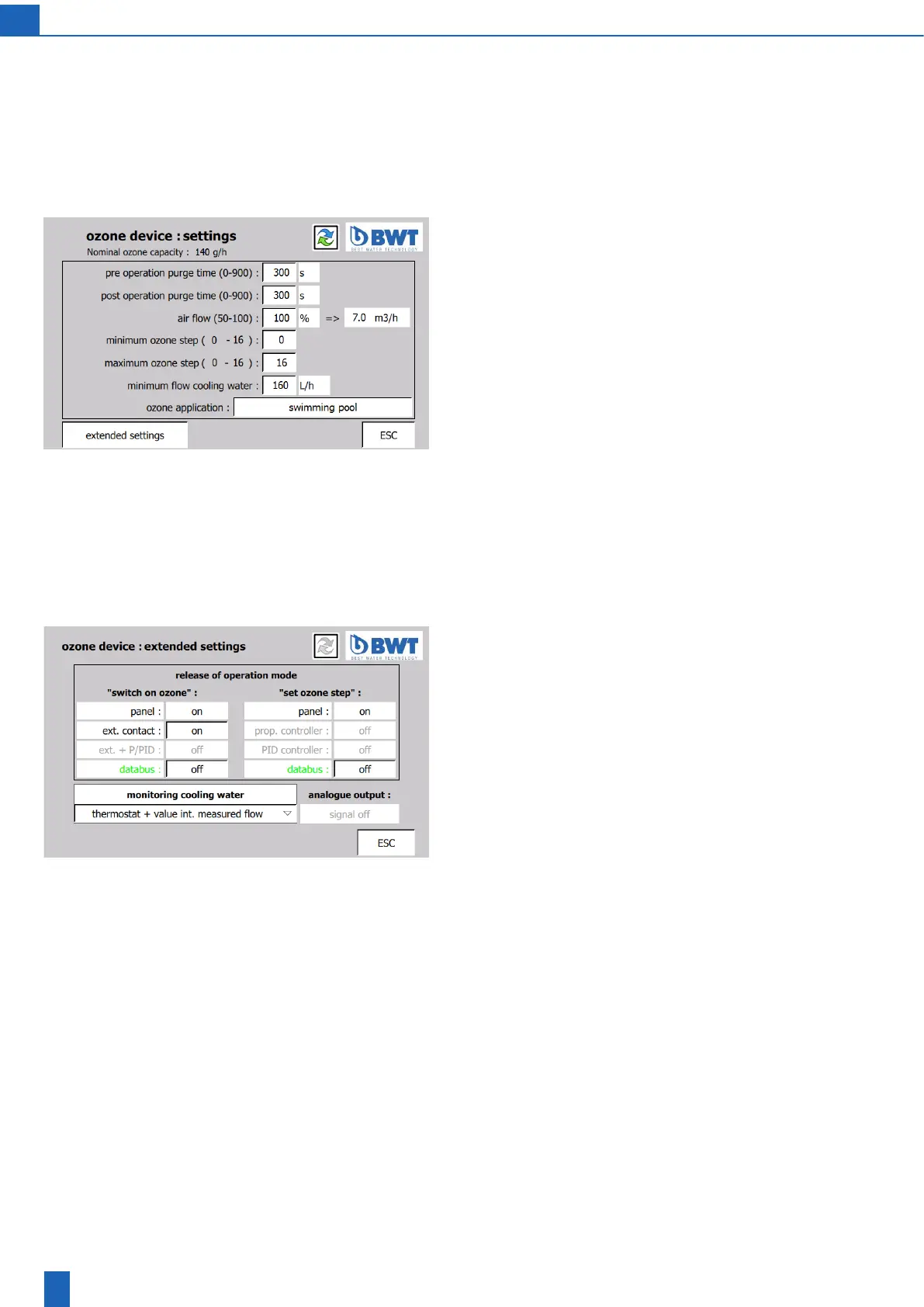
Ozone device: Settings
Pre-operation purge time: The pre-operation purge time can be set in
a range of 0 to 900 seconds (= 0 to 15 minutes).
Post-operation purge time: The post-operation purge time can be set
in a range of 0 to 900 seconds (= 0 to 15 minutes).
Airow:Thesetairowforthedevicemustmatchtheairowdisplayed
ontheairowmeter(2)duringoperation.Theadjustablerangecan
be limited by the air humidity set for the dryer (see the “Dryer settings”
screen).
Minimum/maximum ozone level: Restriction for the ozone level that
can be chosen during operation. During operation, this restriction has
priority over the default ozone level setting provided by the “Set ozone
level” operating mode. For example: If the minimum ozone level is set
to > = 1, operation without ozone, i.e. level 0, is not possible.
Minimumowcoolingwater:Ifthecoolingwaterowismeteredusingan
internalowsensor,thelimitvalueformonitoringcanbespeciedhere.
Ozone application: You can enter a name for the unit application here.
This name appears on the start screen and alternates with the status
display.
Next screen: Extended settings
Ozone device: Extended settings
Release of operation mode
The operating mode for “Switch on ozone” and “Set ozone level” de-
termines the exclusive signal source for the parameter to be set. The
relevant operating mode must be released so that it can be selected on
the “Ozone device: ready/ozone generation” screen. These releases
can be changed only if the device is in the “Ready” operating state.
The “Prop. controller” and “PID controller” (optional) operating modes
can be released only if the signal module SM 1231 = analogue input
module is set on the PLC. In this case, either the “Prop. controller” or
“PID controller” operating mode can be released. In addition, for the
selected controller type, the “Ext. + P/PID” operating mode can be
released for “Switch on ozone”.
The “Databus” (optional) operating mode can be released only if the
databus connection has been activated before hand in the correspon-
ding network. The activation is highlighted in colour: green = active,
red = faulty, black = inactive, grey = not available. You carry out the
activation on the “PLC database connection” screen.
Analogue output (optional)
If the SM 1232 signal module is set for a 4 to 20 mA analogue output in
thePLC,theoutputsignalcanbeswitchedon/o.Whenthesignalis
switchedon,theoutputismonitoredforaminimumowof4mA.When
thesignalisswitchedo,thismonitoringisdeactivated.



 To Next Page