EN
19
Ozone device: Ready/operation
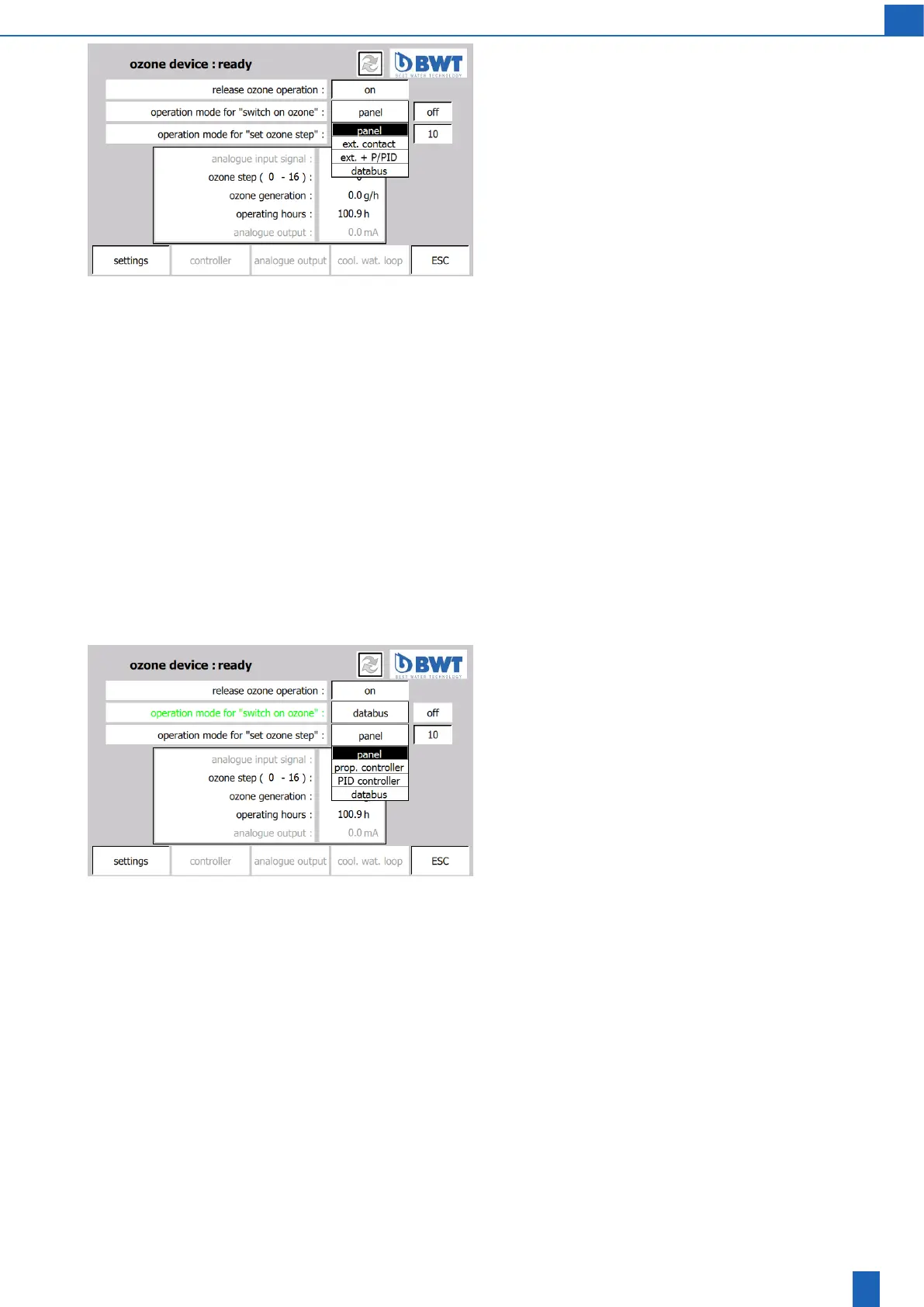
Operation mode for “switch on ozone”
The device can be switched on and o directly on the touch panel
or by remote control. For the “switch on ozone” switch, there are
4 operating modes:
1. Panel: manually on the device
2. Ext. contact: The unit is switched on and o using an external
customer-suppliedoatingcontact
3. Ext.+P/PID(P/PIDcontrolleroption):Theunitisswitchedonand
oasdescribedinitem2.ifozoneisalsorequestedsimultaneously
using the P/PID controller signal. It is then possible to use an external
signal (ext. contact) to interrupt controller operation, for example,
foralterpurge.
4. Data bus (Pronet/Probus option): The unit is switched on and
oexternallyusingthedatabus.Ifafaultoccursinthedatabus
connectionatruntime,theunitisswitchedo.
Release of operation mode
The selected operating mode determines the exclusive signal source
for the “Switch on ozone” switch. For you to select an operating mode,
the release for it must already be provided on the “Ozone device: ex-
tended settings” screen. The “Panel” operating type is always available
for selection. These releases can be changed only if the device is in
the “Ready” operating state.
Release of ozone operation
The unit can be switched on only if the release is set using the “Release
ozone operation” button. The release can be cancelled on the TP at any
time independently of the “Switch on ozone” switch setting. The operator
canthereforealwaysswitchotheunitdirectlyfromtheTPevenwhen
the unit is controlled remotely. If an ozone operation fault occurs, the
release is cancelled by the controller. The operator cannot reset the
release until acknowledgment of the fault (or faults) has been given.
Ozone device: Ready/operation
“Set ozone level” operating mode
The ozone production capacity is adjustable in 16 levels. There are four
operating modes for this adjustment:
1. Panel: manually on the device
2. Proportional controller (P/PID controller option): The ozone level
is set proportionally to an external 4 to 20 mA signal. For example,
thesignalcancomefromtheowmeterofawatervolumeowinto
which the ozone is to be mixed. This operating mode facilitates ozone
metering with the addition of a virtually constant ozone amount per
m
3
ofwaterregardless of thewatervolumeowandthatreacts
quicklytochangesinthewatervolumeow.Ifthe“Prop.controller”
operating mode is selected, the measurement signalling current is
monitored on the PLC analogue input.
3. PID controller (P/PID controller option): The ozone level is set by
the internal PID controller in accordance with an external 4 to 20 mA
measurement signal. The controller sets the ozone level so that the
measurement signal, which corresponds to the current ozone con-
centration in the water, for example, is as close as possible to the
nominal value set by the operator. This operating mode facilitates
ozone metering which keeps the ozone concentration in the water
virtually constant,regardless of the volume ow and ozonecon-
sumption of the water. Ozone metering reacts only relatively slowly to
changestothevolumeowandtheozoneconsumptioninthewater.
If the “PID controller” operating mode is selected, the measurement
signalling current is monitored on the PLC analogue input.
4. Databus(Pronet/Probusoption):Theozonelevelissetexternally
using the data bus. If a fault occurs in the data bus connection at
runtime, the ozone stage is set to “0”.



 To Next Page