EN
26
8.6 Dryer mode
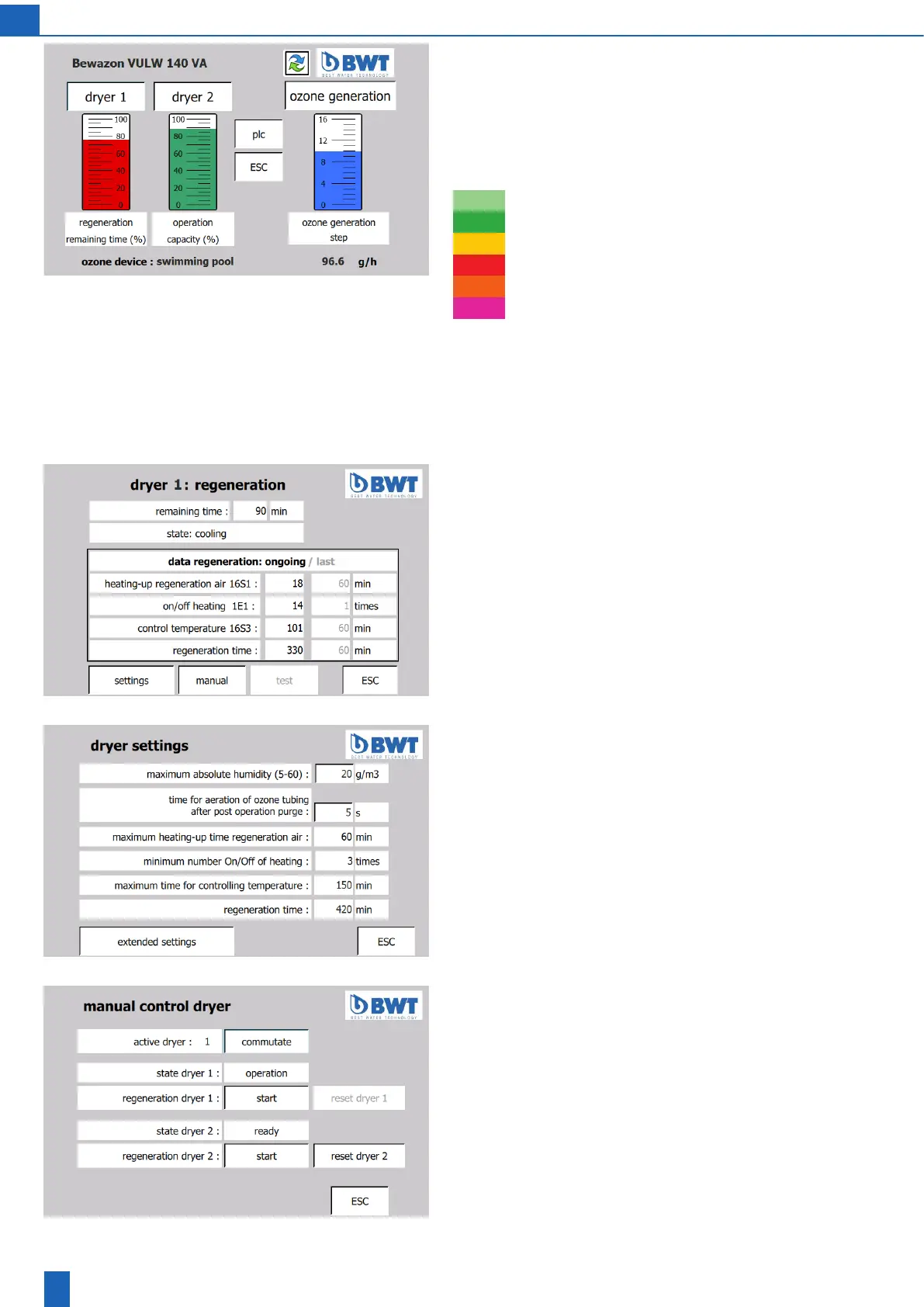
Start screen
The operating states of dryer 1 and dryer 2 are displayed as columns.
When the unit is in operation/ready, the size of the column shows the
capacity still available. During regeneration, it shows the time remaining
for the regeneration. The colour of the column indicates the operating
state itself:
Standby
Operation
Heating up during regeneration
Maintaining temperature during regeneration
Cooling
Not ready, fault
When you tap the “Dryer” button, the following screen opens:
Dryer regeneration/operation/ready
When you tap a dryer column, the dryer regeneration diagram screen
opens
Next screen: Dryer regeneration/operation/ready
Dryer regeneration/operation/ready
This screen displays the data for the last regeneration. If regeneration
is in progress, the data of the current regeneration is also displayed
Manual and test: Functions for Service only
Next screens: Settings, manual control dryer, dryer test
Dryer settings
Maximum absolute humidity: Air humidity setting for the calculation of
the dryer operating time by the PLC
Note: The actual air humidity in the installation space must not be higher
thanthevaluespeciedhere.Theadjustablerangeoftheairhumidity
dependsontheconguredairow.Iftheactualairhumidityisgreater
thanthemaximumsettingvalue,theairowcanbereduced.Youmust
changetheairowsettingonboththe“Ozonedevice:settings”screen
andontheactualmeasuredairow.
CAUTION: If the value set for the maximum absolute air humidity is
toolowortheactualsetairowistoohigh,thismayresult
in damages to the unit.
Manual control dryer
(only with the service password)
Active dryer: The dryer being operated or that is designated for opera-
tion can be switched. It can be switched only if the state of the target
dryer is “ready”.
Regeneration dryer: Dryer regeneration can be started and cancelled
manually.
Reset dryer: A reset (which is not possible while the dryer is in ope-
ration) resets the dryer to the “ready” state with 100% dryer capacity,
regardless of its actual state!
CAUTION: Improper misuse can lead to severe damage to the unit.



 To Next Page