EN
14
8 Operation
8.1 General Information
CAUTION The unit may only be operated by trained personnel.
Operation is carried out using the touch panel (TP). The display is
touch-sensitive. After the plant is switched on, the “BWT” screen appears
Tapthe“BWT”eldtogototheoperatingstartscreen.Youcannavigate
to all of the other screens for operating the unit from there.
Eachofthesescreenshasan“ESC”(=escape)eld.Ifyoutap“ESC”,
you are returned to the previous screen.
If no entry is made for ten minutes, the touch panel automatically swit-
ches back to the “BWT” screen.
Iftheunitpowersupplyremainsswitchedoformorethan24days,
both dryers are regenerated when the power supply returns. The unit
is not ready for ozone generation until the regeneration of the rst
dryer is complete.
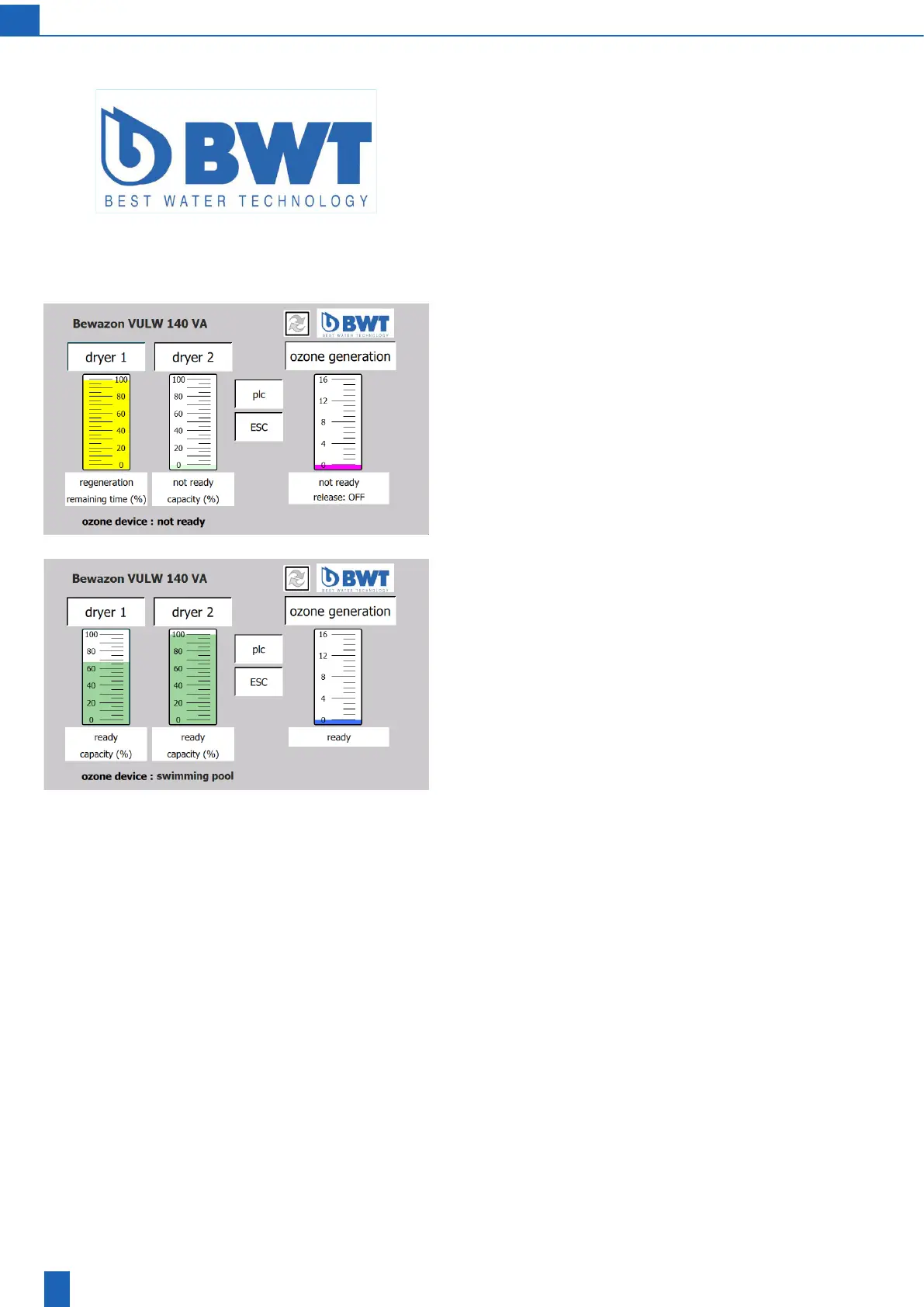
Next screen: Bewazon VULW start screen
8.2 PLC settings
Start screen
The display shows the name of the unit and the current operating con-
dition of the unit components in plain text and as a diagram.
Youcantapanyoftheframedeldsandanyoftheunitcomponents
represented by graph columns to go to the corresponding next screen.
Next screen: PLC



 To Next Page