2021/03 - Indice de révision : B Code : 29740 TRAITEMENT DE L'EAU
44/88
7.1 Conguration of the user interface
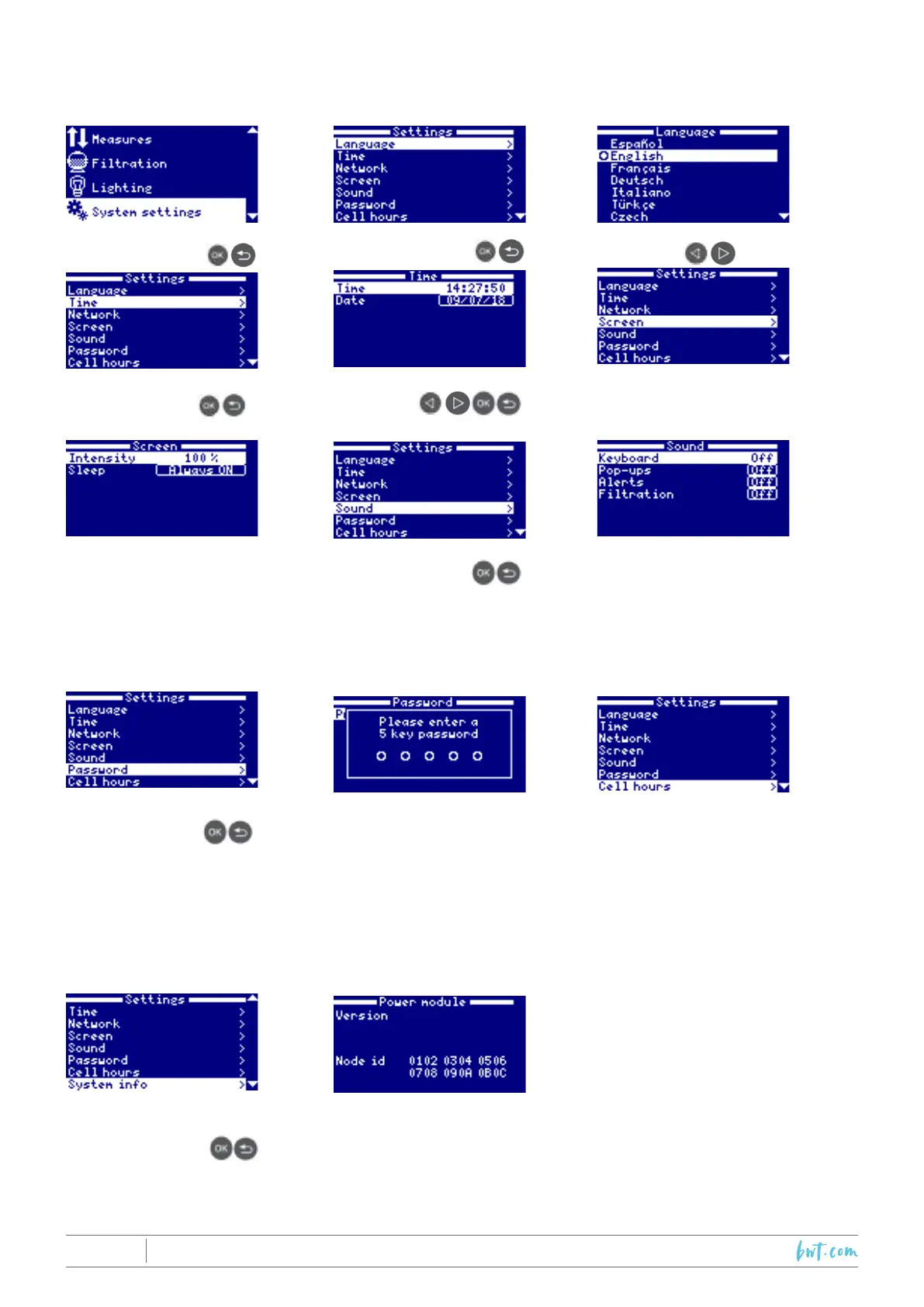
SelecttheSystemSettingsmenu:
1. Select System Settings
2. Select language 3.Choose the preferred
language
4. Set the current date
and time
5.Enterthecurrentdate
and time
6.Screenconguration
7. Set the display light
intensity (0-100%) and
programon/offtimers.
8. Sound settings 9. Sound: Programming
thesystemtoemitsounds
forthefollowingfunctions:
Keyboard (keys), Pop-
ups (urgent messages);
Alarms (operating alarm);
Filtration(startofltration).
10.Setthepassword.
11. Password: Protects
useraccesstothemenuby
activatingapassword.Press
acombinationof5keysand
the system will memorize it.
If you forget the password,
thereisa‘masterpassword’.
Contact your installer/
supplier.
12. Cell operation
counters: Counters of
the operation time of the
various modules.
13.Systeminformation 14. System Information: Information about the software
versions of theTFTdisplay and the power module. It also
showstheIDnodewhichisrequiredtocongurethesystem’s
WiFi connection.



 To Next Page