18 2021/07 - Version: C -
CAUTION
The cables connected to the Aquamat motor must form a loop lower than the motor connectors to avoid
water infiltrations.
7. Setting and programming ends of travel
The ends of travel are managed by a printed circuit board. An electrical panel is used to program the ends of
travel.
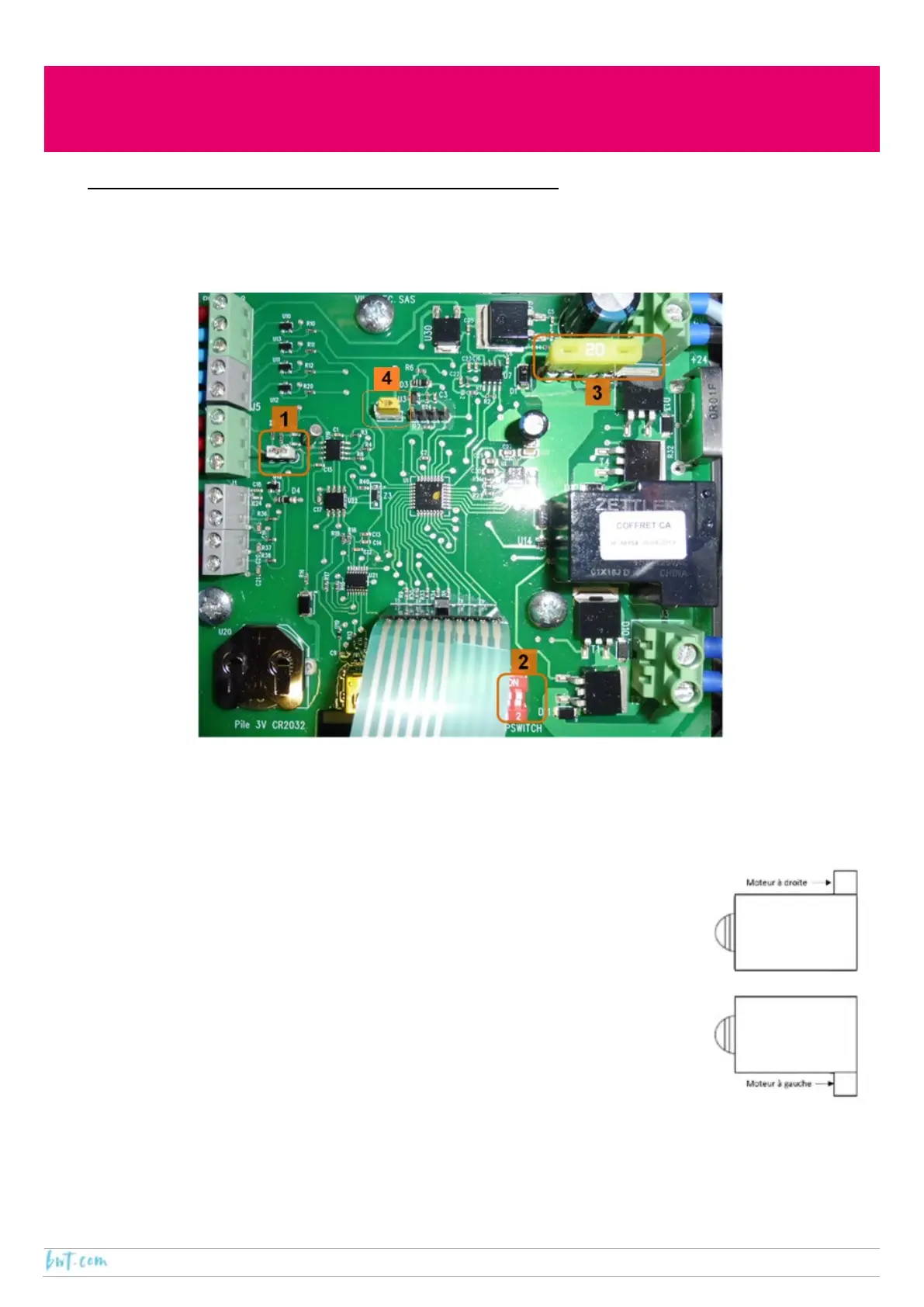
7.1. The printed circuit board
Number 1: Jumper
There are two possible positions for the jumper, the position is selected depending on the motor drive system.
In the case of an AQUAMAT motor, the jumper connects the left-hand side pin and the central pin.
Number 2: Dipswitch
Dipswitch number 1 is used to change the direction of rotation of the motor, this will
depend on the side of the pool on which the motor is located (refer to the figure opposite):
‐ Motor on the right-hand side: dipswitch 1 should be set to OFF
‐ Motor on the left-hand site: dipswitch 1 should be set to ON
Dipswitch number 2 should always be set to ON.
Number 3: Fuse
The board should never be fitted with a fuse with a rating above 20 A. The use of a fuse
rated for the automatic cover motor is highly recommended.
In the case of an AQUAMAT motor, place the 10 A fuse (supplied) on the PCB.
Number 4: Reset
This is used to reset the PCB.



 To Next Page