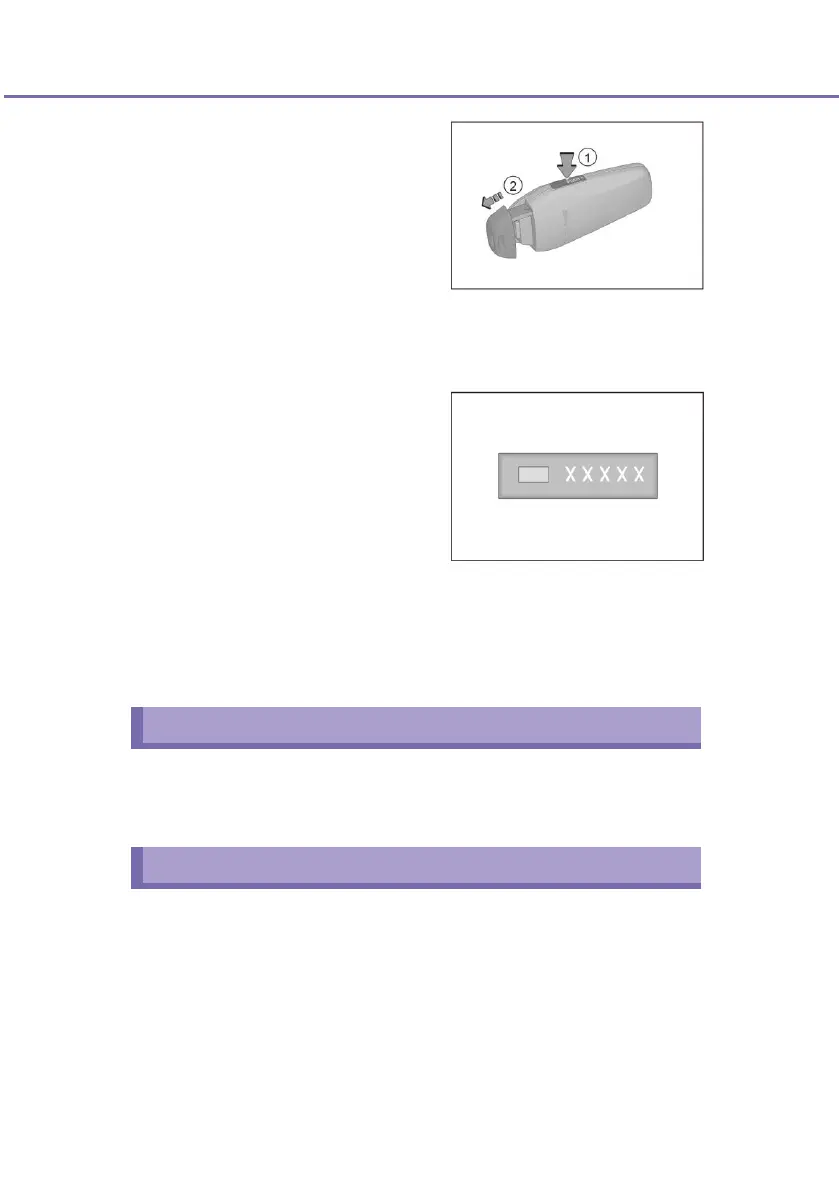
■ To use the mechanical key in
the electronic intelligent key,
follow the procedure as shown
in the figure. Press the
“PUSH” button
①
on the
intelligent key and pull out the
mechanical key in the
direction of arrow
②
.
■ After using the mechanical key, press "PUSH" and insert the
mechanical key.
■ Subject to the actual vehicle configuration.
Mechanical key number plate
■ The mechanical key No. is
shown on the number plate.
Store the number plate
properly and do not place it in
the vehicle.
■ If your mechanical key is lost or you need a spare key, you may
ask a BYD authorized service provider to reproduce the
mechanical key with the mechanical key number plate. BYD
recommends that you remember the mechanical key No. and
store the number plate in a secure place.
Bluetooth key (if any)
Bluetooth key (if any) – You can control the vehicle via Bluetooth
connection to the vehicle in near range, including controlling door
unlocking/locking, etc.
NFC key (if any)
Locking:
With the vehicle power OFF and all doors closed and not locked, put
the NFC (phone) close to the command area on the front left rear
view mirror to lock all vehicle doors at the same time. At the moment,
the turn signals will flash once.












 To Next Page