iNetVu New Gen Troubleshooting Guide
C-COM Satellite Systems Inc.
Step 2:
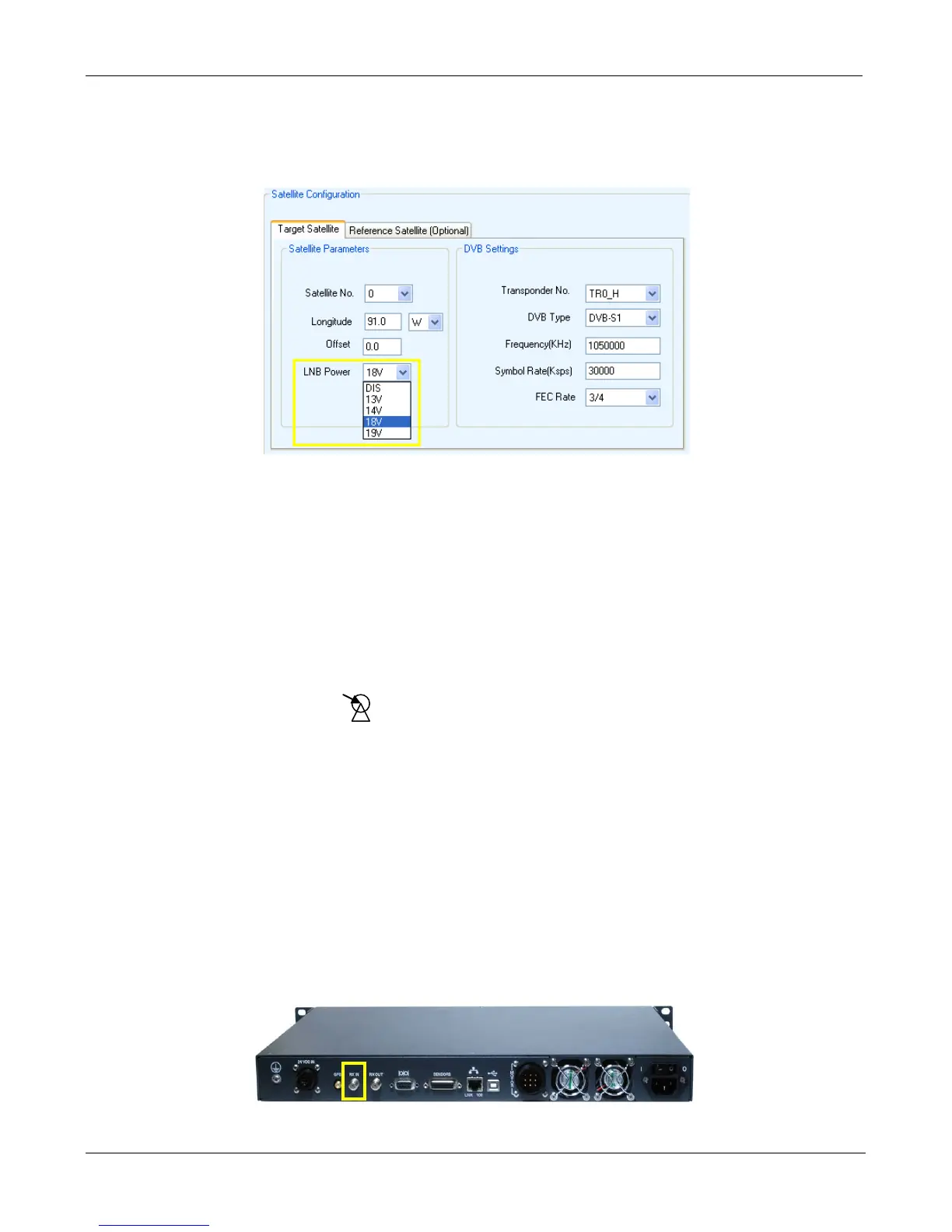
• Verify that the correct “LNB Power” voltage is selected in the iNetVu “Configuration” screen.
• If the incorrect voltage was selected or the option was disabled, please make the necessary
changes and click “Save All” for the changes to take effect.
• If the RF signal is still flashing in RED and YELLOW, please proceed to Step 3.
Step 3:
• Our next step is to test voltage on the hardware to determine if our power source is making it
all the way up to the LNB.
• Starting with the Modems port, disconnect the coax cable and using a volt meter to
determine if the modem is outputting voltage. Please check with your ISP or satellite modem
provider to determine what the normal output should be.
• If no voltage is displayed, please exchange the modem.
• If proper voltage is displayed, reconnect the cable and proceed to Step 4.
Step 4:
• Disconnect the coax cable from the Controllers “SAT IN” port and measure voltage on this
port. If the voltage does not match the configured output from the controller, please contact C-
COM Technical Support.
• If the voltage does match, reconnect the cable and proceed to Step 5.


 To Next Page