Operator manual
Page 9 - 39
Initial version : 11/08
Lastest revision : -
5.3 BME screen options
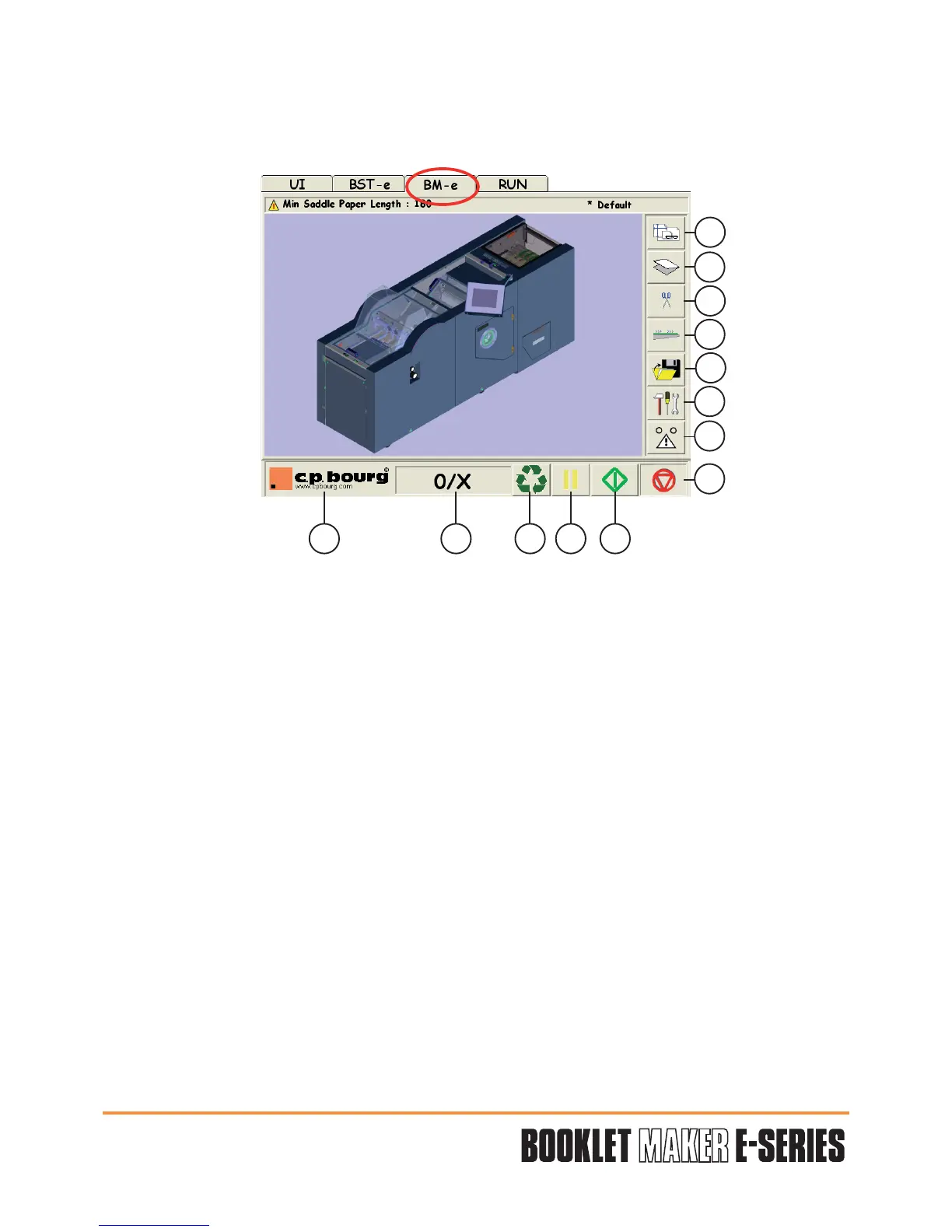
The “BM-e” screen option allows the user to define the realization of the booklet.
1 - Stitching/format paper screen: allows programming the stitching parameters.
2 - Folding screen: allows programming the folding parameters.
3 - Trimmer screen: allows programming the trimming parameters.
4 - Conveyor screen: allows programming the conveyor parameters.
5 - File menu: allows the recording, the creation of a new job and to open or erase an
existing job
.
6 - Only for technicians use.
7 - Error warning.
8 - STOP: End of cycle.
9 - START OF JOB.
10 - PAUSE: Stops collating for a brief moment to enable the operator to empty the
accessory.
11- PURGE: Clears the machine after a jam.
12 - COUNTER.
13 - Software version: Software update history.
1
2
3
4
5
6
7
8
910111213


 To Next Page