Music / Image / Video File Playback Operation
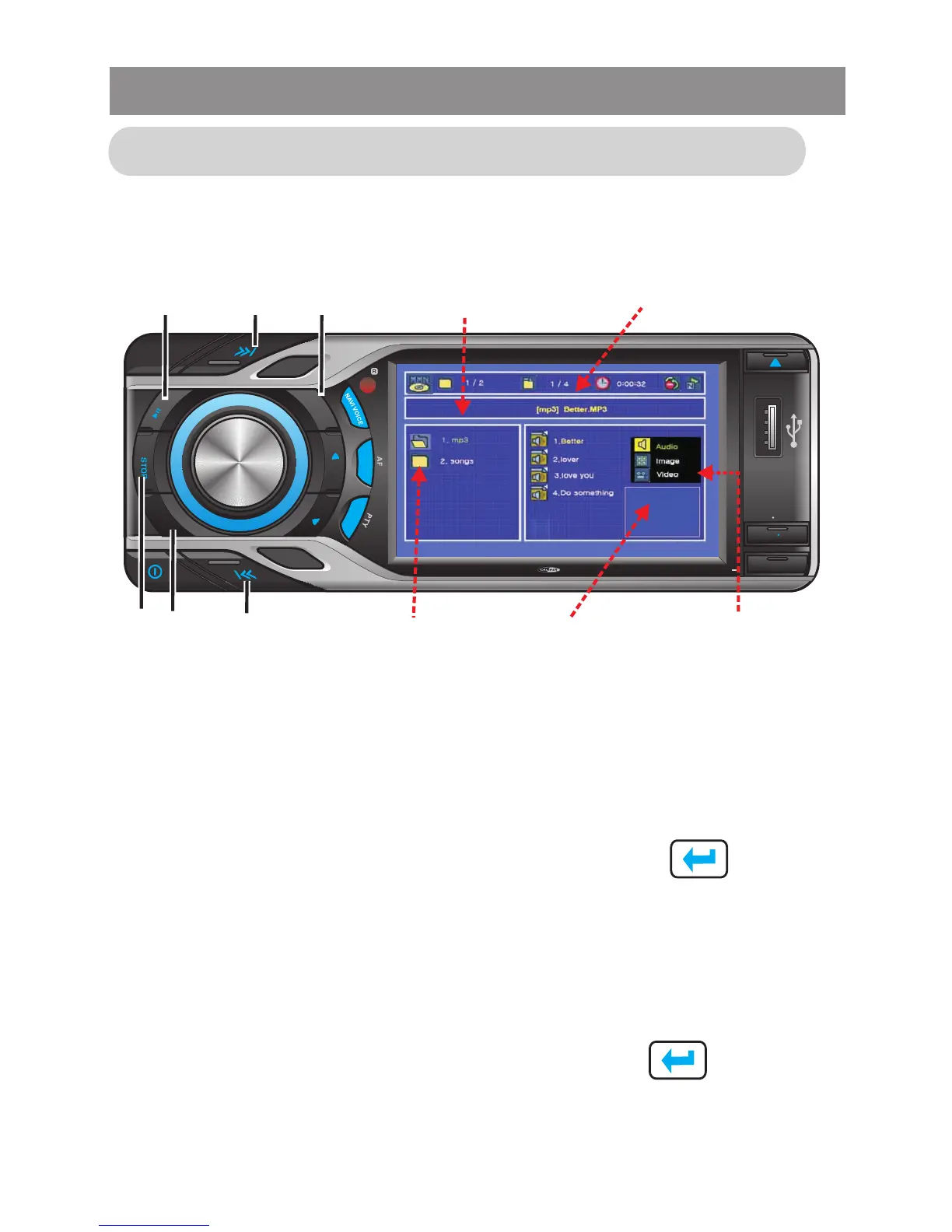
The following display information will appear, if a Multi-Media disc
or USB or SD is inserted into this unit.
In non-search state, press on remote control or tap touch
screen / button to move the cursor to file attribute domain,
then press on remote control or tap touch screen ▲ or ▼
button to select Audio, Image, Video file attribute and press OK
button on remote control or tap touch screen button to
determine the attribute you selected.
File attribute selection
Press on remote control or tap touch screen / button to
move the cursor to folder or file domain. By pressing number ▲
/ ▼ key to select the song you want to play, then press OK
button on remote control or tap touch screen key to play
the selected song. Also, you may press PREV (8) or NEXT (7)
key to play the previous or the next song while play and pause.
Folder/File selection
▲
▲
▲
▲
Media Player
SUBW
LOUD
1
2
3
4
5
6
OSD SET UP
T
RP
RD
M
AS PS
R
L
E
MODE
BAND
MUTE
GPS MODE
TA
4x 75WATTMC D 795
1 4
8
7
2 3
File Info
domain
Playing
statue domain
Folder
domain
Image browse
domain
File
attribute



 To Next Page