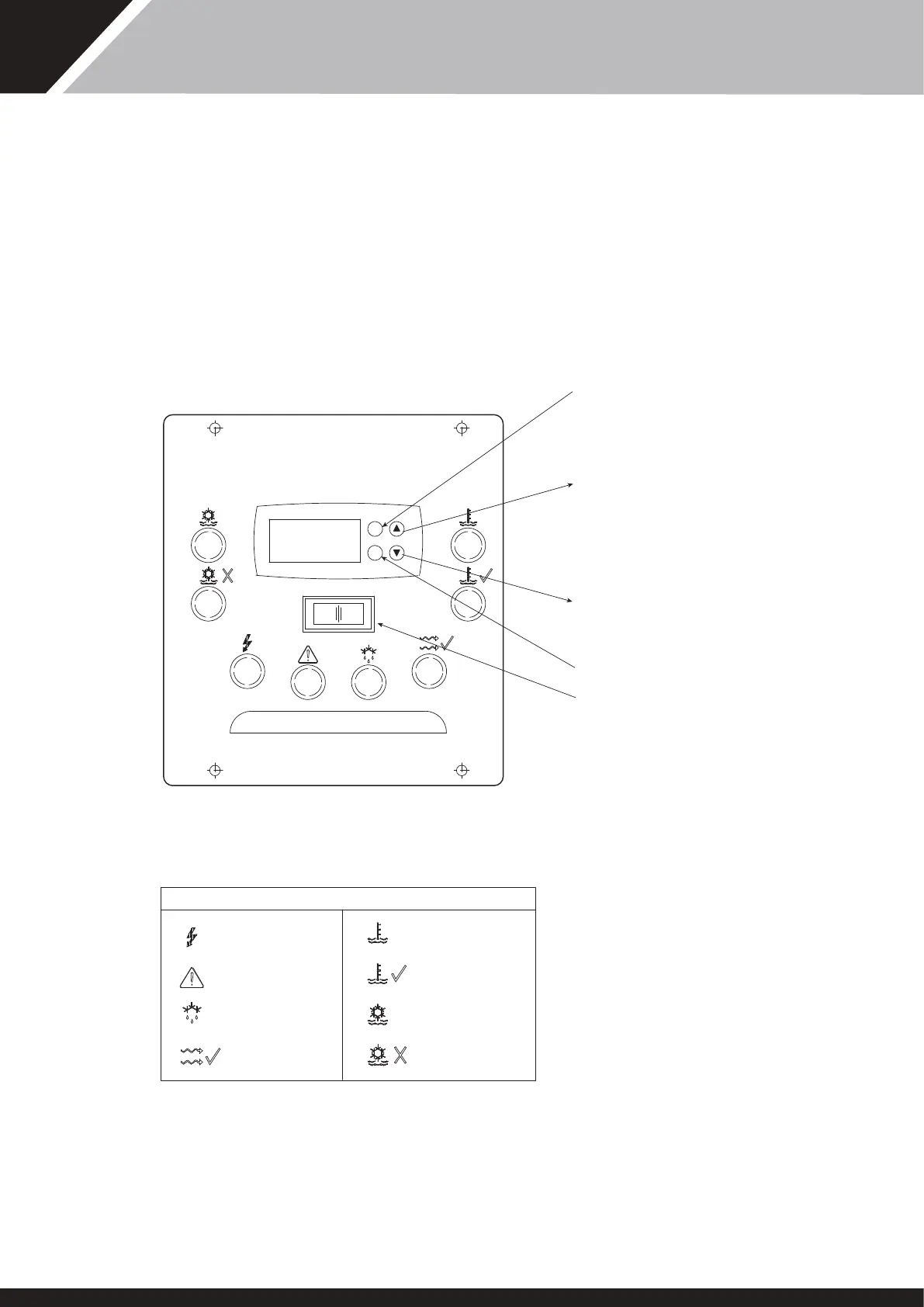
THERMOSTAT
‘HC’ HEATER CHILLER
Adjustable two stage digital ermostat controls and maintains heat and
cooling level.
Press and release ‘P’ key to display required temperature, to alter
required temperature press up or down symbols. Aer five seconds
display reverts to actual water temperature.
When adjusting e temperature on a “PPT” Pro-Pac, before changing
e temperature put e machine into standby mode by switching e
standby switch to ‘O’. Aer e temperature has been changed, switch
e standby switch back to ‘I’.
HEAT
TEMP OK
CHILL
CHILL LIMIT
MAINS
FAU LT
DEFROST
WATER FLOW
KEY
INCREASE
SET POINT
DECREASE
SET POINT
NOT USED
ACCESS
SET POINT
U
P
10
RED
AMBER
RED
AMBER
RED
GREEN
GREEN
CLEAR
STANDBY
SWITCH
Pro-Pac30/45/70 CONSOLE
CONTROLS AND INDICATION LAMPS
27
SD566250 ISSUE 35



 To Next Page