16 ARGO Digital Broadcast IP Production Console
Control Surfaces
Floor Stand Removal
If the control surface is supplied with
a floor stand, it can be removed if
required to reduce the size & weight
when desktop mounting is preferred.
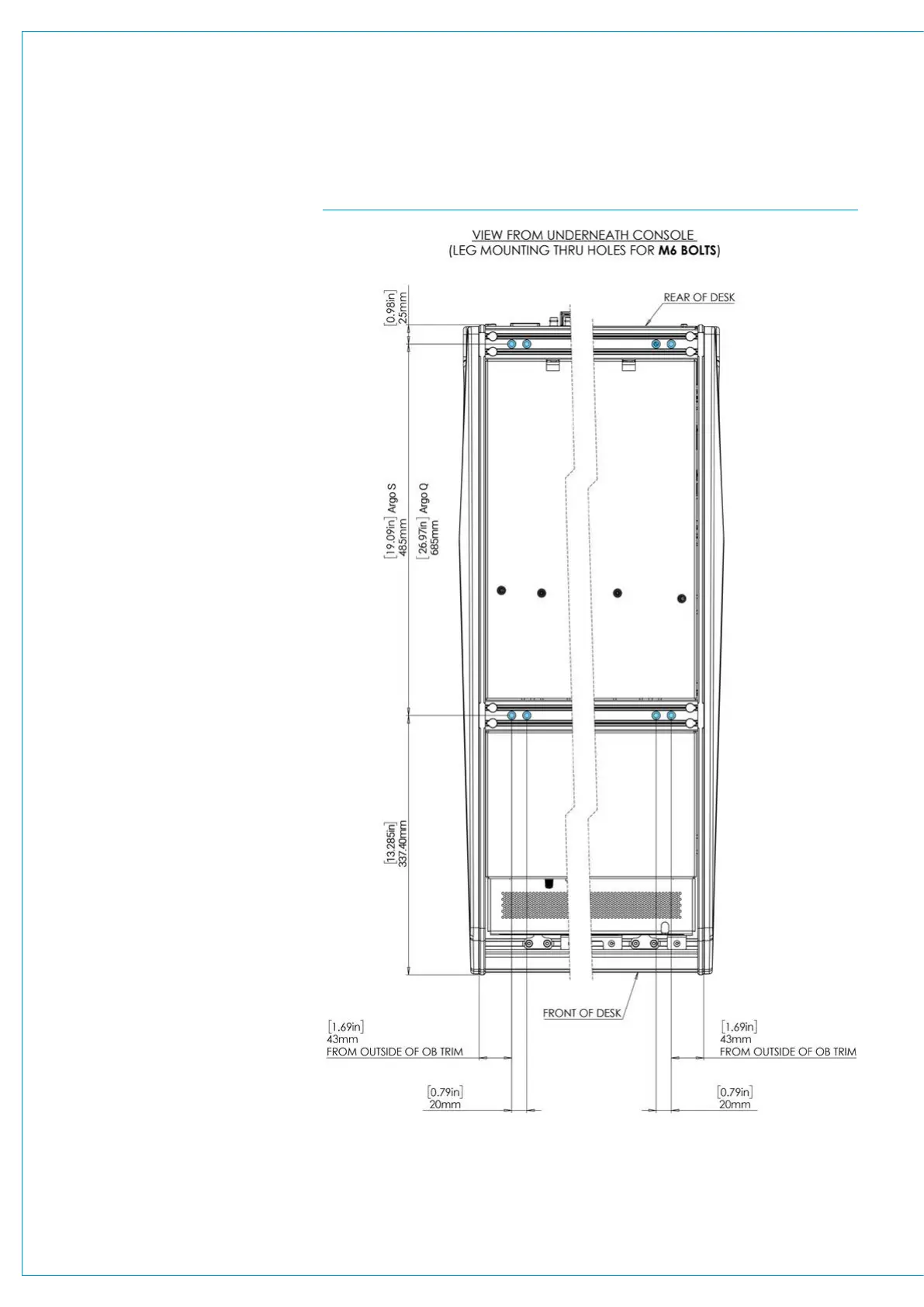
The floor stand is attached to the control
surface by eight x M6 bolts from inside
the console chassis as highlighted in
CYAN in Fig 8 above right.
In order to remove the stand, access is
required to the inside of the chassis which
involves removing the left and right set
of Standard Fader and the Wild assign
panels above them to access the front
set of bolts and removing the rear cover
plates of the 2 end sections to access the
rear set of bolts.
With the fixing bolts removed, the console
surface can be lifted of the stand by a
minimum of 2 people and care needs to
be taken whilst the surface is not fixed to
the stand.
Note: it is NOT recommended to do work
under the control surface unless it is
securely fixed in place.
Floor Stand Refitting
When re-attaching the stand after placing
the surface carefully on top of the stand
by a minimum of 2 people, take care
to align the fixing holes to avoid cross-
threading the bolts.
The surface MUST be correctly fastened
to the stand to prevent possible
equipment damage or personal injury.
Note: the Argo S and Q floor stands
are constructed as a rigid framework
consisting of 2 legs with an upper
and a lower cross member which are
securely bolted through the legs using
M8 countersunk bolts as highlighted in
CYAN in Fig 9 on the next page.
There should be no need to take the floor
stand apart but if it is, then it MUST be
put back together securely before fitting
a surface on to it.
FIG 8 - STAND MOUNTING POINTS FOR ARGO S & ARGO Q



 To Next Page