#,3%.3
/03%.3
/0%.
/0#,
!&
%.#2!$)/
!#4
CL.SENS.
OP.SENS.
2
1
ON
OPEN
OP / CL
AF
ENC/RADIO
A.C.T.
SLOW.SENS
CL.SENS.
OP.SENS.
OPEN
OP / CL
AF
ENC/RADIO
A.C.T.
CL.SENS.
OP.SENS.
OPEN
OP / CL
AF
ENC/RADIO
A.C.T.
NS
p.
22 - Manual
FA00045-EN v.
2 - 09/2016 - © Came S.p.A. - The contents of this manual may be changed, at any time, and without notice.
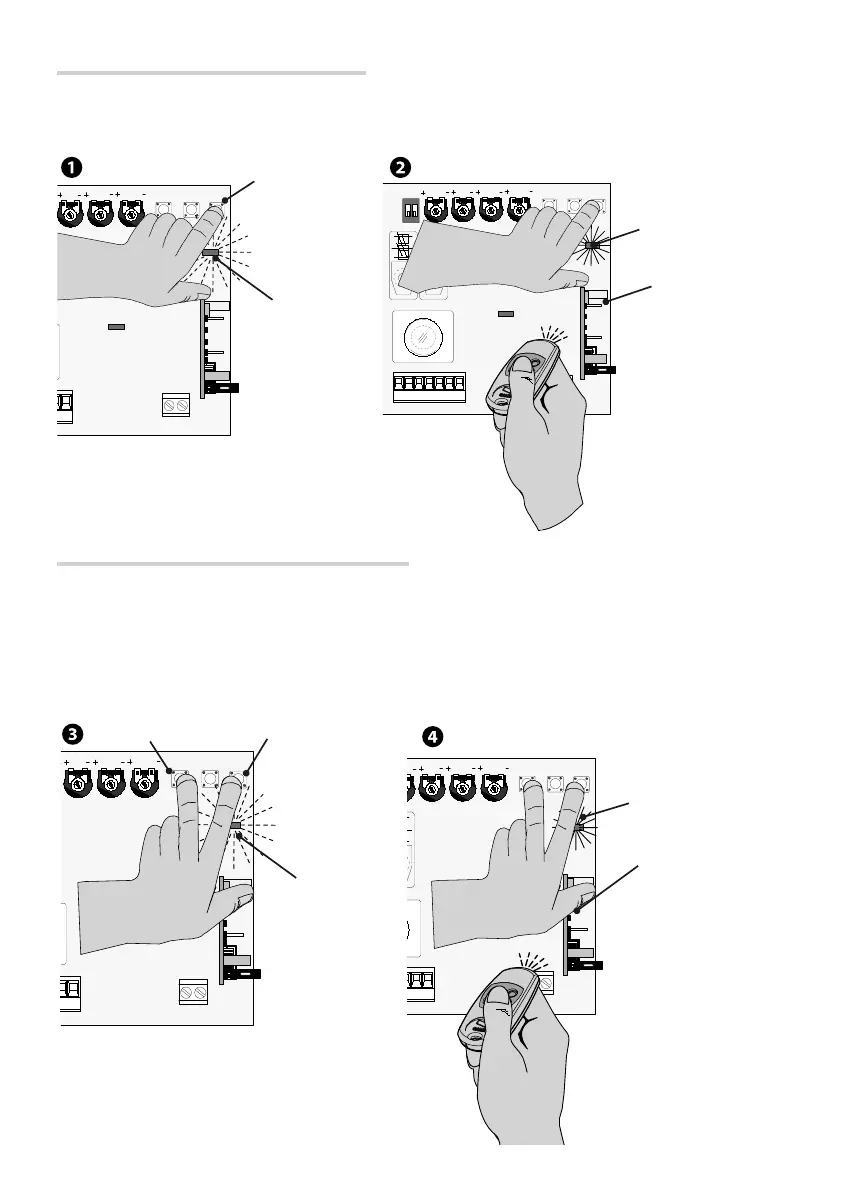
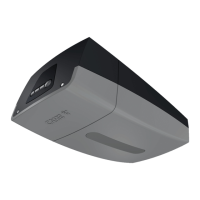
AF card
Activating for the (2-7) sequential command
Press the ENC/RADIO button on the control board. The warning LED flashes.
Press the button on the transmitter you wish to memorize. The LED stays on to indicate that memorization has been
successful
.
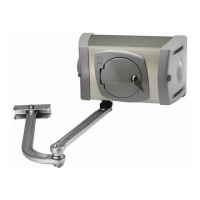
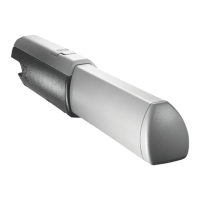
AF card
Activating for the (2-3P) partial opening command
Keep the ENC/RADIO button pressed and then press the OP/CL button.
The LED will flash
.
Press the button on the transmitter you wish to memorize.
The LED stays on to indicate that memorization has been successful
.
LED
ENC/RADIO
LED
LED
ENC/RADIO
OP/CL
LED


 To Next Page