16
DMX
ITALIANO
POLSKI
ESPAÑOL
FRANCAIS
DEUTSCHENGLISH
0 and confirm again. Connect the slave and master units (same model, same software version)
using a DMX cable and activate the control signal output (Stand Alone -> Master/Alone -> Master)
and one of the stand-alone operating modes (Play Scene/Loop) in the master unit. The slave unit
will now follow the master unit.
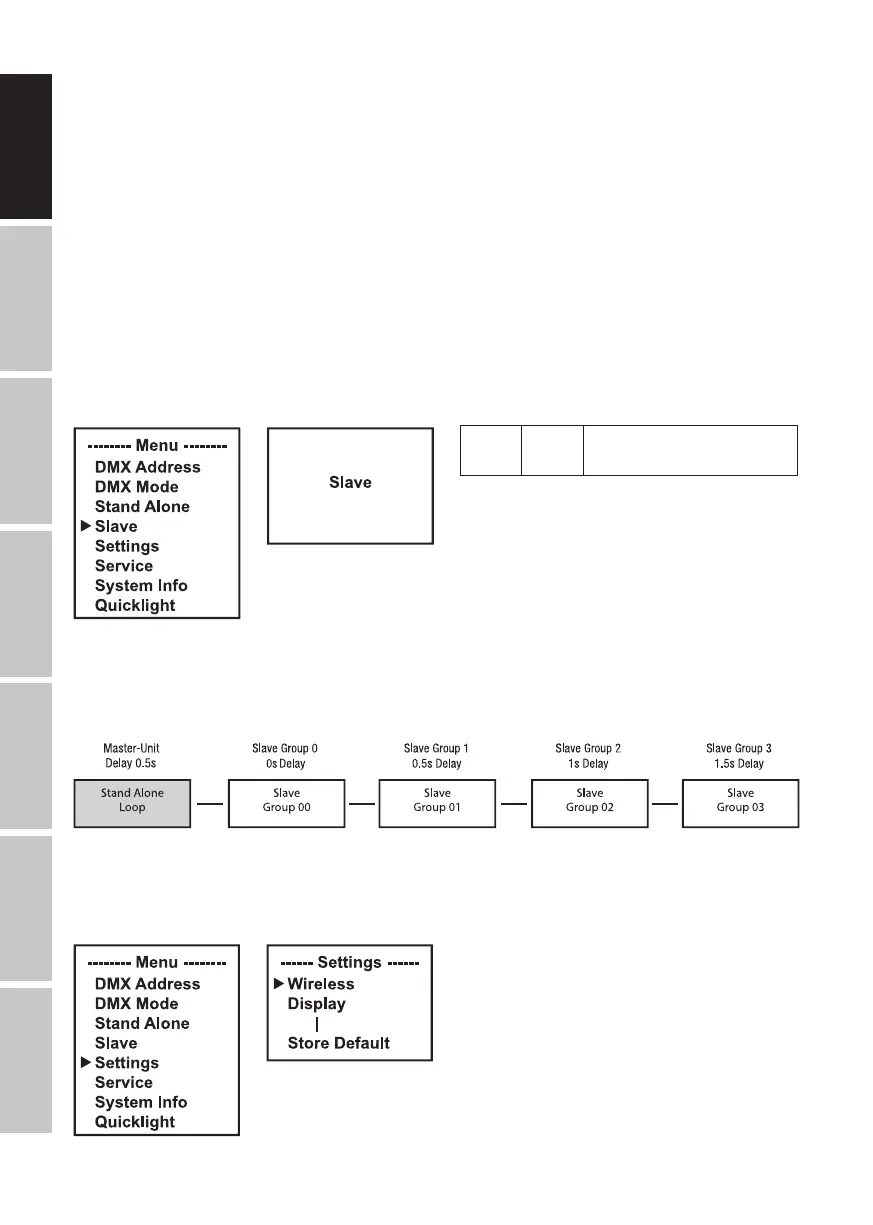
Advanced slave mode: If you wish to control the slave units in master/slave mode using one
of the Play Scene or Play Loop stand-alone modes, the control signal can be played back with
a time delay of up to 24 steps. The delay is set in the Stand Alone menu Master/Alone in the
master unit; the delay factor is set in the slave menu of the corresponding fixture (Group). This
is a simple way to create a running light effect with a large number of identical lights that are
running the same software version, which would otherwise require a suitable DMX controller and
extensive programming. Connect the slave and master units (same model, same software version)
using a DMX cable and activate the control signal output (Stand Alone -> Master/Alone -> Master)
and one of the stand-alone operating modes (Play Scene/Loop) in the master unit.
Group 0–24
Set slave group for
signal delay
Assign the lights to one of up to 24 groups (plus Group 0) according to preference, whereby sev-
eral lights can be assigned to one group. The group number is also the factor by which the delay
time set in the master unit is multiplied.
Set-up example:
SYSTEM SETTINGS (Settings)
Starting from the main screen, press MENU to enter the main menu. Use the ⏶ or ⏷ buttons to
select the menu item Settings and confirm with ENTER.


 To Next Page