17
DMX
DEUTSCHFRANCAIS
ESPAÑOL
ENGLISH
ITALIANO POLSKI
This takes you to the sub-menu (see table). Select sub-menu items with ⏶ or ⏷, confirm with
ENTER, change value or status with ⏶ or ⏷, confirm with ENTER).
(Bold print = factory setting)
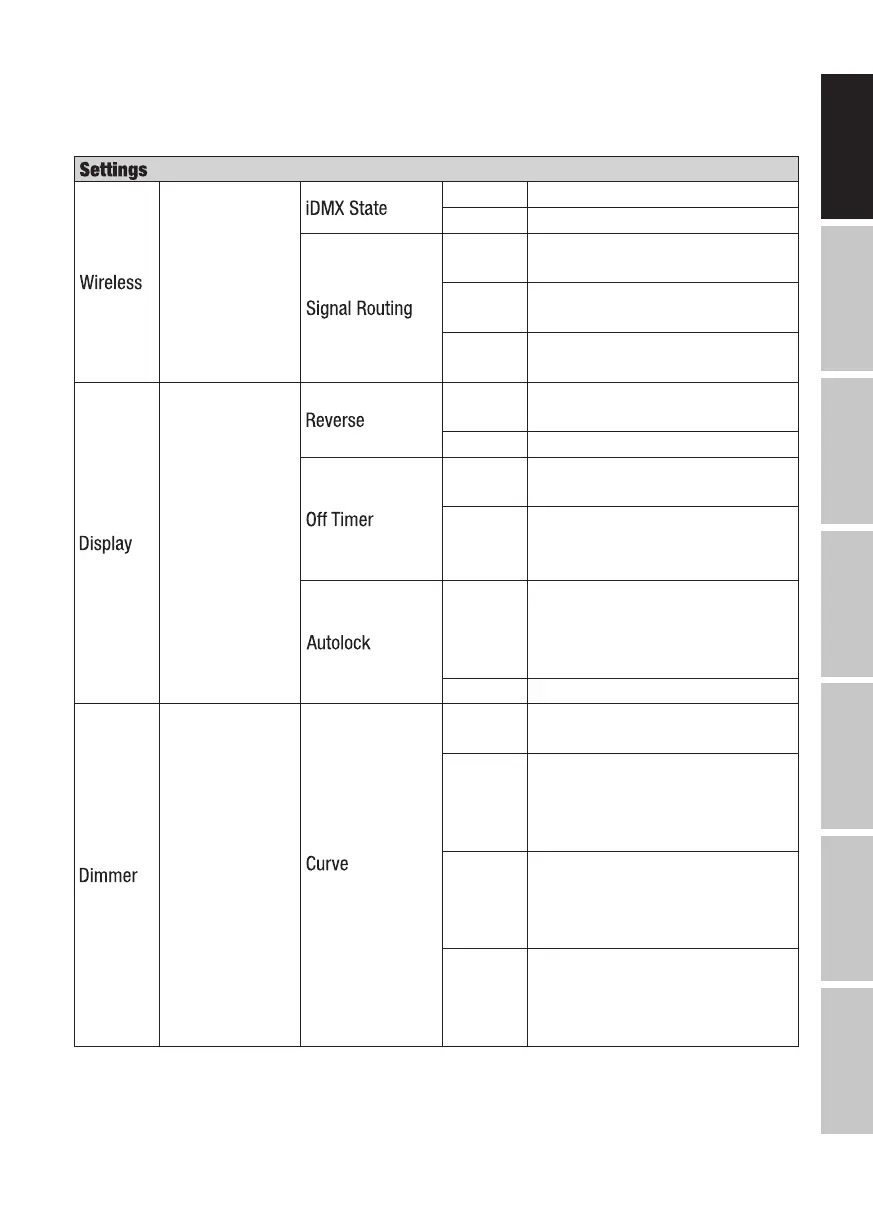
Wireless settings
(iDMX stick
optional)
Off Wireless control deactivated
On Wireless control activated
Send to
XLR
Signal -> DMX OUT
Backup
by XLR
Backup via DMX IN in case of
W-DMX signal interruption
Receive
only
Wireless DMX reception only
Display settings
On
180° display rotation (for example,
for overhead installation)
Off No display rotation
Always
On
Permanently on
Off after
20 sec-
onds
Deactivation after approximately
20 seconds of inactivity
On after
60 sec-
onds
Controls locked after approxi-
mately 60 seconds without input
(LOCKED). To unlock, press MENU
for approx. 3 seconds.
Off Autolock function deactivated
Dimmer settings
Dimmer Curve =
Dimmer curve
PWM Frequency
= LED PWM
frequency
Dimmer
Response = Dim-
ming behaviour
(dimmer curve)
Linear
Light intensity increases linearly
with DMX value
Exponen-
tial
Light intensity can be finely
adjusted at lower DMX values and
broadly adjusted at higher DMX
values
Logarith-
mic
Light intensity can be broadly
adjusted at lower DMX values
and finely adjusted at higher DMX
values
S-curve
Light intensity can be finely adjust-
ed at lower and higher DMX values
and broadly adjusted at medium
DMX values


 To Next Page