20
DMX
ITALIANO
POLSKI
ESPAÑOL
FRANCAIS
DEUTSCHENGLISH
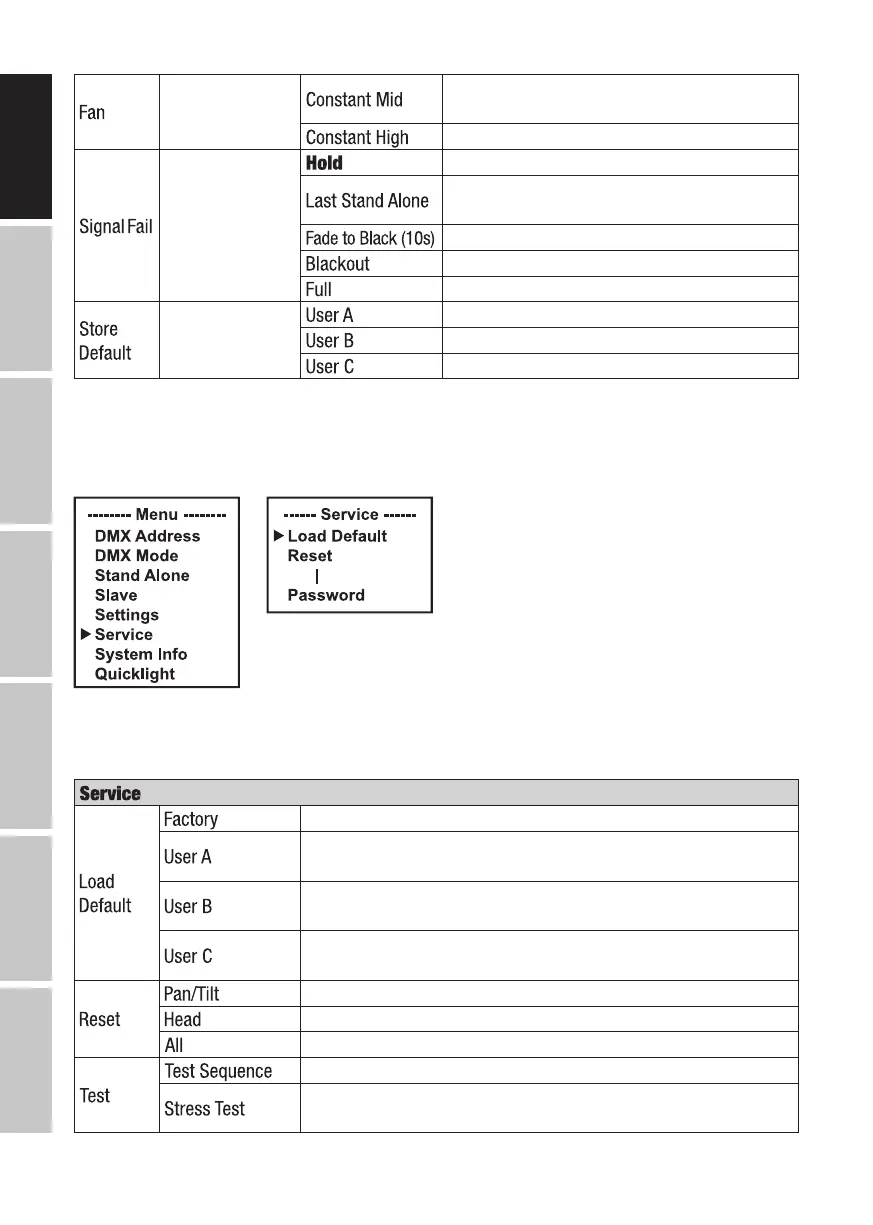
Fan setting
Constant average fan speed with reduced
brightness, if necessary
Constant high fan speed
Operational
status with DMX
signal fault
Last command is retained
The last selected stand-alone operating mode
is activated
10-second fade to blackout
Activates blackout
Full on
Save settings
in three custom
presets
Save all current settings as user preset A
Save all current settings as user preset B
Save all current settings as user preset C
SERVICE MENU (Service)
Starting from the main screen, press MENU to enter the main menu. Use the ⏶ or ⏷ buttons to
select Service and confirm with ENTER.
Information on the sub-menu items in the Service menu and the corresponding options can be
found in the table below (select with ⏶ or ⏷, confirm with ENTER, change value or status with
⏶ or ⏷, confirm with ENTER).
Reset to factory setting
Reset to User A values
(Save user values: Settings -> Store Default)
Reset to User B values
(Save user values: Settings -> Store Default)
Reset to User C values
(Save user values: Settings -> Store Default)
Reset pan/tilt motors
Reset motors in the device head
Reset all motors
Pre-programmed sequence to test all components
Pre-programmed sequence to test all components under
maximum load


 To Next Page