21
DMX
DEUTSCHFRANCAIS
ESPAÑOL
ENGLISH
ITALIANO POLSKI
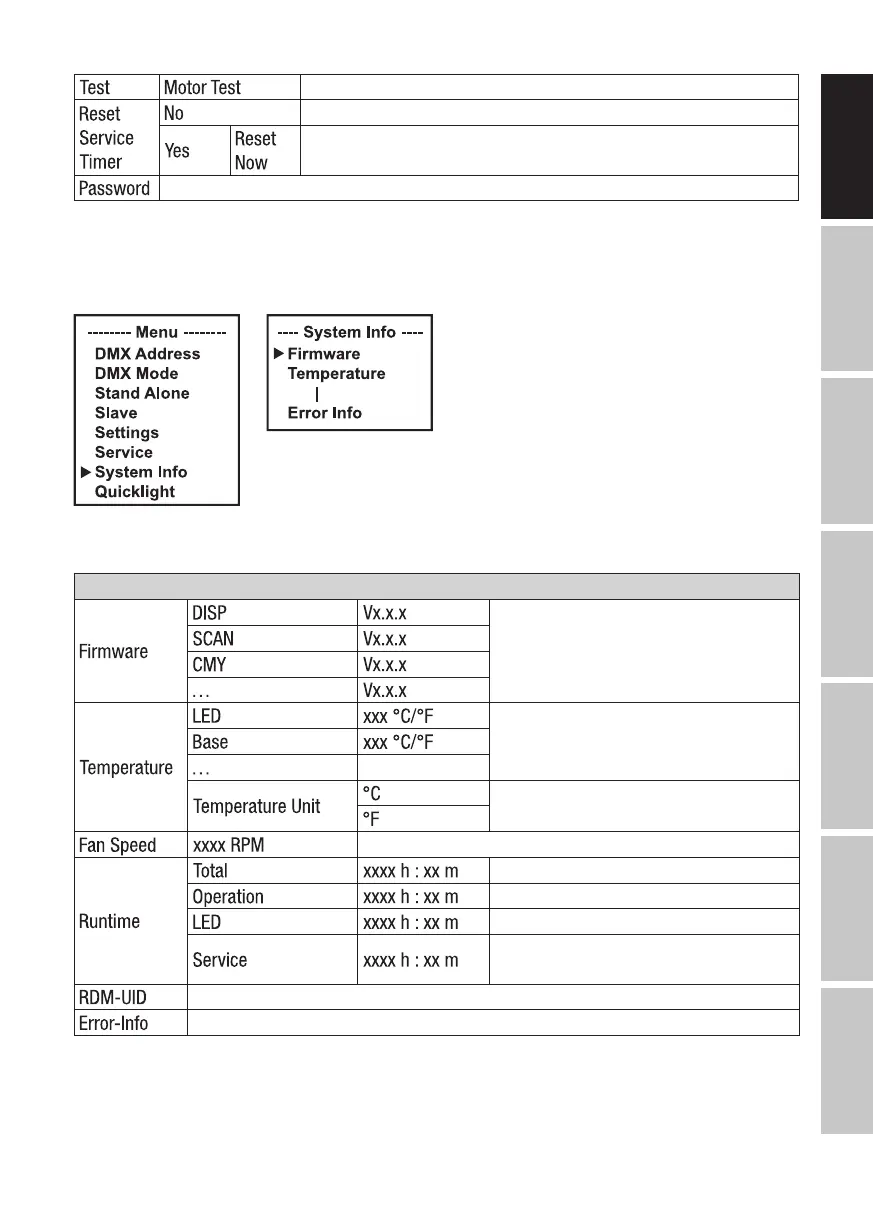
Activate all motors individually with values of 000 to 255
Do not reset service operation time
Reset service operating time
For service purposes only
SYSTEM INFORMATION (System Info)
Starting from the main screen, press MENU to enter the main menu. Use the ⏶ or ⏷ buttons to
select the menu item System Info and confirm with ENTER.
This takes you to the sub-menu (see table for sub-menu items). Select sub-menu items with ⏶
or ⏷, confirm with ENTER, change value or status with ⏶ or ⏷, confirm with ENTER).
System info
Display of the firmware version of the
corresponding component
Display the temperature of the
corresponding component
Set the temperature unit
Display the speed of the corresponding fans
Total operating time
Time in use
Lamp operating time
Operating time since the last reset of
the service operating time
RDM unique identifier
Error display in case of malfunction
QUICKLIGHT
Set up a scene quickly and easily using the basic Moving Head functions without an external
controller. Starting from the main screen, press MENU to access the main menu. Use ⏶ or ⏷ to


 To Next Page