MW8 & MotionWare User Guide: Issue 1.2.1 Page 19
3.2 Applying a
New Set-up
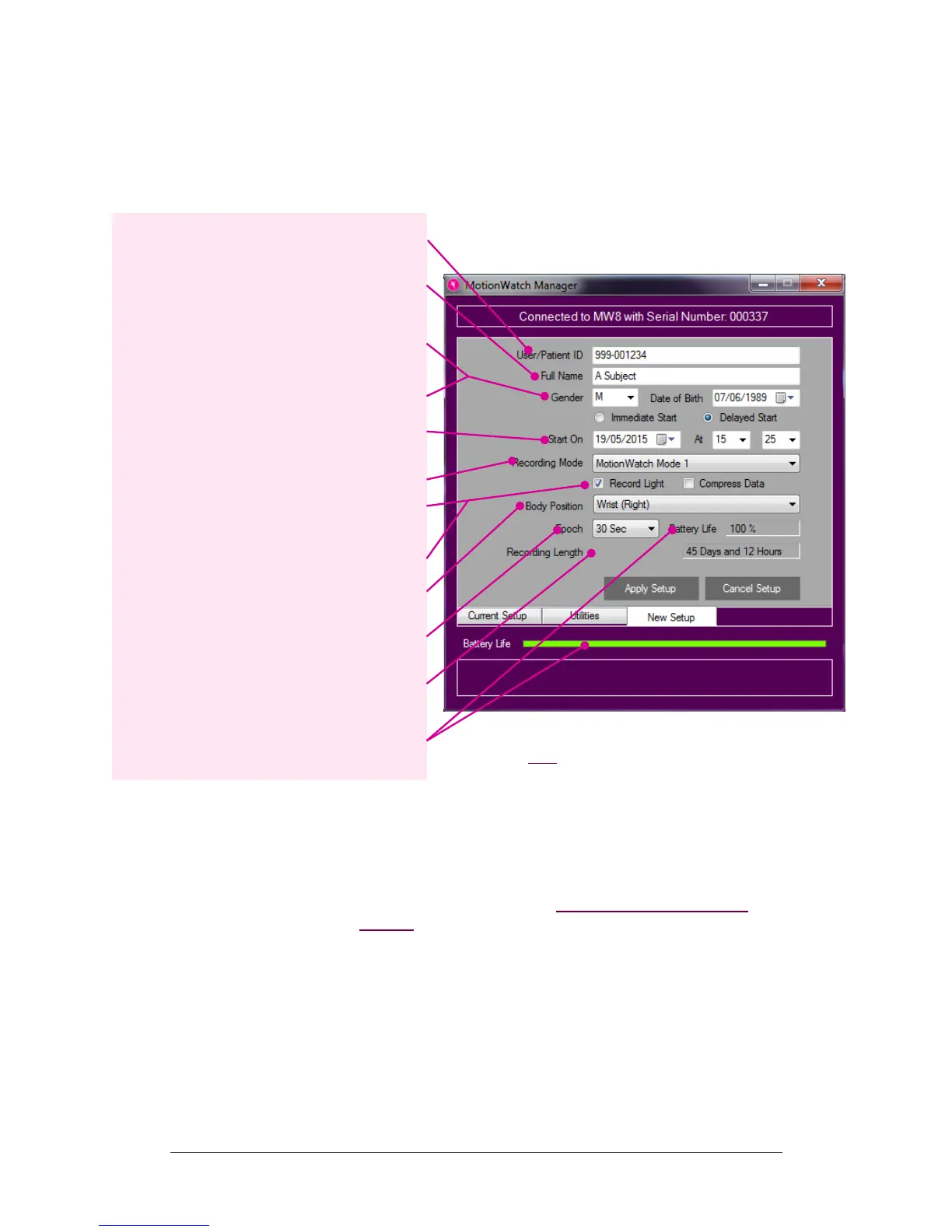
Click the ‘Setup Watch’ button, the new setup tab is
activated and the settings may now be edited:
Immediate or Delayed Start
Select ‘Immediate Start’ to ensure that the MotionWatch
begins recording straight away. The start date and time are
taken from the PC clock so please ensure that this is
correct. A delay of up to 2 minutes is added to the current
time and the recording will start on a complete minute. If
for example the set-up is applied at 16:46:27, the delay will
be one minute and 33 seconds and the recording will begin
at 16:48:00.
Select ‘Delayed Start’ to show the start date/time controls.
This option allows the recording to be delayed for up to 30
days into the future. Use the date, hours and minutes
controls to select the required start date and time.
NOTE: Applying a new set-up to the MotionWatch will
result in the loss of any existing stored data or set-up
information – please ensure that any required data has
been downloaded first. Click the ‘Cancel Setup’ button
to return to the current setup tab without applying the
new setup.
User ID: Enter characters to identify the
subject/patient/study.
Full Name: [optional] Enter characters to identify
the patient/study. Note that the maximum length is
64 characters shared between user ID and Full
Name.
Gender: Use the dropdown to select M, F or X (if
gender is to be undisclosed).
Date of Birth: Use the date control to enter the
date of birth of the subject.
Start Date & Time: Select delayed start to begin
a recording up to 30 days in the future. Immediate
start will begin in 1-2 minutes after disconnection.
Recording Mode: Use the drop down control to
select the recording mode.
Light Recording: Check the box to enable light
recording.
Compress Data: Check the box to compress the
activity data (see below).
Body Position: Choose the mounting location of
the MotionWatch.
Epoch: Use the drop down to select the required
recording epoch.
Recording Length: Shows the expected
maximum length of the recording based upon the
chosen settings.
Battery Life: Indication of approximate battery life
remaining in % and colour coded battery gauge.
Hover over with the mouse for more information.


 To Next Page