MW8 & MotionWare User Guide: Issue 1.2.1 Page 63
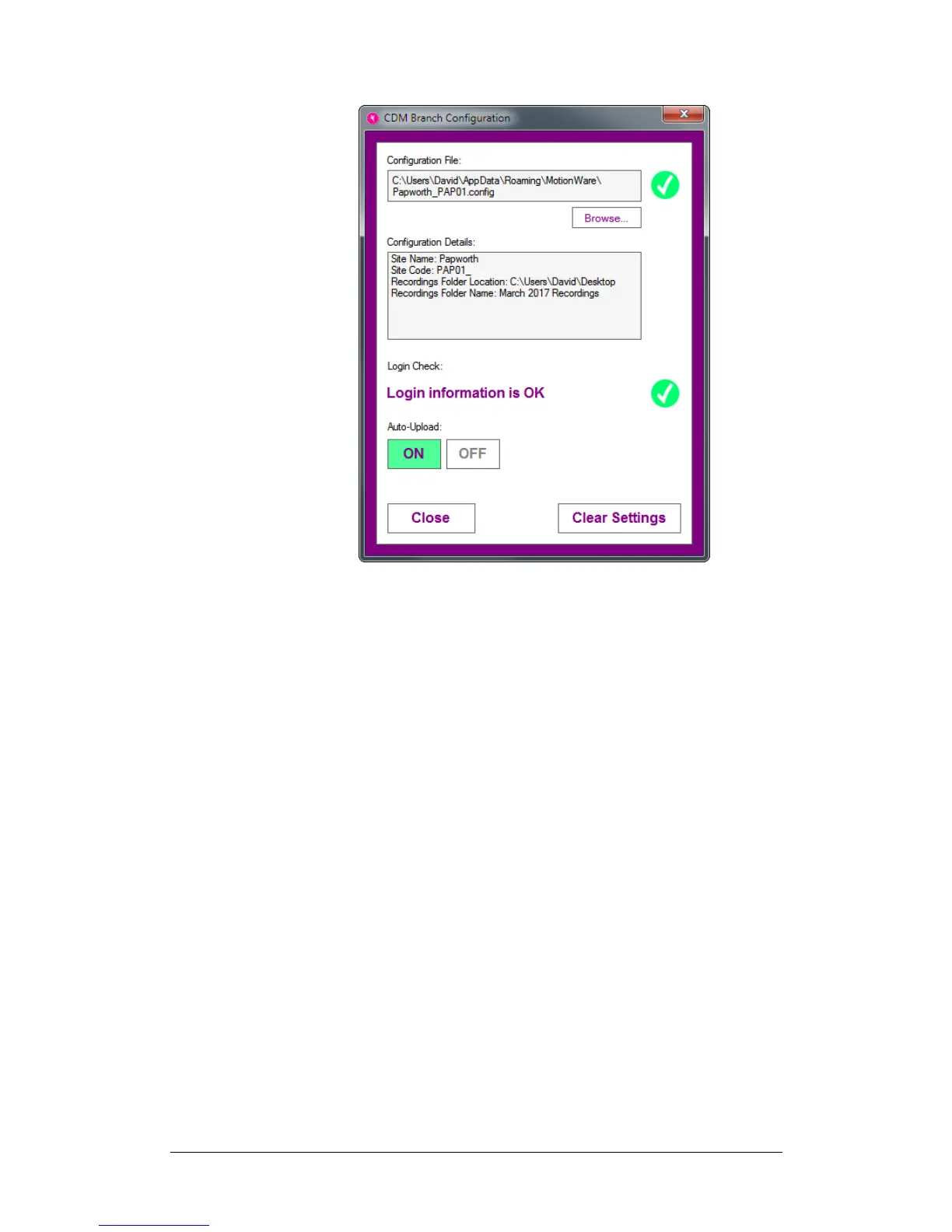
To load a configuration file, click the Browse… button and
select your configuration file using the file selection
dialogue.
The configuration information will be loaded and a
configuration file and login check will be performed. A
green tick will be shown next to the Configuration File
field and one will be shown next to the Login Check field if
these checks succeed.
Auto-Upload
The Auto-Upload feature automatically uploads new
recordings to the cloud immediately after they have been
downloaded from a MotionWatch.
To turn the feature on or off, click the On/Off buttons.
Clear Settings
To clear the currently loaded configuration information,
click the Clear Settings button at the bottom of the
window.
11.6 Synchronising
Recordings
with the Cloud
If you are using the Auto-Upload feature, recordings will
automatically be uploaded to the cloud after they have
been downloaded from a MotionWatch.


 To Next Page