MW8 & MotionWare User Guide: Issue 1.2.1 Page 37
6 Sleep Analysis
6.1 Introduction
The Sleep analysis function is designed to provide a
number of objective sleep measures from overnight
actigraphy data. It can be easily applied either to normal
overnight periods, or used to examine any sleep period
from an altered phase recording such as a shift worker.
First select a region using the MotionWise window
(see Section 5.9 Selecting the Analysis Period above)
which includes a short period of daytime activity at the start
and end. The detailed analysis window will be displayed
and may initially default to the summary function. To select
Sleep Analysis, choose ‘Sleep’ from the Analysis Function
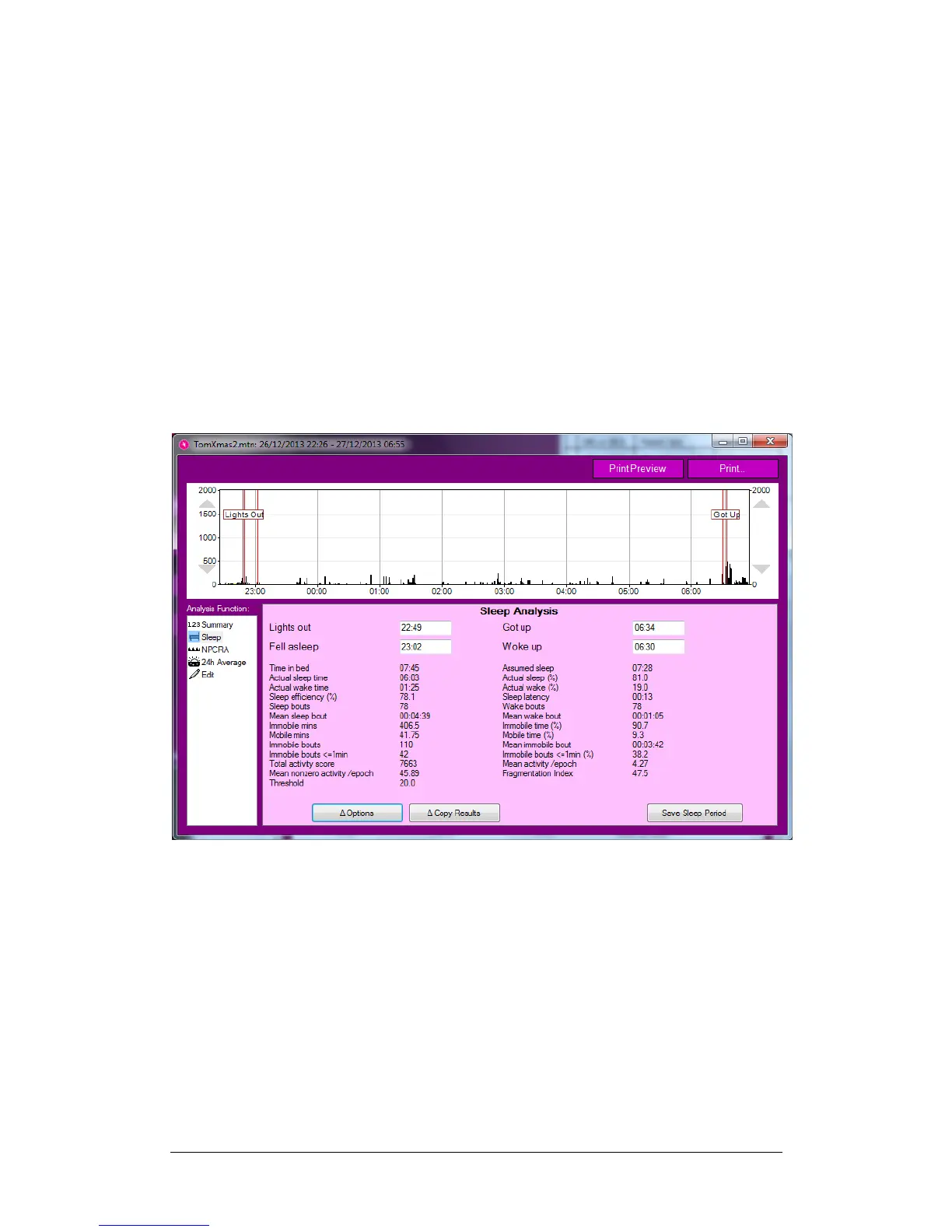
options at the left of the screen. The detailed Sleep
Analysis window will be displayed:
It is now possible to drag the ‘Lights Out’ and ‘Got Up’
markers to the appropriate positions in the data, and the
thinner red markers inside which denote ‘Fell Asleep’ and
‘Woke Up’ will be automatically adjusted from the
combination of your markings and the activity data. All of
these four times are also displayed in the information box
below the graph.
6.2 Sleep Analysis
Statistics
Once the desired sleep region is selected, the software will
automatically perform a categorisation of each epoch of
the period between ‘Fell Asleep’ and ‘Woke Up’ as either
‘Sleep’ or ‘Wake’, and also as either ‘Mobile’ or ‘Immobile’,


 To Next Page