MW8 & MotionWare User Guide: Issue 1.2.1 Page 65
Appendix A - Maintenance and Utilities
A1 - The Utilities
Tab
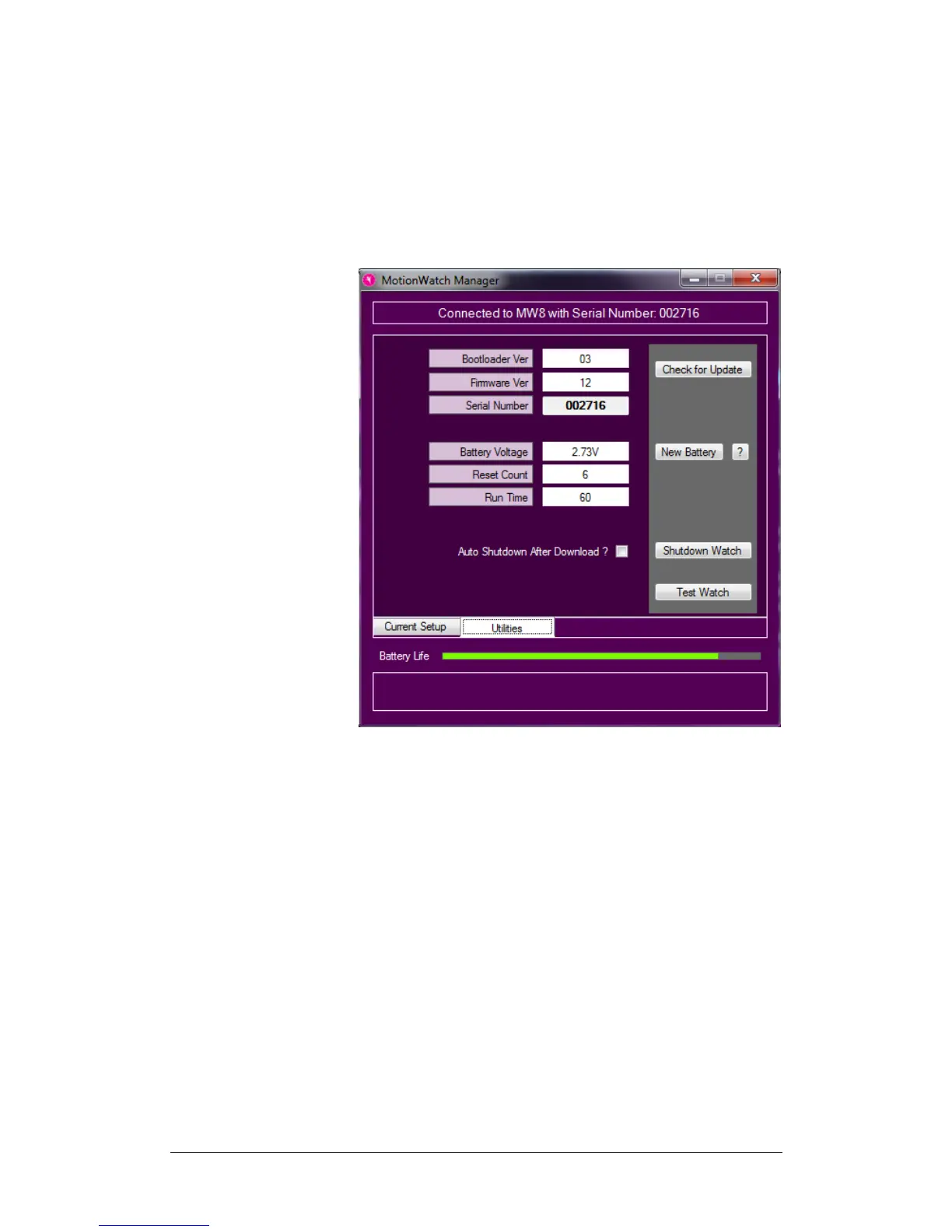
The MotionWatch manager has an additional tab called
‘Utilities’, click on this tab to display a window similar to the
following:
This screen shows some technical information about the
MotionWatch:
Bootloader Ver: This is the version number of part
of the embedded operating software that allows the
MW8 to be updated remotely.
Firmware Ver: This is the version number of the
main operating software for the MW8.
Serial Number: The watch serial number
Battery voltage: Typically this will show a value
above 3.0V for a new battery and will decline
gradually over the usage period.
Reset Count: Used as debug information – the
number of unexpected reset events.
Run Time: amount of run time since last battery
change – should reset to zero when a new battery
is fitted.
Battery Fitted Date: the date that the watch
battery was fitted.


 To Next Page