MW8 & MotionWare User Guide: Issue 1.2.1 Page 61
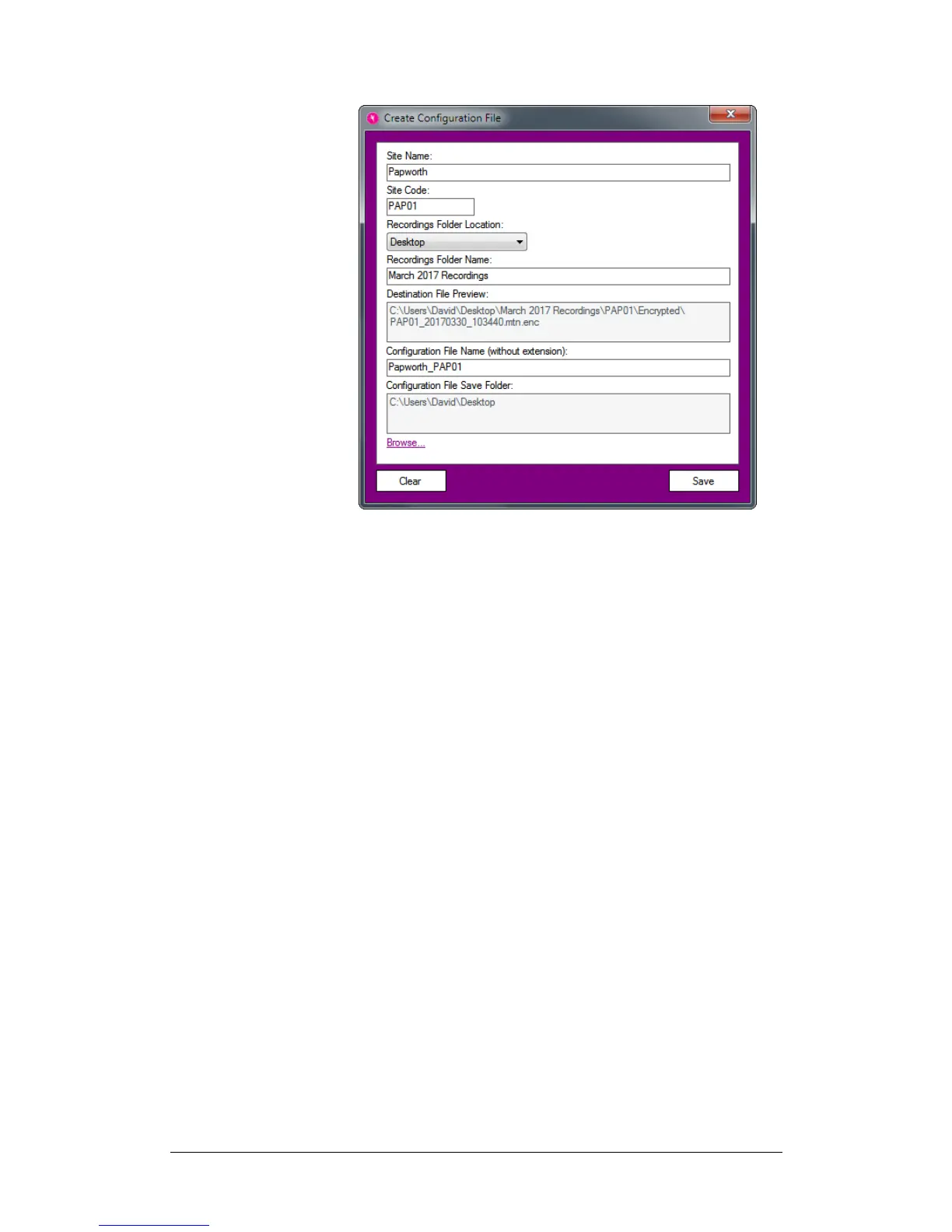
Overview of fields:
Site Name: provide a name for the site which the
configuration file will be used on.
Site Code: provide a site code used to identify the site’s
recordings when data is synchronised with the HQ site.
Recordings Folder Location: this is location of the
Recordings Folder Name (see below) on the branch
computer where the encrypted recordings will be stored
after they have been downloaded from a MotionWatch.
Recordings Folder Name: this is the name of the folder
inside the Recordings Folder Location where the encrypted
recordings will be stored after they have been downloaded
from a MotionWatch.
Destination File Preview: shows the combined
Recordings Folder Location and Recordings Folder Name
and the folder structure within it.
Configuration File Name (without extension): provide a
file name for the configuration file without an extension.
Configuration File Save Folder: click the Browse… link
to specify a folder to save the configuration file to.
After providing the necessary information, click the Save
button to save the configuration file and create the branch
account on the cloud server.


 To Next Page