Parts and Their Functions
1-12
1
Before You Start Using This Machine
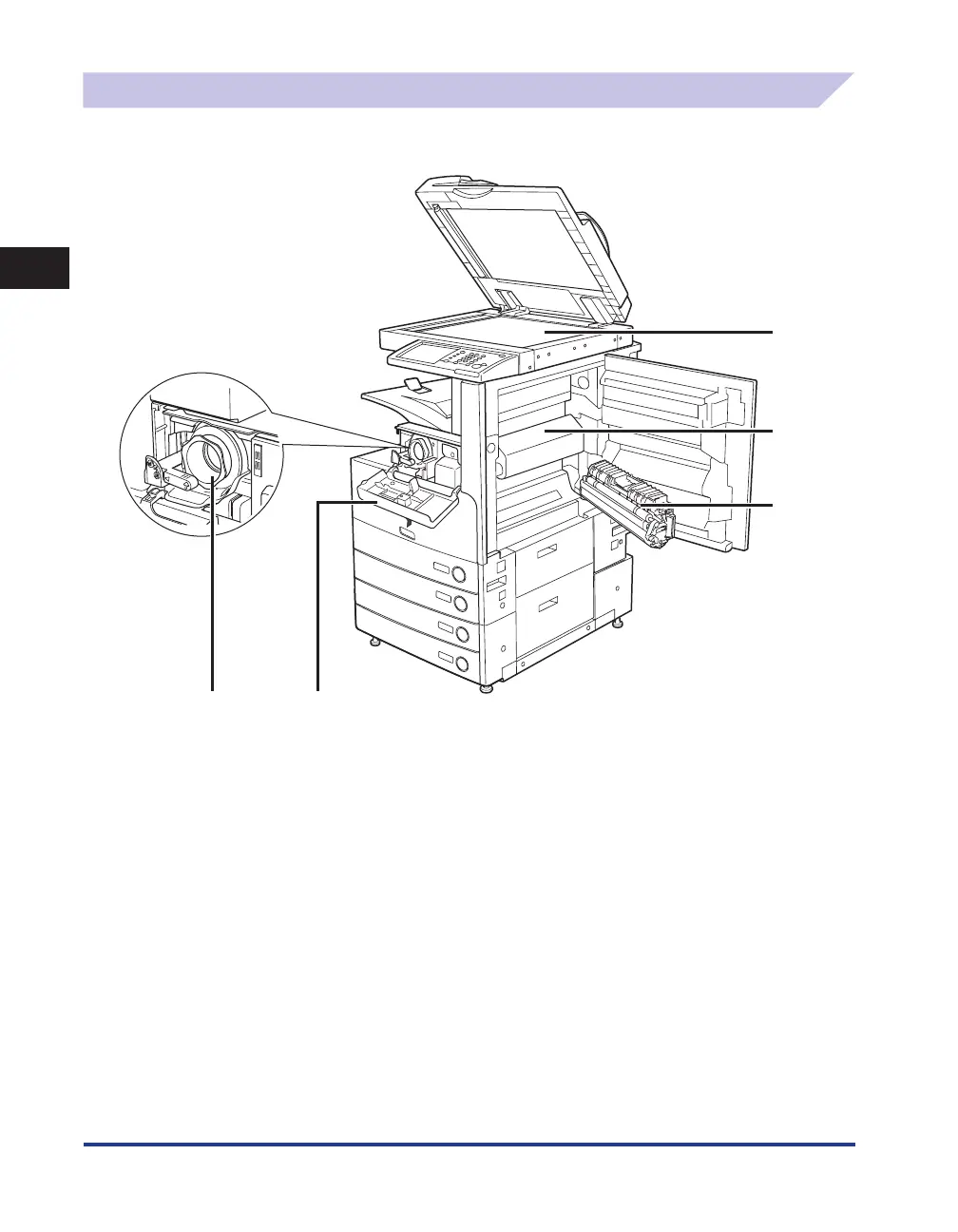
Internal View
The optional Feeder (DADF-U1) (standard-equipped for the imageRUNNER 3245/3245i/3235/3235i)
and Cassette Feeding Unit-Y3 are attached.
①
②
③
④
⑤
① Platen Glass
Use the platen glass when scanning books, thick originals,
thin originals, transparencies, etc.
② Fixing Unit's Upper Cover
Open this cover to clear a paper jam in the fixing unit. (See
“Fixing Unit (Inside the Main Unit),” on p. 3-10.)
③ Duplexing Unit
Pull out the duplexing unit to clear a paper jam. (See
“Duplexing Unit (Inside the Main Unit),” on p. 3-13.)
④ Toner Supply Port Cover
Open this cover to replace the toner cartridge.
⑤ Toner Cartridge
When toner runs out, pull out the toner cartridge, and
replace it with a new one. Toner cartridges are sold
separately (not standard equipment). (See “Consumables,”
on p. 2-62.)










 To Next Page