44
1
2
3
4
5
Introduction
Contents at
a Glance
Basic
Operation
Advanced
Operation
Advanced
Image Editing
and Printing
Editing JPEG
Images
Index
Processing
Large Numbers
of Images
Reference
Performing Advanced Editing
This section explains how to use the advanced adjustment function on
the tool palette in the edit window.
Adjustments made using the high-level functions of the [RAW] and
[RGB] tool palettes, as well as the functions of the [NR] tool palette are
explained in this section.
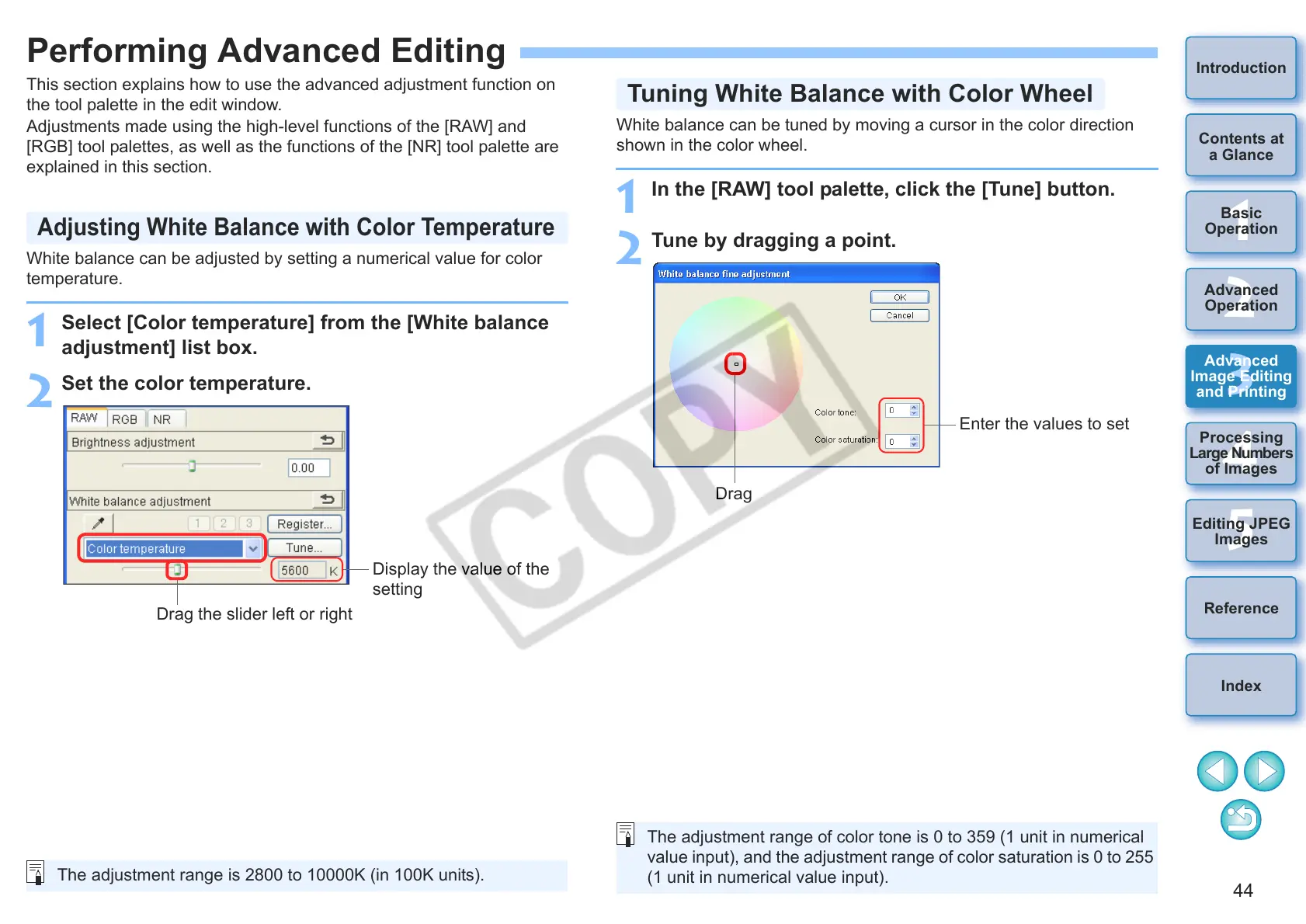
White balance can be adjusted by setting a numerical value for color
temperature.
1
Select [Color temperature] from the [White balance
adjustment] list box.
2
Set the color temperature.
Adjusting White Balance with Color Temperature
Display the value of the
setting
Drag the slider left or right
The adjustment range is 2800 to 10000K (in 100K units).
White balance can be tuned by moving a cursor in the color direction
shown in the color wheel.
1
In the [RAW] tool palette, click the [Tune] button.
2
Tune by dragging a point.
Tuning White Balance with Color Wheel
Enter the values to set
Drag
The adjustment range of color tone is 0 to 359 (1 unit in numerical
value input), and the adjustment range of color saturation is 0 to 255
(1 unit in numerical value input).










 To Next Page