EasyManua.ls Logo

Canon EOS 10D - List of Quick Check Window Functions

Canon EOS 10D
106 pages
Print Icon
To Next Page IconTo Next Page
To Previous Page IconTo Previous Page
Loading...
92
1
2
3
4
5
Introduction
Contents at
a Glance
Basic
Operation
Advanced
Operation
Advanced
Image Editing
and Printing
Editing JPEG
Images
Index
Processing
Large Numbers
of Images
Reference
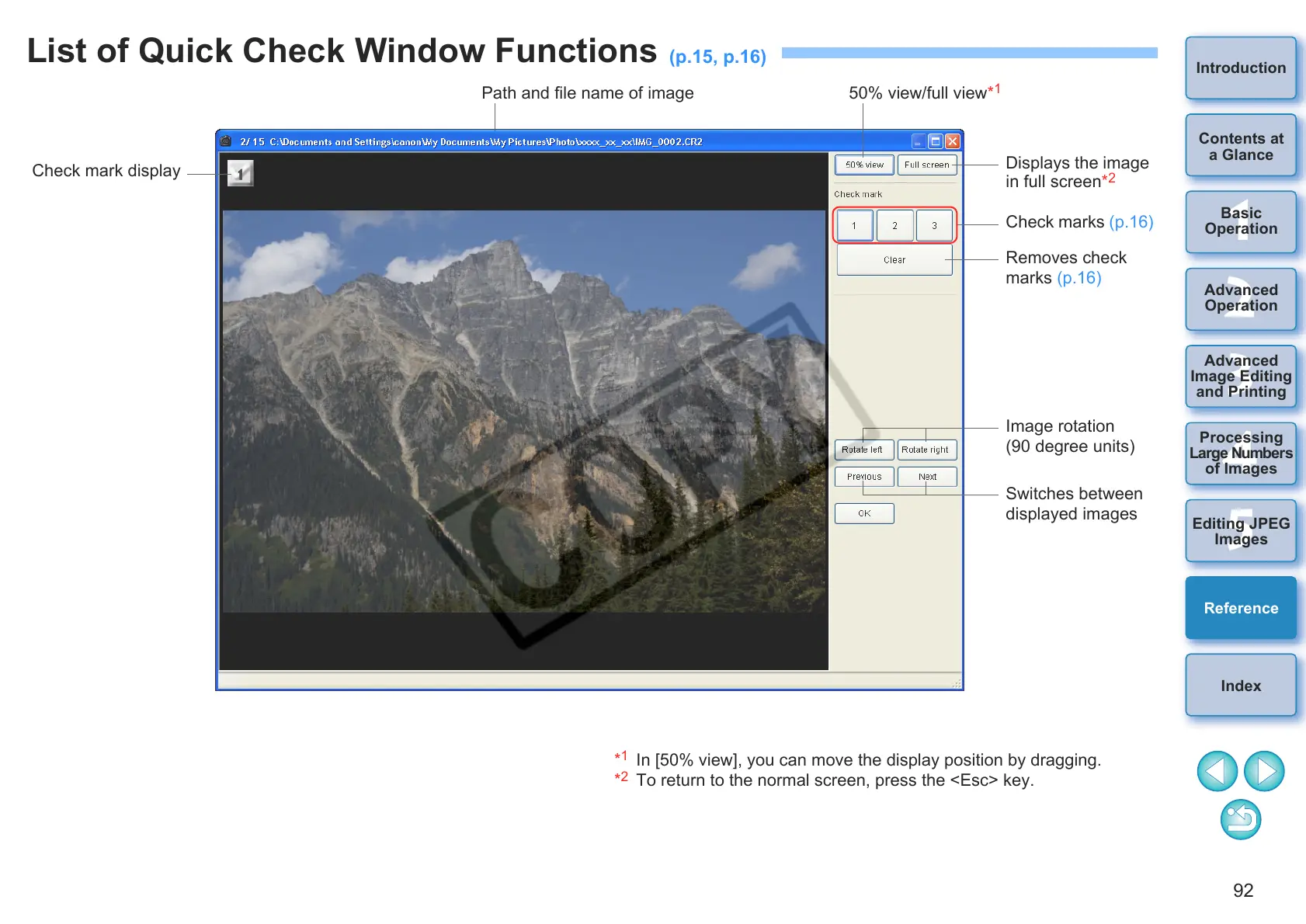
List of Quick Check Window Functions
(p
.15,
p
.16
)
Check marks (p.16)
Check mark display
Removes check
marks (p.16)
Image rotation
(90 degree units)
Switches between
displayed images
Displays the image
in full screen*
2
Path and file name of image 50% view/full view*
1
*
1
In [50% view], you can move the display position by dragging.
*
2
To return to the normal screen, press the <Esc> key.

Table of Contents

Other manuals for Canon EOS 10D

Related product manuals