93
1
2
3
4
5
Introduction
Contents at
a Glance
Basic
Operation
Advanced
Operation
Advanced
Image Editing
and Printing
Editing JPEG
Images
Index
Processing
Large Numbers
of Images
Reference
List of Edit Image Window Functions
.29,
.30
*
1
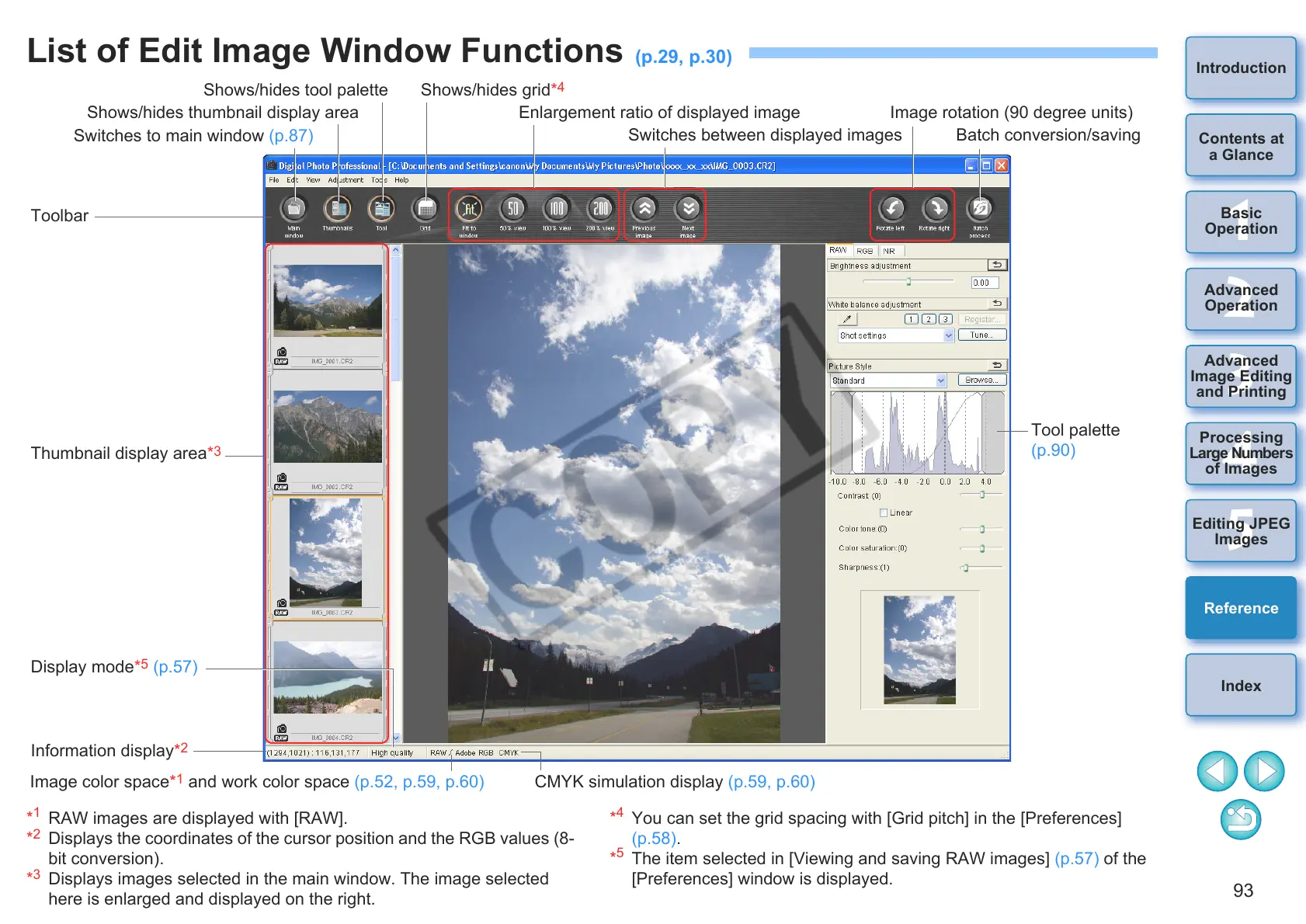
RAW images are displayed with [RAW].
*
2
Displays the coordinates of the cursor position and the RGB values (8-
bit conversion).
*
3
Displays images selected in the main window. The image selected
here is enlarged and displayed on the right.
*
4
You can set the grid spacing with [Grid pitch] in the [Preferences]
(p.58).
*
5
The item selected in [Viewing and saving RAW images] (p.57) of the
[Preferences] window is displayed.
Shows/hides thumbnail display area
Shows/hides tool palette Shows/hides grid*
4
Enlargement ratio of displayed image
Switches to main window (p.87)
Switches between displayed images
Image rotation (90 degree units)
Batch conversion/saving
Toolbar
Thumbnail display area*
3
Display mode*
5
(p.57)
Information display*
2
Tool palette
(p.90)
Image color space*
1
and work color space (p.52, p.59, p.60) CMYK simulation display (p.59, p.60)









 To Next Page