73
1
2
3
4
5
Introduction
Contents at
a Glance
Basic
Operation
Advanced
Operation
Advanced
Image Editing
and Printing
Editing JPEG
Images
Index
Processing
Large Numbers
of Images
Reference
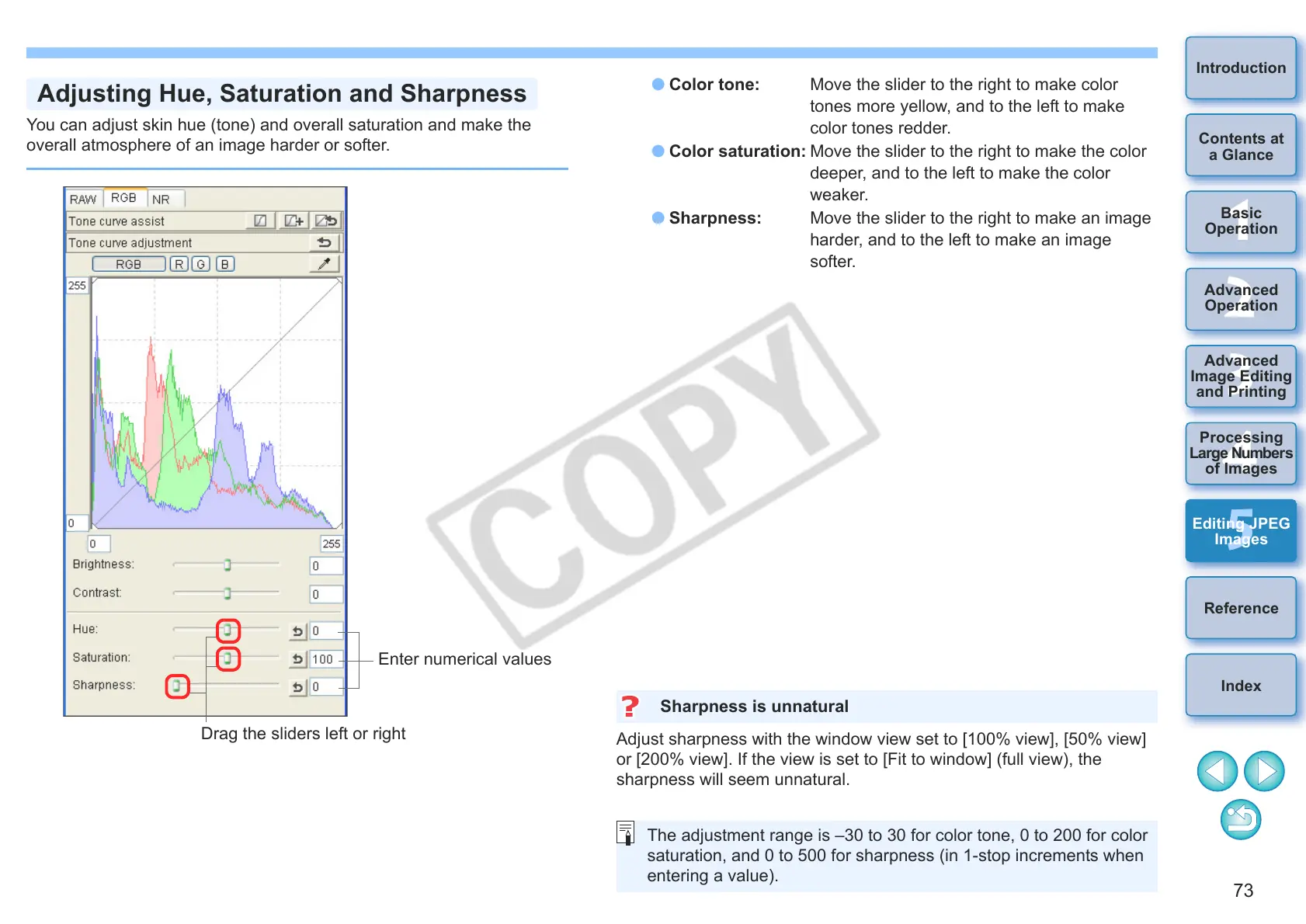
You can adjust skin hue (tone) and overall saturation and make the
overall atmosphere of an image harder or softer.
Adjusting Hue, Saturation and Sharpness
Enter numerical values
Drag the sliders left or right
O Color tone: Move the slider to the right to make color
tones more yellow, and to the left to make
color tones redder.
O Color saturation: Move the slider to the right to make the color
deeper, and to the left to make the color
weaker.
O Sharpness: Move the slider to the right to make an image
harder, and to the left to make an image
softer.
djust sharpness with the window view set to [100% view], [50% view]
or [200% view]. If the view is set to [Fit to window] (full view), the
sharpness will seem unnatural.
Sharpness is unnatural
The adjustment range is –30 to 30 for color tone, 0 to 200 for color
saturation, and 0 to 500 for sharpness (in 1-stop increments when
entering a value).










 To Next Page