95
1
2
3
4
5
Introduction
Contents at
a Glance
Basic
Operation
Advanced
Operation
Advanced
Image Editing
and Printing
Editing JPEG
Images
Index
Processing
Large Numbers
of Images
Reference
List of Trimming Window Functions
.31,
.77
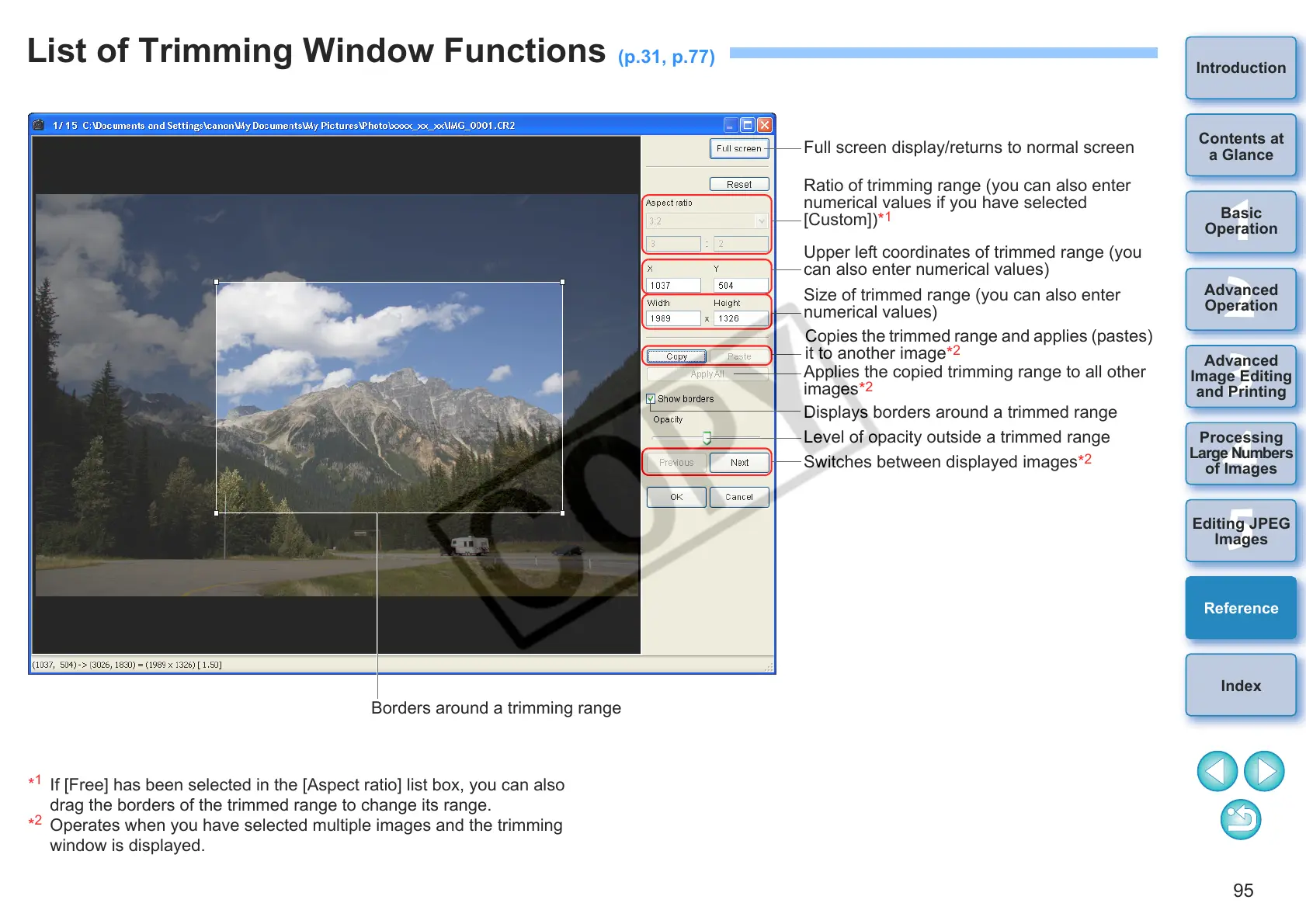
Full screen display/returns to normal screen
Ratio of trimming range (you can also enter
numerical values if you have selected
[Custom])*
1
Upper left coordinates of trimmed range (you
can also enter numerical values)
Size of trimmed range (you can also enter
numerical values)
Copies the trimmed range and applies (pastes)
it to another image*
2
Displays borders around a trimmed range
Switches between displayed images*
2
Level of opacity outside a trimmed range
*
1
If [Free] has been selected in the [Aspect ratio] list box, you can also
drag the borders of the trimmed range to change its range.
*
2
Operates when you have selected multiple images and the trimming
window is displayed.
Borders around a trimming range
Applies the copied trimming range to all other
images*
2










 To Next Page