70
1
2
3
4
5
Introduction
Contents at
a Glance
Basic
Operation
Advanced
Operation
Advanced
Image Editing
and Printing
Editing JPEG
Images
Index
Processing
Large Numbers
of Images
Reference
In order to make the image a desirable standard image, automatically
adjust the image tone curve (p.99). You can select the degree of
automatic adjustment from “Standard” and “High”.
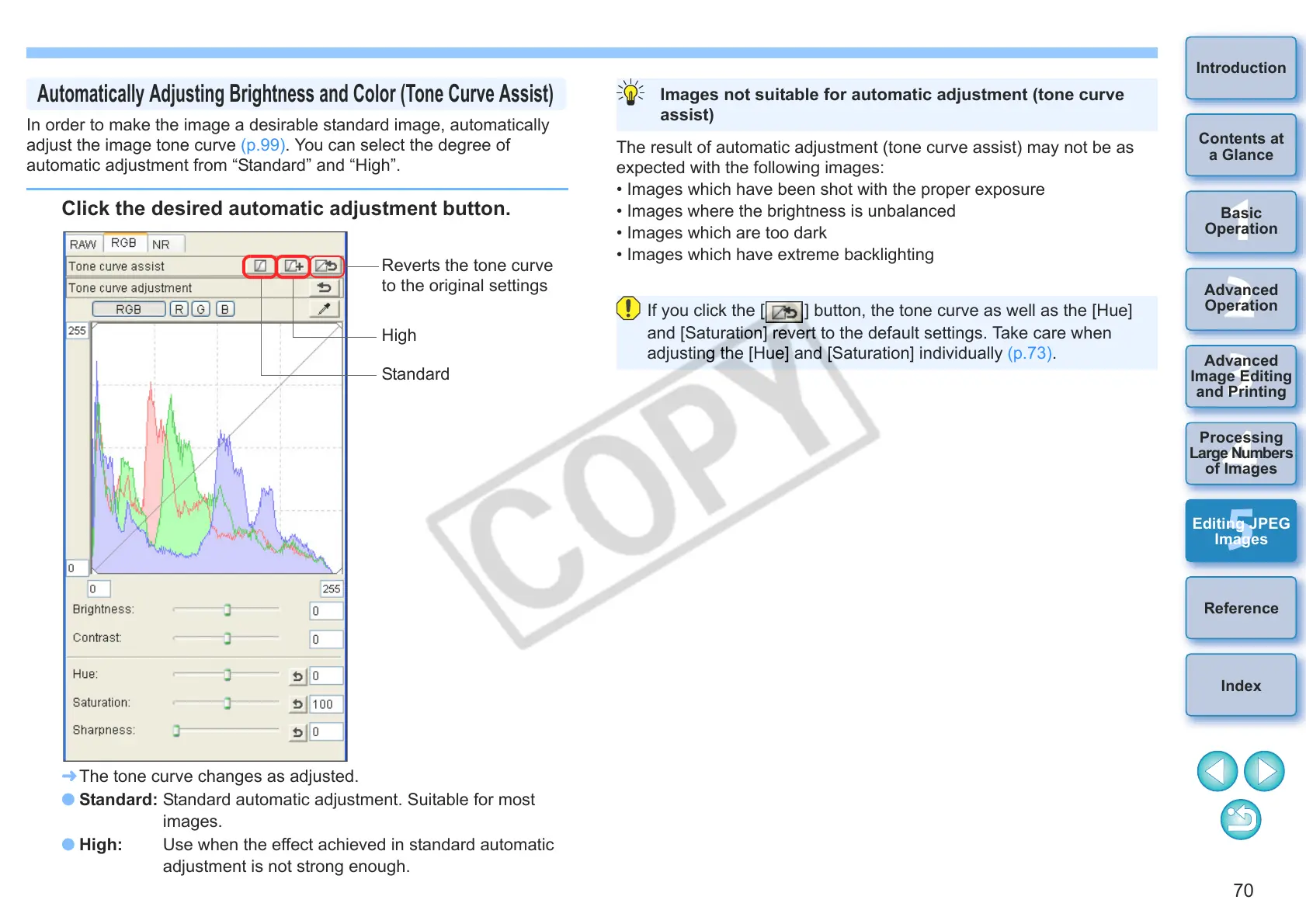
Click the desired automatic adjustment button.
¿ The tone curve changes as adjusted.
O Standard: Standard automatic adjustment. Suitable for most
images.
O High: Use when the effect achieved in standard automatic
adjustment is not strong enough.
Automatically Adjusting Brightness and Color (Tone Curve Assist)
Reverts the tone curve
to the original settings
High
Standard
The result of automatic adjustment (tone curve assist) may not be as
expected with the following images:
• Images which have been shot with the proper exposure
• Images where the brightness is unbalanced
• Images which are too dark
• Images which have extreme backlighting
Images not suitable for automatic adjustment (tone curve
assist)
If you click the [ ] button, the tone curve as well as the [Hue]
and [Saturation] revert to the default settings. Take care when
adjusting the [Hue] and [Saturation] individually (p.73).










 To Next Page