74
1
2
3
4
5
Introduction
Contents at
a Glance
Basic
Operation
Advanced
Operation
Advanced
Image Editing
and Printing
Editing JPEG
Images
Index
Processing
Large Numbers
of Images
Reference
You can adjust the brightness, contrast and color of a specific area by
changing the tone curve (p.99).
1
Select the tone curve mode and interpolation
method.
Tone Curve Adjustment
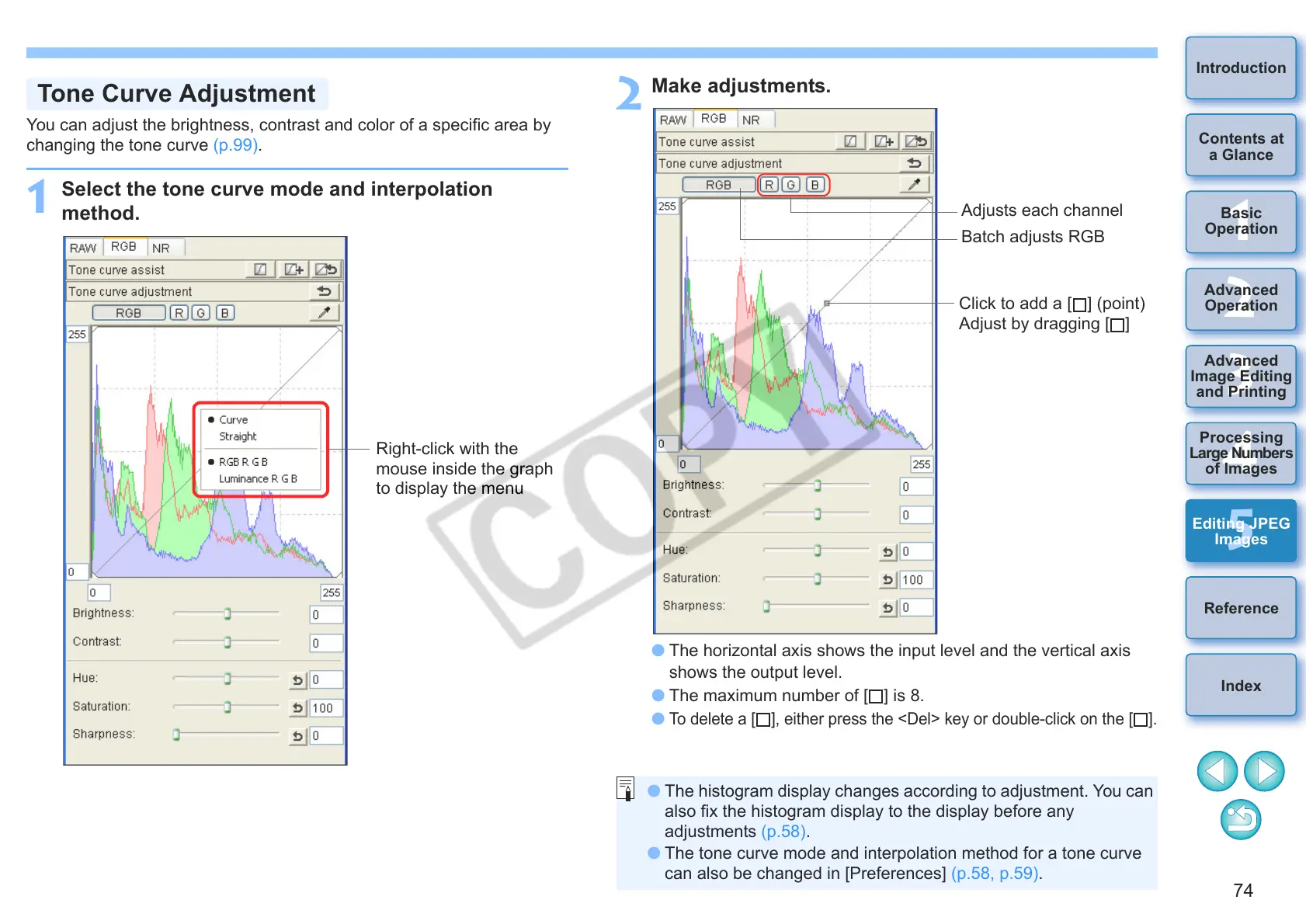
Right-click with the
mouse inside the graph
to display the menu
2
Make adjustments.
O The horizontal axis shows the input level and the vertical axis
shows the output level.
O The maximum number of [ ] is 8.
O
To delete a [ ], either press the <Del> key or double-click on the [ ].
Click to add a [ ] (point)
Adjust by dragging [ ]
Adjusts each channel
Batch adjusts RGB
O The histogram display changes according to adjustment. You can
also fix the histogram display to the display before any
adjustments (p.58).
O The tone curve mode and interpolation method for a tone curve
can also be changed in [Preferences] (p.58, p.59).










 To Next Page