64
A Customizing the Picture StyleN
For Monochrome, you can also set [Filter effect] and [Toning effect] in
addition to [Sharpness] and [Contrast].
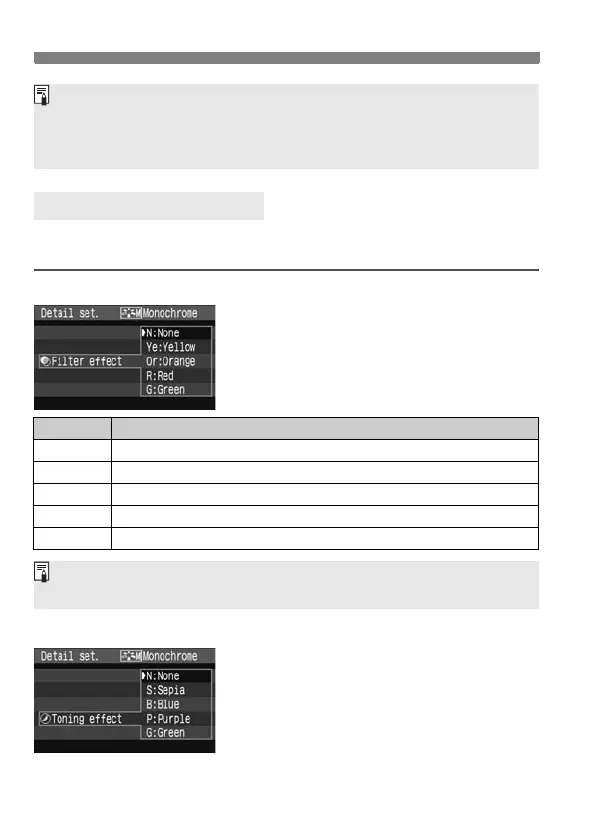
[Filter effect]
With a filter effect applied to a
monochrome image, you can make
white clouds or green trees stand out
more.
[Toning effect]
By applying a toning effect, you can
create a monochrome image in that
color. It can make the image look more
impressive.
The following can be selected: [N:None]
[S:Sepia] [B:Blue] [P:Purple]
[G:Green].
Monochrome Adjustment
By selecting [Default set.] in step 3, you can revert the respective
Picture Style to its default parameters.
To shoot with the Picture Style you modified, follow step 2 on the
preceding page to select the Picture Style and then shoot.
Filter Sample Effects
N: None Normal black-and-white image with no filter effects.
Ye: Yellow
The blue sky will look more natural, and the white clouds will look crisper.
Or: Orange
The blue sky will look slightly darker. The sunset will look more brilliant.
R: Red
The blue sky will look quite dark. Fall leaves will look crisper and brighter.
G: Green
Skin tones and lips will look fine. Tree leaves will look crisper and brighter.
Setting the [Contrast] to the plus side will make the filter effect more
pronounced.



 To Next Page