16
For detailed information, reference page numbers are provided in
parentheses (p.**).
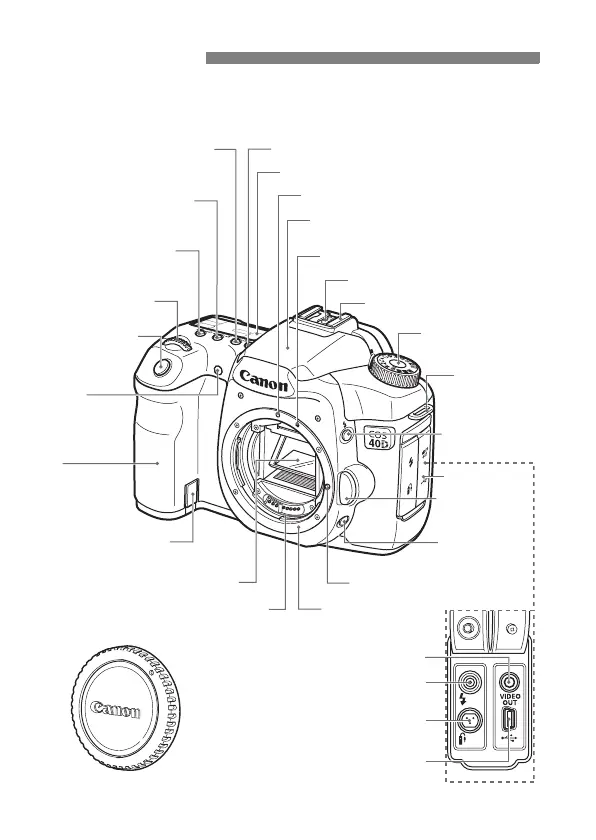
Nomenclature
Digital terminal (p.134,148)
Video OUT terminal (p.122)
Remote control terminal
(N3 type) (p.97)
PC terminal (p.106)
LCD panel (p.18)
Hot shoe (p.105)
EF Lens mount index (p.30)
Built-in flash/AF-assist beam
(p.99/79)
EF-S Lens mount index (p.30)
Grip
(Battery
compartment)
DC coupler cord
hole (p.170)
Flash-sync contacts
Shutter button
(p.32)
Mode Dial (p.20)
Lens lock pin
Lens mount
Contacts (p.13)
Body cap (p.30)
Depth-of-field
preview button
(p.89)
Red-eye
reduction/
Self-timer lamp
(p.100/82)
Strap mount
(p.23)
Lens release
button (p.30)
Terminal cover
Mirror (p.98,131)
<U> LCD panel illumination button (p.96)
<D> Flash
button (p.99)
<n>
Metering mode
selection
/White balance
selection button (p.92/67)
<o> AF mode
selection/Drive mode
selection button (p.76/81)
<m> ISO speed set
/
Flash exposure compensation
button (p.59/101)
<6> Main Dial
(p.33)



 To Next Page